

Plugin info
Maintenance & Compatibility
Maintenance score
Possibly abandoned • Last updated 2052 days ago
Is BadgeOS AffiliateWP Integration abandoned?
Possibly abandoned (last update 2052 days ago).
Compatibility
Similar & Alternatives
Explore plugins with similar tags, and compare key metrics like downloads, ratings, updates, support, and WP/PHP compatibility.
Description
BadgeOS
BadgeOS turns your site into an achievement and badging system. Easily create badges and set up the steps and achievements users complete to earn them.
BadgeOS AffiliateWP Integration
The BadgeOS AffiliateWP Integration addon enables achievement and enagement features to your affiliate program. It lets you award BadgeOS achievements to engage your website users to become as affiliates to boost your website traffic!
Prerequisites
- BadgeOS
- AffiliateWP
Features
- You can award achievements when an affiliate signs up to your affiliate management system.
- You can award achievements when an affiliate earns a new referral from your affiliate management system.
- You can award achievements when your affiliate management system receives a referral visit.
Following are the triggers provided by BadgeOS AffiliateWP Integration add-on to award achievements:
- Affiliate sign up.
- An affiliate earns a new referral.
- An affiliate gets a referral paid.
- Referral gets rejected.
- The system receives a referral visit.
- New User’s sign-up through an affiliate.
Installation Instructions
Before installation please make sure you have latest AffiliateWP installed.
- Upload the plugin files to the
/wp-content/plugins/directory, or install the plugin through the WordPress plugins screen directly. - Activate the plugin through the ‘Plugins’ screen in WordPress
Installation
Frequently Asked Questions
For what AffiliateWP activities I can reward users with badges?
You can reward your users with achievements, points, or ranks for the following AffiliateWP Activities:
1. Affiliate Sign-Up
2. Earn a referral
3. Referral Paid
4. Referral Rejected
5. Referral Visit
6. New User Sign-up through an Affiliate
Where can I find these BadgeOS AffiliateWP triggers?
Here are the instructions:
- Navigate to BadgeOS menu from WP Dashboard
- Click at the desired achievement type
- Click at “Add New” if you want to add a new achievement or edit the desired achievement
- Go to the “Required Steps” section
- Click at “Add New Step”
- Select “AffiliateWP Activity” for Require field. A new field “AffiliateWP trigger” will appear. You can find these triggers in this field’s dropdown.
Review feed
Screenshots

BadgeOS AffiliateWP Integration Add-on all triggers.

Achievements will be awarded to Affiliates on sign up.

Points will be awarded to Affiliates on Referral Paid.
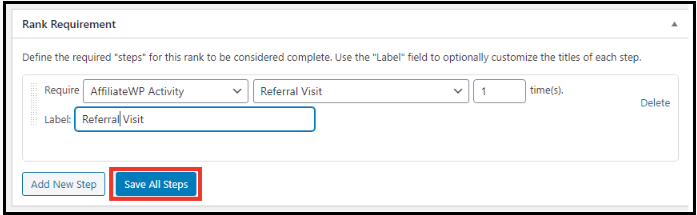
Rank will be awarded to Affiliates on Referral Visit.
Changelog
1.0
- Initial