

Bangla Fonts Collection
This plugin embeds some nice Bangla fonts what increase readability of Bangla language on a website. Even you don't need a Bangla software instal …
Plugin info
Maintenance & Compatibility
Maintenance score
Possibly abandoned • Last updated 2337 days ago • 2 reviews
Is Bangla Fonts Collection abandoned?
Possibly abandoned (last update 2337 days ago).
Compatibility
Similar & Alternatives
Explore plugins with similar tags, and compare key metrics like downloads, ratings, updates, support, and WP/PHP compatibility.
Description
Bangla Fonts Collection plugin helps to make WordPress website better in Bangla typography. It also increases visitor’s readability so users shall like to read your Bangla content.
This enables a feature that helps you to write Bangla in your WordPress dashboard’s text boxes and textarea boxes without any help of your computer software. You have to use Bangla phonetic keyboard to write Bangla.
So that you are able to add/edit your Bangla content in the go and any computer what have Bangla software or not. We have used Avro Phonetic version 1.1.4
So, it’ll be like:
amar sonar bangla = আমার সোনার বাংলা
Note: wysiwyg editors not supported yet.
Credits:
Avro Phonetic of omicronlab.com
Bangla Writing documentation by Avro
Some of the added fonts:
- SiyamRupali
- AdorshoLipi
- SolaimanLipi
- And some more …
Installation
To install the plugin and get it working.
- Upload the plugin files to the
/wp-content/plugins/plugin-namedirectory, or install the plugin through the WordPress plugins screen directly. - Activate the plugin through the ‘Plugins’ screen in WordPress
- Use the Settings link to write your CSS
- Enjoy easily readable Bangla text.
Frequently Asked Questions
All listed Fonts shall embed
Yes, and more will come in the future version
Do I need to do any further settings?
Yes, You have to write CSS selectors to set your preferred font. You’ll get help texts on the Settings page.
How do I enable Bangla writing
In admin bar you can see a button “English Enabled” or “বাংলা চলছে”. “English Enabled” means English will be written. Click on it and it turns to “বাংলা চলছে” and then you can write Bangla.
Adminbar button not able to change fonts, any sortcut?
Keyboard shortcut: Ctrl+m toggle bangla and english.
Review feed
Screenshots
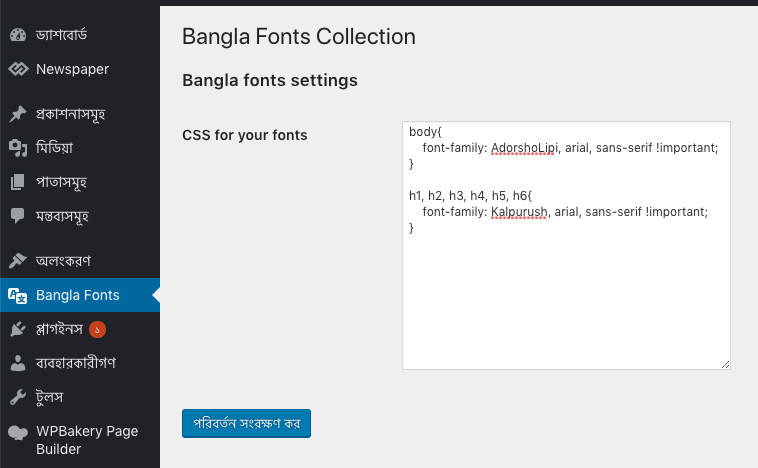
Settings Page

List of Useable fonts

Sample CSS Selector shown in settings page
Changelog
2.2
- Noto Sans Bengali font added
2.1
- fixed issues
2.0
- Enable Bangla writing without Bangla software installed
1.0
- Initial version.