

Barcode Generator for WooCommerce – Create & Print Product Barcodes Easily
Generate barcodes for WooCommerce products. Print labels, display barcodes on product pages, and manage inventory with ease.
Plugin info
Maintenance & Compatibility
Maintenance score
Maintained • Last updated 131 days ago
Is Barcode Generator for WooCommerce – Create & Print Product Barcodes Easily abandoned?
Likely maintained (last update 131 days ago).
Compatibility
Similar & Alternatives
Explore plugins with similar tags, and compare key metrics like downloads, ratings, updates, support, and WP/PHP compatibility.
Description
Barcode Generator for WooCommerce helps create barcodes for all products in your WooCommerce store. Display barcodes on product pages, print labels, and improve your inventory workflow.
This plugin automatically generates barcode numbers for products, supports SKU-based or Product ID–based barcodes, and includes bulk barcode management tools.
FREE VERSION FEATURES
✔ Automatic Product Barcode Number Generation
Creates a unique 6–9 digit barcode number for every product.
✔ Barcode from Product SKU
Barcode updates automatically when SKU changes.
✔ Barcode from Product ID
Use product ID as barcode value.
✔ Print Product Barcodes
Print single or multiple product labels.
✔ Bulk Actions for Barcodes
Generate and regenerate barcodes in bulk.
✔ Barcode Download Page
View, filter, sort, search, and download all product barcodes.
✔ Display Barcodes on Product Pages
Show barcodes in up to 4 positions + shortcode support.
✔ Translation Ready
Compatible with WPML and all major translation plugins.
Why Use Barcode Generator for WooCommerce?
- Simplifies inventory management
- Efficient order fulfillment
- Accurate warehouse handling
- Compatible with all barcode scanners
- Works with POS systems (Premium)
Use Cases
- Retail stores
- Warehouses
- Online shops
- Logistics & packaging
- Invoice-based businesses
Extra Features for Premium Version
Premium Version Available with advanced features like EAN13/EAN8/UPC-A product barcodes, WooCommerce order barcodes, POS-style order scanning, PDF invoice barcodes, and more.
Add product price and product name to barcode label: In the Pro version, USers can add product price and product name to the barcode sticker.
Barcode Sticker design: 100 types of barcode stickers can be designed by customizing the barcode label, custom text, price, and product name.
Add Custom text on barcode sticker: Custom text or Custom number can be added to barcode stickers. The plugin allows two fields where custom text or numbers can be added to the barcode sticker. For example, you can input the country name and brand name on the product’s barcode sticker.
GTIN, UPC, EAN, or ISBN Supported: In the premium version, product barcodes can be generated using the product’s GTIN, UPC, EAN, or ISBN value. WooCommerce added this field in its 9.3.0 version.
EAN for the WooCommerce Plugin Supported: Existing users of the EAN for WooCommerce plugin can generate product barcodes from EAN values.
14 types of barcode Format: in the Premium version, you can create product barcodes from 14 types of formats. EAN13, EAN8, UPC, etc.
Porduct barcode for Variable attribute or Child: The premium plugin help to generates product barcodes for both variable parent and variable child products.
WooCommerce Order barcode:The premium plugin allows you to create order barcodes for each order on your WooCommerce website. The order barcode value is generated from the order number or transaction number. You can view the order barcodes on the WooCommerce order dashboard page. It also creates barcodes for products on the order dashboard page.
Order Barcode on WooCommerce Order email: When an order is created, an order barcode is generated and this barcode will be displayed in all order emails in WooCommerce. In order emails, the item barcode can be displayed in addition to the order barcode.
WooCommerce Order Barcode in PDF Invoices: The Barcode Generator Pro plugin is integrated with three (3) WooCommerce PDF Invoice plugins. So, you can add order barcodes and item barcodes to the PDF plugins below.
- PDF invoices and packing slips plugin.
- Print Invoice & Delivery Notes for WooCommerce
- WooCommerce PDF Invoices – Web Toffee
Bulk print of product barcodes: You can easily find all product barcodes from the print page and you can print product barcodes in bulk. There is also the facility to sort product barcodes by category, set custom width and height of barcode sticker and print for all types of pages including A4, label printer etc.
Scan and Search Orders (POS System Integration):
Instantly find orders by scanning:
✔ Order ID
✔ Order Barcode
Use any barcode scanner to instantly search WooCommerce orders — just like a professional POS system.
👉 Demo:
✅ Auto-Generate EAN13, EAN8, UPC-A, and Custom-Digit Product Barcodes:
Generate valid global barcode formats instantly for all products.
✅ Auto-Generate EAN13, EAN8, UPC-A, Order ID, Order Number & Custom-Digit Order Barcodes:
Every WooCommerce order gets a barcode automatically.
✅ Order Dashboard Custom Barcode Field:
Create or edit a custom barcode for any order directly from the WooCommerce Order Page.
Language support
- Chinese (China)
- Dutch
- French (France)
- Russian
- Spanish (Spain)
Credits
This plugin includes a modified version of the JsBarcode jQuery plugin by Johan Lindell, which is licensed under the MIT license. Original library copyright © Johan Lindell. The modified version complies with the MIT license.
Privacy
This plugin does not connect to any third-party applications. It does not collect or store any user information. This plugin only generates barcode image.
Feedback
Any suggestions or feedback are welcome, thank you for using or trying my plugin. Please let me know about your experience and rate this plugin.
Auto Generate EAN 13, EAN 8, UPC A & Custom Product Barcodes
Scan & Search WooCommerce Orders | POS-Style Order Lookup
How to add barcode to WooCommerce website
Preview PRO Barcode for WooCommerce
Installation
Go to the Plugins Menu in WordPress and select Plugins > Add new
Search for “ Barcode Generator for WooCommerce”
Click “Install” and “Activate”.
Frequently Asked Questions
WooCommerce Barcode generally refers to a plugin or extension that allows users to create and manage barcodes for their products, orders, and invoices. Primarily, barcodes represent data by varying the width, spacing, and shape of parallel lines.
Using barcodes with WooCommerce offers significant benefits, Faster product identification and accurate order processing and management. Product barcodes also help in tracking inventory levels, which helps avoid product stockouts and overstocking.
The product barcode is valid for life. The barcode will never be lost. If the barcode value changes, only the barcode will change.
This plugin generates unique barcodes for each product. The barcode will take its content from the product SKU, ID, and automatic barcode number. and the barcode image will be automatically generated based on that.
No, the barcode is generated instantly on the web page. Barcode images are not stored in any files on your WordPress site.
No, barcodes are created based on product ID or SKU. So it doesn’t depend on the URL of the product. It depends on the product ID or SKU. The barcode will change if the SKU is changed
Yes, this plugin will work on such WordPress themes that are WooCommerce-supported.
Yes, this plugin will only work if the WooCommerce plugin is enabled on the WordPress site. Because it only generates barcodes for WooCommerce products and WooCommerce orders.
Yes, it is 100% ad-free
You will find it on the edit product page. Click on Edit and look at the right sidebar
Review feed
Screenshots
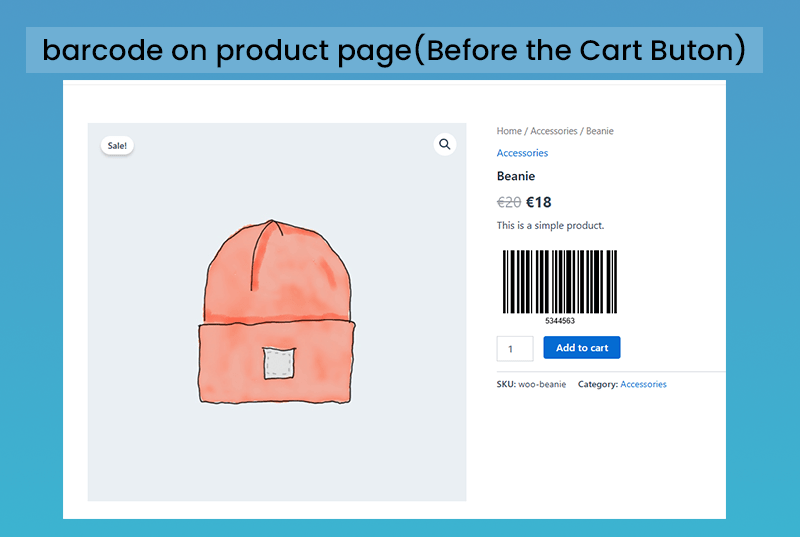
barcode on product page - loaction 1

barcode on product page - loaction 2
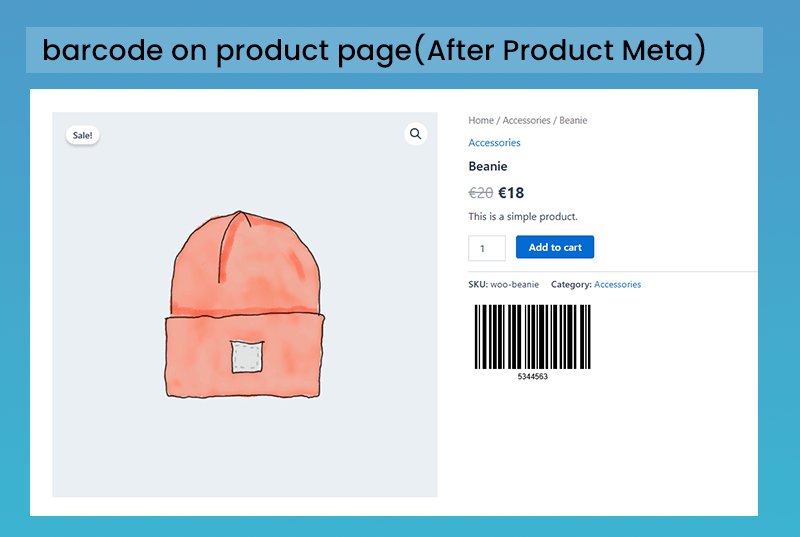
barcode on product page - loaction 3
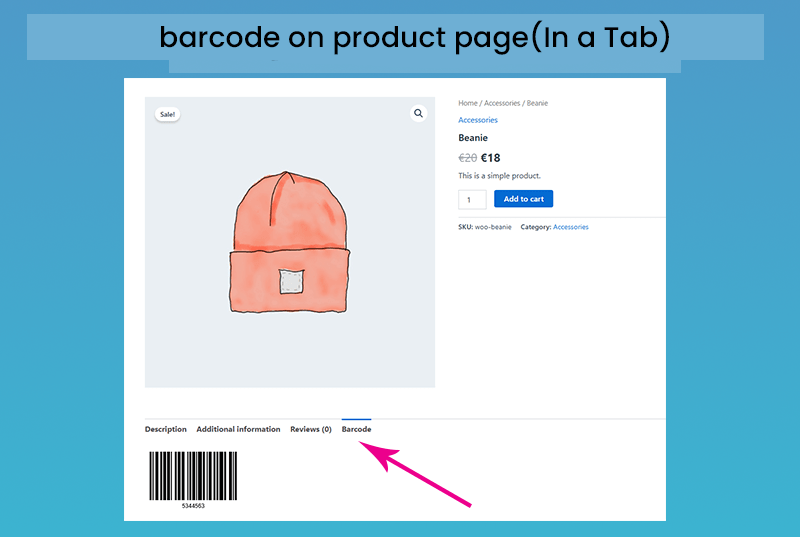
barcode on product page - loaction 4
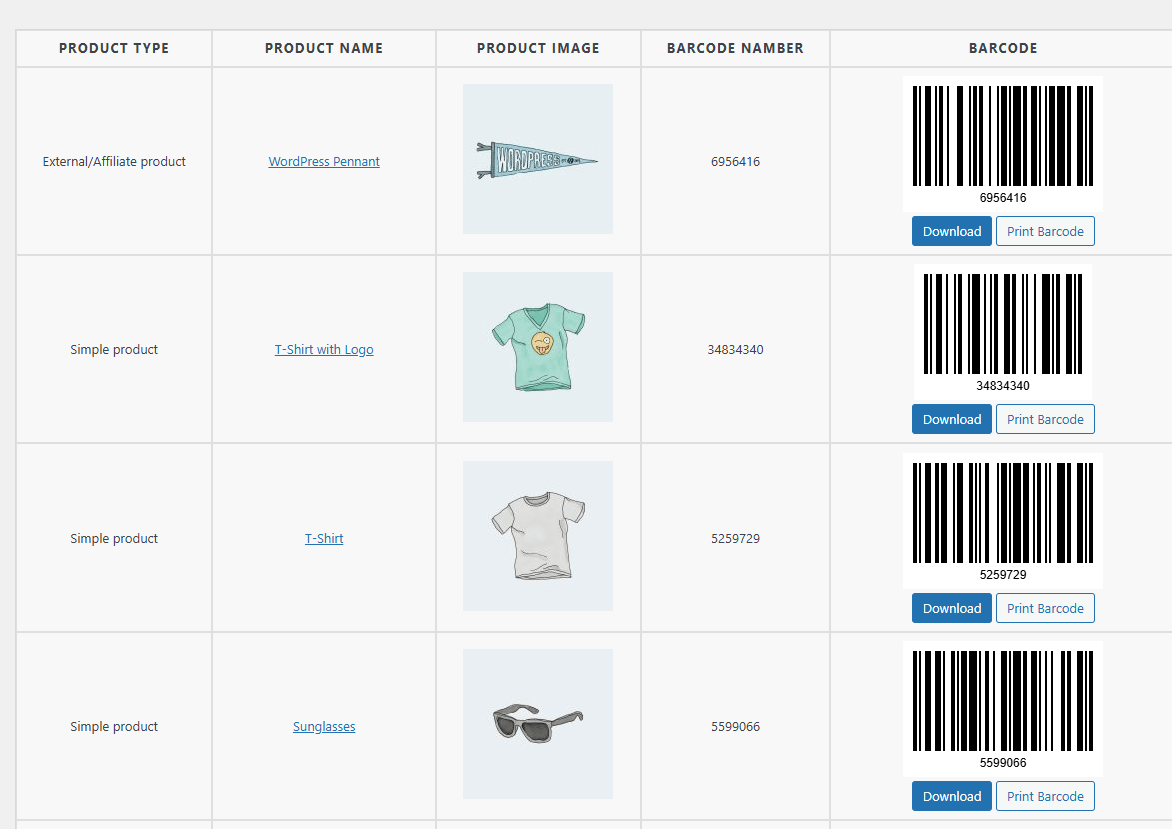
Download Page
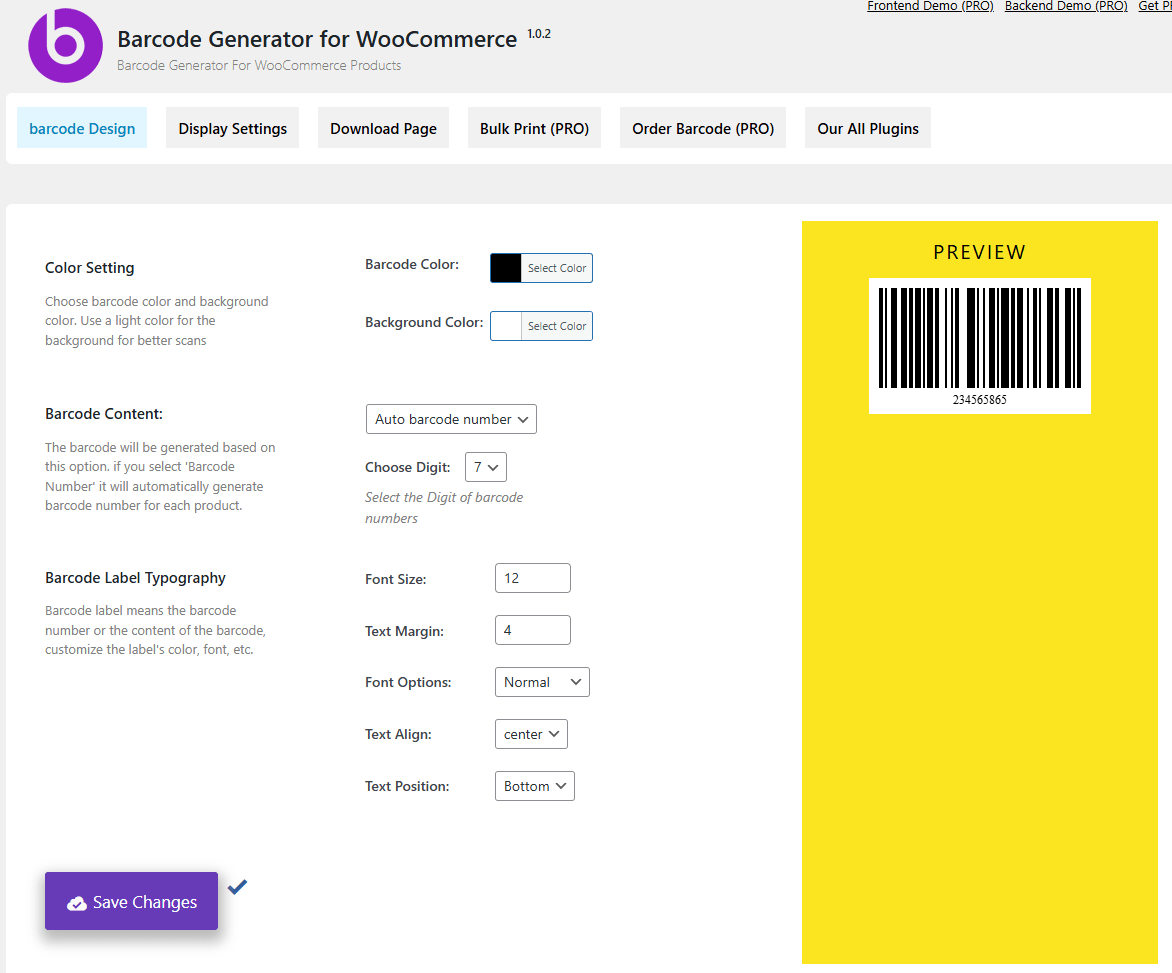
Plugin Settings Page
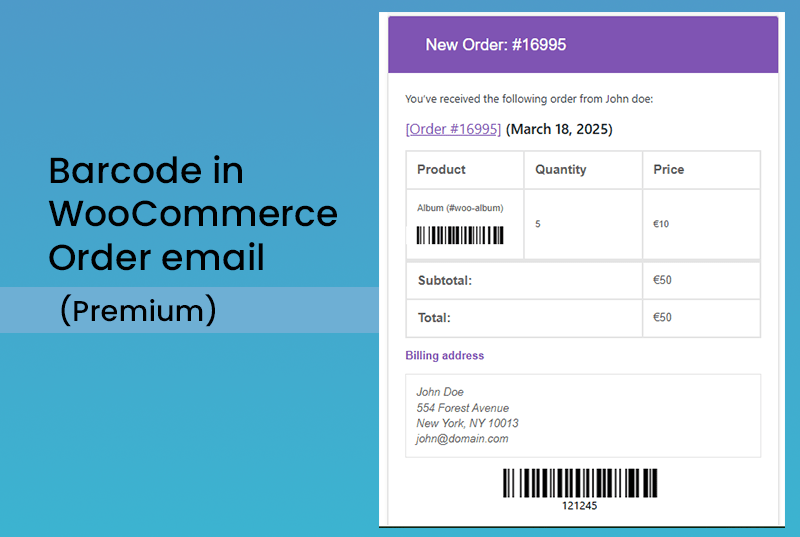
Order Barcode (Pro Features)
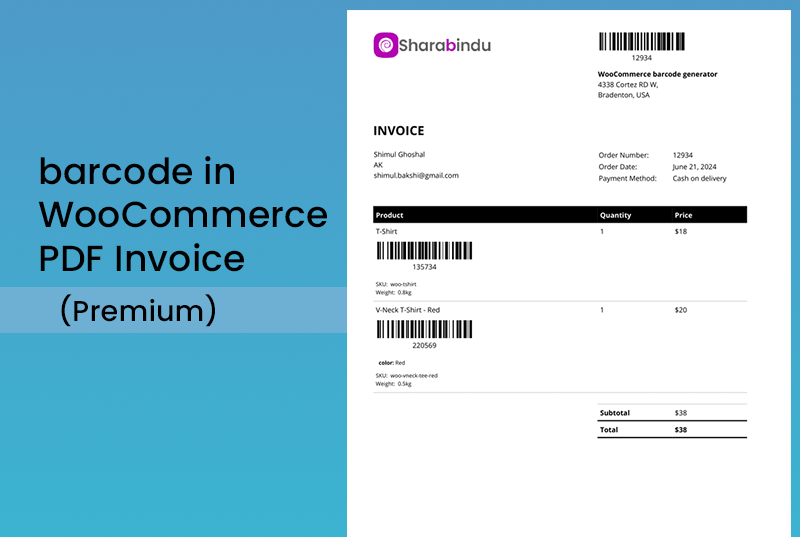
Barcode on invoice (Pro Features)
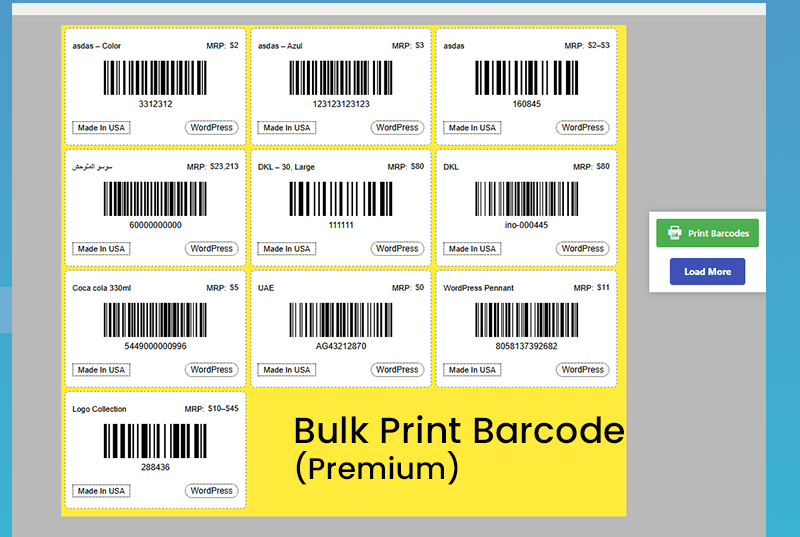
Bulk Print Page (Pro Features)
Changelog
1.0.7
- Update: Compatibility Update
1.0.6
- Fix: Update the pluign settings page
1.0.5
- Fix: barcode Download issues Solved on Download page
1.0.4
- Update: Compatibility Update
1.0.3
- New: Add barcode to single Product page
- Update: Compatibility Update
1.0.2
- New: Add Download page for product Barcode
- Update: Compatibility Update
1.0.1
- Fix: The plugin install issues
1.0.0
- Initial release