

Basic Dev Tools
A plugin with some Basic Tools For Development and Developers. Trying to be easier the way of develop common things in WP
Plugin info
Maintenance & Compatibility
Maintenance score
Possibly abandoned • Last updated 3789 days ago • 4 reviews
Is Basic Dev Tools abandoned?
Possibly abandoned (last update 3789 days ago).
Compatibility
Similar & Alternatives
Explore plugins with similar tags, and compare key metrics like downloads, ratings, updates, support, and WP/PHP compatibility.
Description
This was developed thinking in the common things that a developer could need at the time of build an app in WP.
Special Settings
A Special Setting Page allowing you to easily change global settings that in ocations are hidden in WP.
Cron Task and Schedules Manager
A section that allow you to create and delete schedules and tasks that run internally in the WP Cron. You could see and monitor the distinct schedules, the times and next executions for each one. Also you have the posibilty to execute one of them without affect the cron schedules.
Post Types Manager with shotcodes
A section that allow you to create distinct Post Types without a line of code. You could specify names and special settings like new taxonomies for each one of them. Then you could call them with the common functions for posts from WP or using special shortcodes prepared for you to manage it.
Installation
- Download Basic Dev Tools.
- Upload the ‘basic-dev-tools’ directory to your ‘/wp-content/plugins/’ directory, using your favorite method (ftp, sftp, scp, etc…)
- Activate Basic Dev Tools from your Plugins page.
A new menu appears allowing you to use the tools.
Frequently Asked Questions
None.
Review feed
Screenshots

On activation, the plugin adds a new menu with the available tools to use.
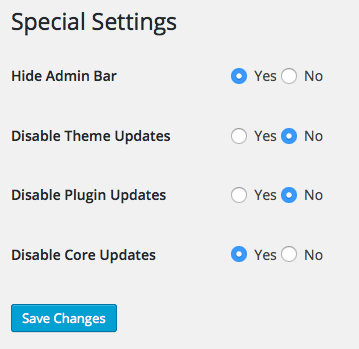
Special Settings page.

Task Manager Section in Cron Manager Page.

Schedules Manager Section in Cron Manager Page.

Post Types Manager Page with some items.
Changelog
1.4.1 (2015-05-24)
- Added “Hide Admin Bar” Special Setting
- Added “Disable Theme Updates” Special Setting
- Added “Disable Plugin Updates” Special Setting
- Added “Disable Core Updates” Special Setting
- Screenshot changed
1.4 (2015-05-24)
- Bug with files in svn fixed
1.3 (2015-05-23)
- tableobject api updated
- Added Crons Manager Functionality with posibilty of create and execute tasks
- Added Cron Schedules to global wp filter
- Added Special Settings to manage common thing faster
- Screenshots added
1.2 (2015-05-03)
- tableobject api updated
- Added Cron Task Manager menu
- Added Cron Schedules Manager
- Added partialy Cron Manager to implement in version 2
- New tags added to be relevant in the plugin
- Readme file updated
1.1 (2015-04-26)
- tableobject api updated
- Shortcodes with dynamic options in function of the dynamic postypes
- Removed Cron Task Manager menu to implement in version 2
1.0
- Initial Release