

Basic URL ShortCodes
BASIC URL ShortCodes plugin support for a basic short codes to use in your post/page editor that produce correct absolute URLs.
Plugin info
Maintenance & Compatibility
Maintenance score
Possibly abandoned • Last updated 543 days ago • 2 reviews
Is Basic URL ShortCodes abandoned?
Possibly abandoned (last update 543 days ago).
Compatibility
Similar & Alternatives
Explore plugins with similar tags, and compare key metrics like downloads, ratings, updates, support, and WP/PHP compatibility.
Description
Sometimes you want to put the base URL (that of the blog, or that of the active template) in your content editor. Times when the template customising isn’t quite flexible enough.
With this plugin you can use [home_url] to output the base URL of the blog (as set in your Settings). Or, you can use [theme_url_template] to output the URL of the active template. And You can use the [UPLOAD_URL] to output the URL of the upload folder.
For example 
The supported short codes are as follows:
* [home_url] – the configured blog URL (set in Settings). E.g. http://localhost/wp-demo
* [theme_url_template] – the URL of the active template. E.g. http://localhost/wp-demo/wp-content/themes/mytheme
* [UPLOAD_URL] – the URL of the upload folder. E.g. http://localhost/wp-demo/wp-content/uploads
License
This plugin uses the GPLv3 license.
Installation
Use WordPress Add New Plugin feature, searching “BASIC URL ShortCodes”, or download the archive and:
- Unzip the archive on your computer
- Upload
basic-url-shortcodesdirectory to the/wp-content/plugins/directory - Activate the plugin through the ‘Plugins’ menu in WordPress
- Use shortcode & enjoy
Frequently Asked Questions
There are no FAQs at this time. Feel free to suggest some!
Review feed
Screenshots
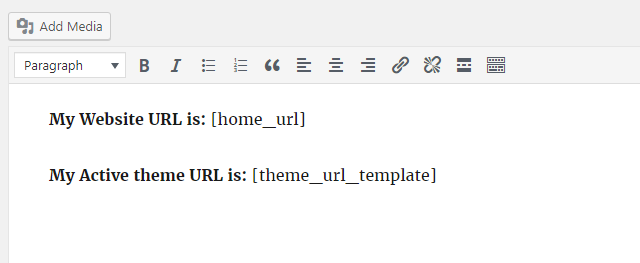
Sample short code use.

Rendered output.