

bbP Auto Block Spammers
A bbPress plugin that allows moderators to block bbPress spammers
Plugin info
Maintenance & Compatibility
Maintenance score
Stale • Last updated 304 days ago • 1 reviews
Is bbP Auto Block Spammers abandoned?
Likely maintained (last update 304 days ago).
Compatibility
Similar & Alternatives
Explore plugins with similar tags, and compare key metrics like downloads, ratings, updates, support, and WP/PHP compatibility.
Description
Allow your moderators to block spammers from using the forum.
Moderators can mark Topics and Replies as spam, but they cannot change the forum role of a user. This plugin allows them to block users without giving moderators additional access to wp-admin.
If a user exceeds the spam limit as set by the ‘Spam Limit’ field in bbPress Settings, the forum role for that user will be changed to ‘Blocked’, meaning they can no longer use the forums. If moderators unspam the posts by a user and the number of spam entries by that user falls below the Spam Limit, then the forum role for that user will be changed to ‘Participant’.
Site admins can review and set the number of spam flags, if any, for each user at the bottom of the Edit User screen in wp-admin.
This plugin is very lightweight. It does not manipulate posts. It only fires when a Topic or Reply is marked as spam or unspam.
For more information about this plugin, please visit bbP Auto Block Spammers
Installation
-
Upload the zip on the Plugins > Add screen in wp-admin
-
Activate the plugin through the ‘Plugins’ menu in WordPress
-
Go to wp-admin > Settings > Forums. Under ‘Forum User Settings’, find ‘Spam Limit’, enter a number and Save. It will default to zero.
Frequently Asked Questions
- Yes. Network activate and then set the Spam Limit on a per blog basis
Review feed
Good for helping to control spammers
Screenshots
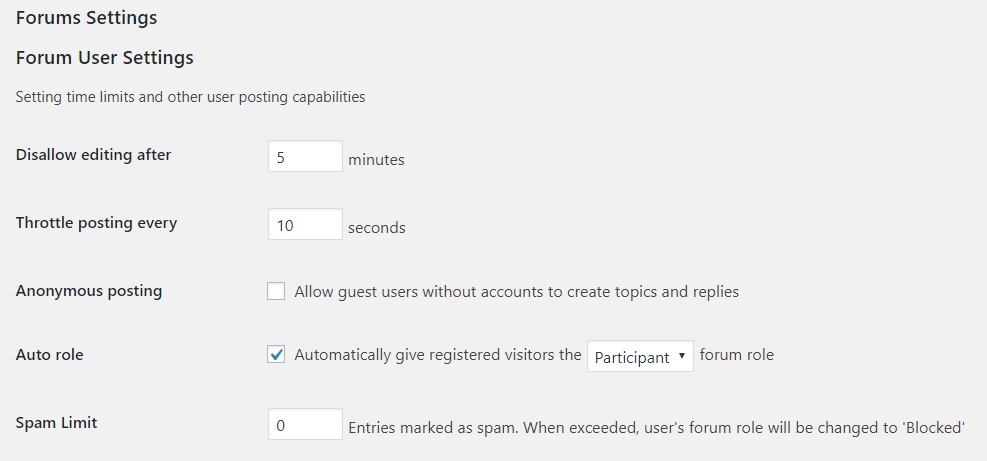
The bbPress settings screen, showing the Spam Limit field
Changelog
1.2
- Tested in 5.4
- fix php notice re Undefined variable
1.1
- Tested in 5.0
1.0
- Initial release.