

Plugin info
Maintenance & Compatibility
Maintenance score
Possibly abandoned • Last updated 4674 days ago • 4 reviews
Is bbPress Topic Thumbnails abandoned?
Possibly abandoned (last update 4674 days ago).
Compatibility
Similar & Alternatives
Explore plugins with similar tags, and compare key metrics like downloads, ratings, updates, support, and WP/PHP compatibility.
Description
This plugin adds support for Topic Thumbnails with bbPress. It works by retrieving the first image from each topic and displaying it alongside the topic title on the index page. Thumbnails are sized according to the default ‘thumbnail’ size in your WordPress media settings. The images will also resize appropriately if you’re using a responsive WordPress theme.
This plugin works with GD bbPress Attachments and most other bbPress image management plugins.
If you enable this plugin while bbPress is disabled (or not installed) it will display a warning message.
Installation
- Upload
bbpress-post-thumbnailsto the/wp-content/plugins/or/wp-content/mu-plugins/directory - Activate the plugin through the ‘Plugins’ menu in WordPress
Frequently Asked Questions
Does this support Multisite?
Yes. You can activate it on a sitewide or network-wide basis.
Does this work with bbPress 1.x?
No. Only bbPress 2.0 and newer are supported.
Can I specify the image to be used as a thumbnail?
No. It automatically grabs the first image associated with the topic. You just need to ensure the image you want appears first in the topic.
Can I change the appearance of the thumbnails?
Yes. You can modify the appearance of the thumbnails using CSS. The ‘bbp-topic-thumbnail’ selector is added to each thumbnail to enable you to add your own CSS styling.
Review feed
Screenshots
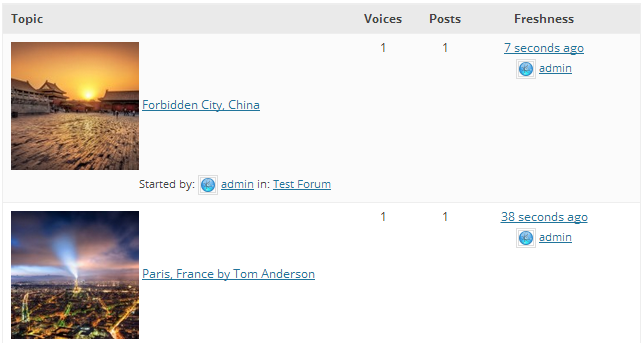
Forum topic view with thumbnails.
Changelog
1.2
- The image thumbnail now links to the topic permalink.
1.1
- Now honours ‘thumbnail’ size option from the WordPress Media Settings.
- Thumbnails now resize appropriately in responsive layouts.
1.0
- Initial release.