

bbRedirector
bbRedirector makes it easy to redirect a page to another location using absolute urls.
Plugin info
Maintenance & Compatibility
Maintenance score
Possibly abandoned • Last updated 5974 days ago
Is bbRedirector abandoned?
Possibly abandoned (last update 5974 days ago).
Compatibility
Similar & Alternatives
Explore plugins with similar tags, and compare key metrics like downloads, ratings, updates, support, and WP/PHP compatibility.
Description
DO NOT USE THIS PLUGIN!
It is outdated, not maintained and frankly there are better plugins to use.
bbRedirector makes it easy to redirect a page to another location using absolute urls from within WordPress.
No mod_rewrite nor .htaccess is needed. You just create a page, add a specific customfield and choose the
redirect template included with this plugin. It even allows you to set the required http status code (302 or 301).
You can also set a default sitewide redirection or setup your own custom redirection.
The included templates should give you an easy start using this plugin.
Feature requests? Remarks? Questions? Patches?
Feel free to contact me.
Installation
- Upload the bbRedirector directory to the
/wp-content/plugins/directory. - Activate the plugin through the ‘Plugins’ menu in WordPress.
- Place the bbredirector-page-template-metakey.php in your templates’ directory e.g.
/wp-content/themes/default/ - Create a Page.
- Add a customfield with the name redirect_url and as a value a full url e.g. http://www.burobjorn.nl
- Select the page template ‘Page Redirect Meta’
- Publish the created Page and check if the page redirects to url you entered.
Frequently Asked Questions
Installation Instructions
- Upload the bbRedirector directory to the
/wp-content/plugins/directory. - Activate the plugin through the ‘Plugins’ menu in WordPress.
- Place the bbredirector-page-template-metakey.php in your templates’ directory e.g.
/wp-content/themes/default/ - Create a Page.
- Add a customfield with the name redirect_url and as a value a full url e.g. http://www.burobjorn.nl
- Select the page template ‘Page Redirect Meta’
- Publish the created Page and check if the page redirects to url you entered.
Will this plugin work on WP MU?
Yes, it should work, but the settings are on a per blog base. So you need install and set it up per blog.
How can I setup default redirection location for all pages?
- Add bbredirector-page-template-default.php template page to your themes’ directory e.g.
/wp-content/themes/default - Change the Settings of the bbRedirector plugin according to your wishes
- For every page you want to use the default redirection, select the page template
Page Redirect Default
Tip: You can add all the supplied page template examples to your themes’ directory and select the one you need on a per page base
How can I setup redirection for a page without customfields?
I presume you know a bit about PHP and know how to create WordPress templates? Otherwise I would not recommend doing this.
- Add bbredirector-page-template-custom.php template page to your themes’ directory e.g.
/wp-content/themes/default - Change the arguments in the code of the template according to your wishes
- For every page you want to redirect to this ‘hardcoded’ url, select the page template
Page Redirect Custom
Tip: You can add all the supplied page template examples to your themes’ directory and select the one you need on a per page base
I get an empty or white page?
- If you use the bbredirector-page-template-default, make sure the allow default redirection option is ticked when using the default template.
- If you’ve created your own page template, make sure no characters including whitespace are left over calling the bbrd_redirect() function.
- Check if the url contains any whitespace or weird characters.
Can you tell me a bit more about the details?
The plugin uses ‘cascading redirection’ e.g. it first checks if a redirect url was given as parameter and uses this.
If no redirect url parameter was found, it checks if a page id parameter was supplied. If a page id was found it uses
a metakey (by default redirect_url) and the page’s id to check for a redirection url in the custom field of the page.
If none was found or no page id was given the plugin checks if ‘allowed to use the default redirection’ is enabled(default).
If it is enabled it will use the redirection url set in the plugin settings, which by default is the site url set in
the WordPress settings. If ‘allowed to use the default redirection’ was disabled the redirection will fail silently
and return a boolean false.
Due to the ‘cascading redirection’ it is easy to create different type of templates, as you can see in the supplied example
templates.
Review feed
Screenshots
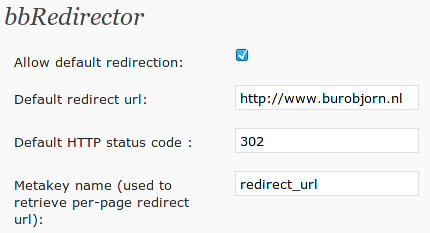
The bbRedirector settings screen.

This screenshot shows how to setup a page to use a redirect template using the same method as the general installation instructions.
Changelog
1.0
- Plugin was made availble