

Best Custom CSS
This plugin help you to manage your css files with an easy and convenient method directly from Wordpress dashboard.
Plugin info
Maintenance & Compatibility
Maintenance score
Possibly abandoned • Last updated 5341 days ago • 1 reviews
Is Best Custom CSS abandoned?
Possibly abandoned (last update 5341 days ago).
Compatibility
Similar & Alternatives
Explore plugins with similar tags, and compare key metrics like downloads, ratings, updates, support, and WP/PHP compatibility.
Description
Custom Css plugin help you to manage your css files quickly and efficiently, directly from your dashboard.
Overcoming the problems of IE is an everyday issue, which guzzles time and effort.
With this plugin the administration of css files in your site becomes fast and easy as you are able to write css code from the admin panel for IE in separated files, and for all the other browsers in a single customized file.
An option to edit your admin panel css file is also available, for customizing your own admin panel.
Installation
- Download the plugin from the plugins page in the admin panel.
- Upload
customcssdirectory to the/wp-content/plugins/directory - Activate the plugin through the ‘Plugins’ menu in WordPress
or:
- Search for ‘best custom css’ in the plugins section of the admin panel.
- look for ‘Custom CSS’ in the title, download it.
- Activate the plugin.
- A new section named ‘Custom CSS’ was added to the admin panel.
Frequently Asked Questions
I can’t see the ‘update file’ button in the Css editor page.
Go to /wp-content/plugins/cutomcss/css directory in your FTP client, look for the file that you can’t update.
Right click on “file permissions…”. Change the numeric value to 666.
Press ‘OK’.
Review feed
best plugin for css
Screenshots
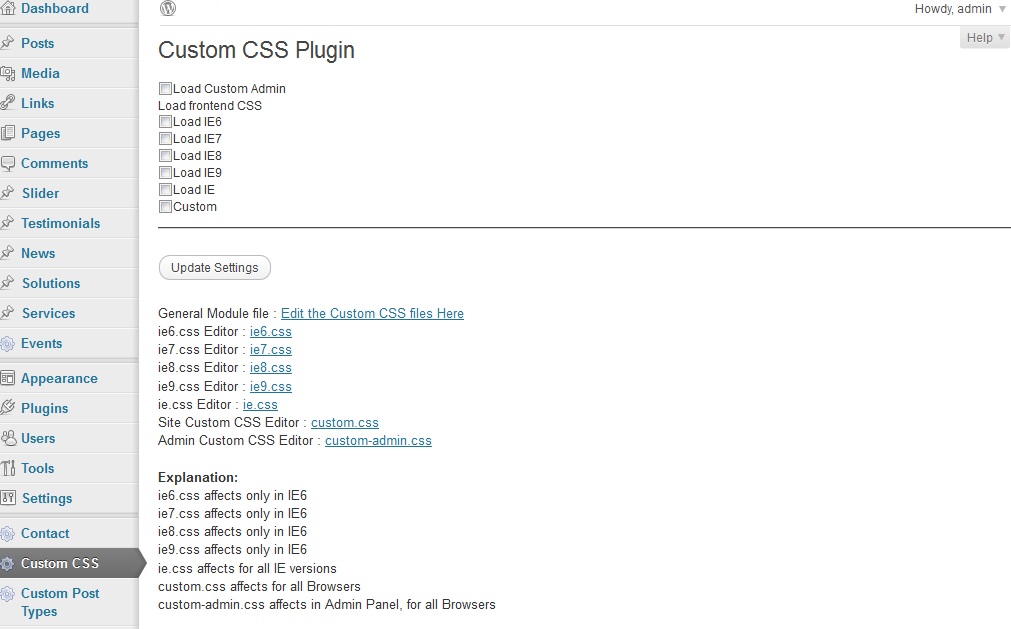
This is the plugin page, which from there you can manage your css files.

This is the editor for a certain css file. Please note that the editor is Left-to-Right by default, for you Bi-lingual users.
Changelog
1.0
- Plugin is Released.