

Better Forms
Lightweight plugin that just simply makes the forms on your WordPress site look better, more professional and reliable across browsers
Plugin info
Maintenance & Compatibility
Maintenance score
Possibly abandoned • Last updated 3891 days ago • 1 reviews
Is Better Forms abandoned?
Possibly abandoned (last update 3891 days ago).
Compatibility
Similar & Alternatives
Explore plugins with similar tags, and compare key metrics like downloads, ratings, updates, support, and WP/PHP compatibility.
Description
NOTE: this plugin does not add any contact form functionality, it only affects the looks of form elements already created on your site, for instance by a specialized contact forms plugin like Gravity Forms.
WordPress Better Forms is a lightweight free WordPress plugin that improves the visual impact and aesthetics of forms and form elements on your site.
All forms elements will have a much improved standardized look and feel across all browsers. This will overall make the forms look more professional and cleaner. Form elements are the pieces combined to create forms on your site.
The new visual look will apply to all form elements including: input, textarea, select boxes, check boxes, radio buttons, regular buttons and submit buttons.
You might also want to check out our other free plugins, the WordPress Shortcodes plugin and the WordPress Social Media plugin. You can also find them here on the WordPress registry.
NOTE: some themes might use highly customized form elements which might end up looking odd when this plugin is enabled. You can use the Extra Styles entry field to override the styles of the plugin for those specific theme elements.
Features
- Integrates fully with all WordPress forms
- Great looking professional form elements
- Applies to input, textarea, select, checkbox, radio, buttons
Related Links:
- WordPress Better Forms Official Page
- Our own site where you can see social sharing and following in action
- Stripefolio theme demo where you can see how the form elements will look
- The free Stripefolio WordPress portfolio theme the Official page for the theme in the above demo link
- Formalize the JavaScript library responsible for the new forms look
Installation
- Download the plugin
- Simply go under the Plugins page, then click on Add new and select the plugin’s .zip file
- Alternatively you can extract the contents of the zip file directly to your wp-content/plugins/ folder
- Finally, just go under Plugins and activate the plugin
Frequently Asked Questions
How can I see the form elements in action?
Have a look at our site or the Stripefolio portfolio theme demo where you can see the form elements in action
Review feed
Screenshots
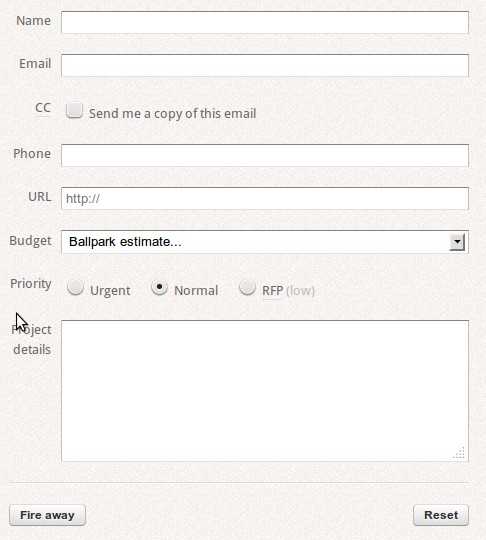
A demo of how form elements will look

A demo of how form elements will look on focus

An example of all form elements together
Changelog
1.1.3
- Fixes for options module
1.1.2
- First public release.