

Better Menu Widget
Better Menu Widget makes it easy to customize your menu widgets by adding css styles and a heading link.
Plugin info
Maintenance & Compatibility
Maintenance score
Possibly abandoned • Last updated 2565 days ago • 5 reviews
Is Better Menu Widget abandoned?
Possibly abandoned (last update 2565 days ago).
Compatibility
Similar & Alternatives
Explore plugins with similar tags, and compare key metrics like downloads, ratings, updates, support, and WP/PHP compatibility.
Description
This plugin is no longer under active development. With all the improvements to WordPress the need for this plugin has long passed. It will still work but no improvements will be made.
A Custom Menu widget that adds a custom url to the widget title and adds a custom css class. The default custom menu CSS class is sub-menu and it is applied to the
Based on the core WordPress Custom Menu widget.
Options
- Custom title URL
- Custom CSS class
Plugin’s Official Site
Installation
Option 1- Automatic Install
- Use the built-in plugin installer in your WordPress installation
- Search for “Better Menu Widget”
- Click “Install Now”
- Plugin will automatically install
Option 2- Manual Install
- Download the plugin file to your hard drive
- Go to the Plugins management page and Upload ‘better-menu-widget.zip’
- Activate the plugin
Option 3- Manual Install
- Download the plugin file to your hard drive
- Unzip better-menu-widget.zip
- Place the folder ‘better-menu-widget’ into your plugins directory /wp-content/plugins via ftp
- Go to the Plugins management page and Activate the plugin
Frequently Asked Questions
How do I style a Better Menu Widget?
You can style a Better Menu Widget by adding the default menu class sub-menu to your theme’s style sheet. If you’ve changed the menu class in the widget options, then you would use the new class name you created.
Review feed
Working very well
Screenshots
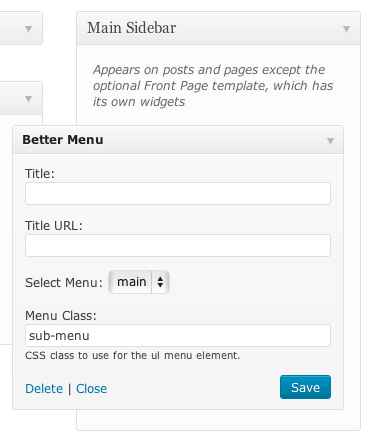
Default widget settings
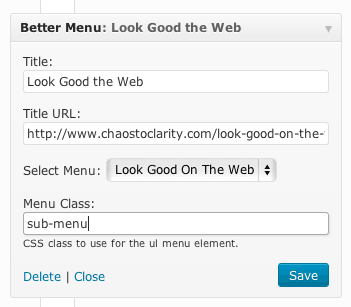
Example widget settings
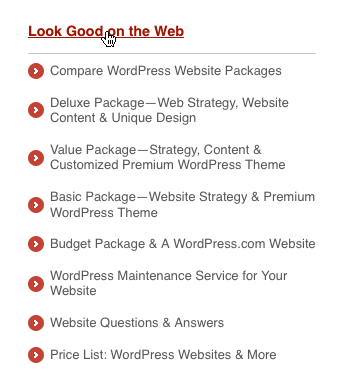
Front-end view of Better Custom Menu widget
Changelog
1.5.1
Update site urls.
1.5
Added ability for multiple CSS classes. Thanks to Joe Buckle.
1.4.1
Change constructor style to PHP5.
Improve code comments.
Tested against WordPress 4.2.2.
1.4
Security enhancements. Allow only valid characters for html class.
Update plugin URL.
Reminder: always backup your site before you update any plugin.
1.3
Security enhancements.
1.2
Internationalize plugin.
Added developer credits.
1.1
Important Change! Read before you update.
The widget class was changed from “menu-widget” to “better-menu-widget” to avoid class name conflicts. This will cause any widgets you have to disappear so you’ll need to add them again. You may also need to update your style sheets.
1.0
Initial public release.