

Bg Book Publisher
The plugin helps you to publish big book with a detailed structure of chapters and sections and forms table of contents of the book.
Plugin info
Maintenance & Compatibility
Maintenance score
Possibly abandoned • Last updated 1036 days ago • 1 reviews
Is Bg Book Publisher abandoned?
Possibly abandoned (last update 1036 days ago).
Compatibility
Similar & Alternatives
Explore plugins with similar tags, and compare key metrics like downloads, ratings, updates, support, and WP/PHP compatibility.
Description
When you save a post, the plugin splits it into pages and adds a table of contents in the form of a spoiler to the top of each page.
On the post editing page you can set the maximum level of headers included in the table of contents and the level of headings where you break the pages (see screenshot).
You can set the header levels from 1 to 6, and also disable the action of the plug-in for this post by unchecking the item ‘this post is book’.
You can also set the author of the published book, which will be showed directly in the post title.
To insert name of book author into the text you can also use shortcode [book_author] or PHP-function bg_bpub_book_author($post_id) in page template.
CSS
To customize the post appearance, you can use the following classes:
1. bg_bpub_toc – class of contaner (div) with table of contents.
2. bg_bpub_toc_h1 … bg_bpub_toc_h6 – classes of chapter headers in table of contents.
3. bg_bpub_book_author – class of contaner (span) with name of book author.
PHP filters
-
bg_bpub_post_types – array of post types processed by the plugin, default is [‘post’, ‘page’];
-
bg_bpub_title – title html after book author is added;
-
bg_toc – html output of the TOC;
Notes for Translators
You can translate this plugin using POT-file in languages folder with program PoEdit (http://www.poedit.net/).
More in detail about translation WordPress plugins, see “Translating WordPress” (https://codex.wordpress.org/Translating_WordPress).
Send me your PO-files. I will insert them in plugin in next version.
License
GNU General Public License v2
Installation
- Upload ‘bg-book-publisher’ directory to the ‘/wp-content/plugins/’ directory.
- Activate the plugin through the ‘Plugins’ menu in WordPress.
Frequently Asked Questions
Review feed
Screenshots
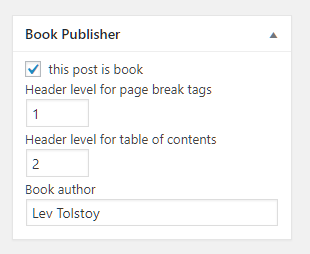
Plugin's post settings.

Plugin's options.
Changelog
= 1.25
-
Collapsible TOC; individual post setting + global option to expand depending on number of items.
-
Grid-TOC option for shot-named items e.g. numbers.
-
Full-text link (displays all pages at once).
-
Hooks added
1.1.0
- Unordered List in TOC.
1.0.3
- Allow saving post in admin dashboard only.
1.0.2
- Delete anchor from the TOC link to the first header on the page.
1.0.1
- Fixed some bugs.
1.0
- Plugin in start edition