

Bible Reader
A beautiful Bible reader with a 'Verse of the Day' and a 'Hebrew date converter'.
Plugin info
Maintenance & Compatibility
Maintenance score
Stale • Last updated 331 days ago
Is Bible Reader abandoned?
Likely maintained (last update 331 days ago).
Compatibility
Similar & Alternatives
Explore plugins with similar tags, and compare key metrics like downloads, ratings, updates, support, and WP/PHP compatibility.
Description
Features:
– Bible Reader with multiple languages and translations
– Verse of the Day
– Hebrew Date Converter
– Word Cloud Visualization
– Word Highlighting
– Chapter Navigation
– Font Size Options
– Easy Sharing Options
Requires a free API key from scripture.api.bible.
Note: API.Bible has usage limits (500 requests/hour for free tier).
External Services
This plugin connects to the API.Bible service (https://scripture.api.bible) to fetch Bible translations, books, chapters, and verses. This is required for the core functionality of displaying Bible content.
Data sent to API.Bible:
– Bible version ID (e.g., ‘06125adad2d5898a-01’)
– Book ID (e.g., ‘GEN’)
– Chapter number (e.g., 1)
– Language code (e.g., ‘eng’)
When data is sent:
– When loading available Bible versions for a selected language
– When loading books for a selected Bible version
– When loading chapters for a selected book
– When loading verses for a selected chapter
– When performing searches
The plugin does NOT send:
– User personal data
– IP addresses
– Site URLs
– Any identifiable information
API.Bible is provided by American Bible Society:
– Terms of Service: https://scripture.api.bible/docs/terms
– Privacy Policy: https://scripture.api.bible/docs/privacy
Hebrew Date Conversion
The plugin also connects to HebCal’s Hebrew Date Converter API (https://www.hebcal.com) for converting Gregorian dates to Hebrew dates.
Data sent to HebCal:
– Day, month, and year of Gregorian date being converted
When data is sent:
– Only when a user actively uses the Hebrew date converter feature
HebCal is provided by HebCal LLC:
– Terms of Service: https://www.hebcal.com/about/terms-and-conditions
– Privacy Policy: https://www.hebcal.com/about/privacy-policy
Social Sharing
This plugin includes optional sharing features that generate links to social media platforms.
No data is sent to these services unless the user actively chooses to share content.
When a user shares a verse:
– The verse text and reference are encoded in the share URL
– The user’s browser connects directly to the chosen platform
– No data passes through our servers
Supported services:
– X (Twitter): https://twitter.com/tos
– Truth Social: https://truthsocial.com/terms
– Gab: https://gab.com/about/terms
– WhatsApp: https://www.whatsapp.com/legal
– Telegram: https://telegram.org/tos
– Email (uses default mail client)
The plugin does NOT:
– Track sharing activity
– Store any sharing data
– Connect to these services without user initiation
Privacy Notice
This plugin does not collect, store or share any personal user data.
All Bible content is fetched directly from API.Bible and not stored locally.
Installation
- Upload the plugin files to
/wp-content/plugins/bible-reader - Activate the plugin through the ‘Plugins’ menu
- Get your API key from https://scripture.api.bible
- Configure your API key in Settings Bible Reader
Frequently Asked Questions
Register for free at https://scripture.api.bible
Use the shortcode [bible_reader]
Use the shortcode [verse_of_the_day]
Use the shortcode [hebrew_date_converter]
Review feed
Screenshots

Bible Reader

Verse of the Day display with reference
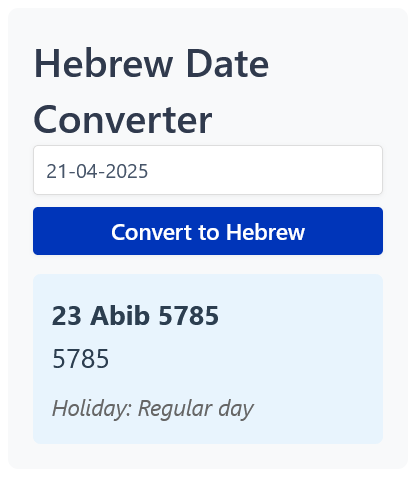
Hebrew Date Converter showing conversion results
Changelog
1.0.1
- Added: Text domain
- Enhanced: Security improvements in AJAX handlers
- Fixed: Verse selection toolbar behavior
- Updated: Documentation and privacy notices
1.0
- Initial release