

Bible Verse Display
Lets you display either the verse of the day from Biblegateway, or a random verse from your favorites.
Plugin info
Maintenance & Compatibility
Maintenance score
Possibly abandoned • Last updated 4941 days ago • 1 reviews
Is Bible Verse Display abandoned?
Possibly abandoned (last update 4941 days ago).
Compatibility
Similar & Alternatives
Explore plugins with similar tags, and compare key metrics like downloads, ratings, updates, support, and WP/PHP compatibility.
Description
Bible Verse Display allows you to display a bible verse on your site either in posts/pages or via the included widget. The verse displayed can either be the verse of the day from Biblegateway or a random verse chosen from verses you nominate as your favorites. Multiple versions/languages available.
- To nominate your favorite verses, simply enter in the verse reference. Bible Verse Display will look up the verse for you. No manual typing in of the verse is necessary!
- You can select from several different bible versions
- You can have it display a verse randomly from your favorites, or display Biblegateway’s Verse of the Day
- Verses can be displayed in English, French, German, Spanish, Italian, or Romanian
- Bible Verse Display Widget included
Compatibility
Should work from WordPress 2.9.2.
Download
Installation
- Install directly from WordPress (go to Plugins -> Add New)
OR - Install manually
- Unzip the plugin files to the
/wp-content/plugins/bible-verse-display/directory - Activate the plugin through the ‘Plugins’ menu in WordPress
- Set your preferred settings through the Bible Verse Display section under WordPress’ Settings menu
Frequently Asked Questions
How can I style the verses?
The verses are contained in a div tag whether you use the widget or the shortcode. The div class for the widget is called bvdwidget. For the shortcode, if you do not specify a class in the parameters, the class is called bvdshortcode; otherwise, it is whatever you specified. Simply add the class to your theme’s css file and style it as you desire.
Review feed
Screenshots
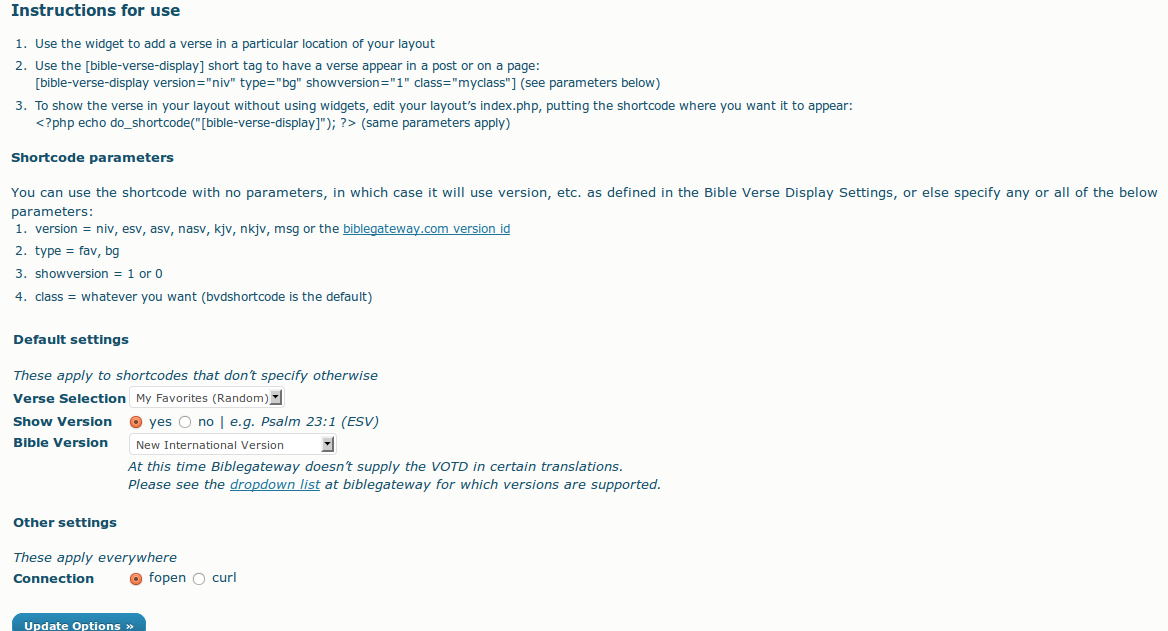
See screenshot-1.png for a view of the Settings.
Changelog
1.0 — April 1 2010
- Plugin launched
1.1 — April 1 2010
- Fixed bug with regards to the NASV and Favorite verses
- Fixed bug with regards to different versions of biblegateway’s Verse of the Day
- Added class parameter to shortcode
- Added The Message as a Bible version
1.2 — October 29, 2010
- Added a lot more Bible versions (including non-English ones) and changed a bunch of the underlying code to accomodate them
- Added option to tack today’s date onto the end of the widget title (choice of a few date formats)
1.3 — February 25, 2011
- Added the ability to show or hide the version acronym
- Added the ability to use either fopen or CURL
1.4 — March 12, 2011
- Added the ability to use either fopen or CURL for Biblegateway VOTD too. Oops 🙂
1.5 — July 17, 2011
- Updated verse parser to accommodate biblegateway.com’s changed HTML in their verse display
1.6 — September 21, 2012
- Updated verse parser to accommodate biblegateway.com’s change to their method of displaying verses