

Block Patterns for Food Bloggers
A beautiful collection of block patterns for food bloggers.
Plugin info
Maintenance & Compatibility
Maintenance score
Maintained • Last updated 119 days ago • 2 reviews
Is Block Patterns for Food Bloggers abandoned?
Likely maintained (last update 119 days ago).
Compatibility
Similar & Alternatives
Explore plugins with similar tags, and compare key metrics like downloads, ratings, updates, support, and WP/PHP compatibility.
Description
A beautiful collection of block patterns for food bloggers.
What is a WordPress pattern?
A WordPress pattern is a collection of blocks arranged together into an thoughtful, intentional, opinionated section for a page of post. Once inserted into a page, the author can edit and customize the blocks to their needs.
Patterns make it incredibly simple to add complex layouts and designs to any WordPress site without having to start from scratch every time. Patterns can also highlight and expose features and combinations of blocks that may not be immediately obvious or intuitive.
Included patterns:
- Recipe Index
- Search Bar
- Hero
- Newsletter
- Book Feature
- About Author
- Instagram Hero
- Featured Categories
- Latest Posts (grid)
- Latest Posts (overlay style)
Features
- 19 Gutenberg Block Patterns for Food Bloggers
- No impact on page speed
Recommended Themes & DEMO
Even though the plugin works great with any theme, currently, it includes patterns that were thoroughly tested with the following WPZOOM themes:
Foodica PRO
CookBook – NEW
Gourmand
Cookely
Quick Tips
Use the Group block to control spacing and color for more than one block at a time.
Use the Cover block to control your pattern’s height, including min-height and full-viewport designs.
If your pattern contains numerous root-level blocks it can be helpful to Group them all together. This makes it easier to move your pattern around once inserted.
Additional Resources
Images Credit:
https://www.foodiesfeed.com/
Installation
This section describes how to install the plugin and get it working.
- Go to Plugins > Add New
- Search for plugin name
- Install & Activate.
In the Block editor click on the “+” button at the top-left, select the Patterns tab. You will find a category named “WPZOOM Food Blog Patterns” with all patterns included in this plugin.
Frequently Asked Questions
Review feed
Love this plugin!
Screenshots
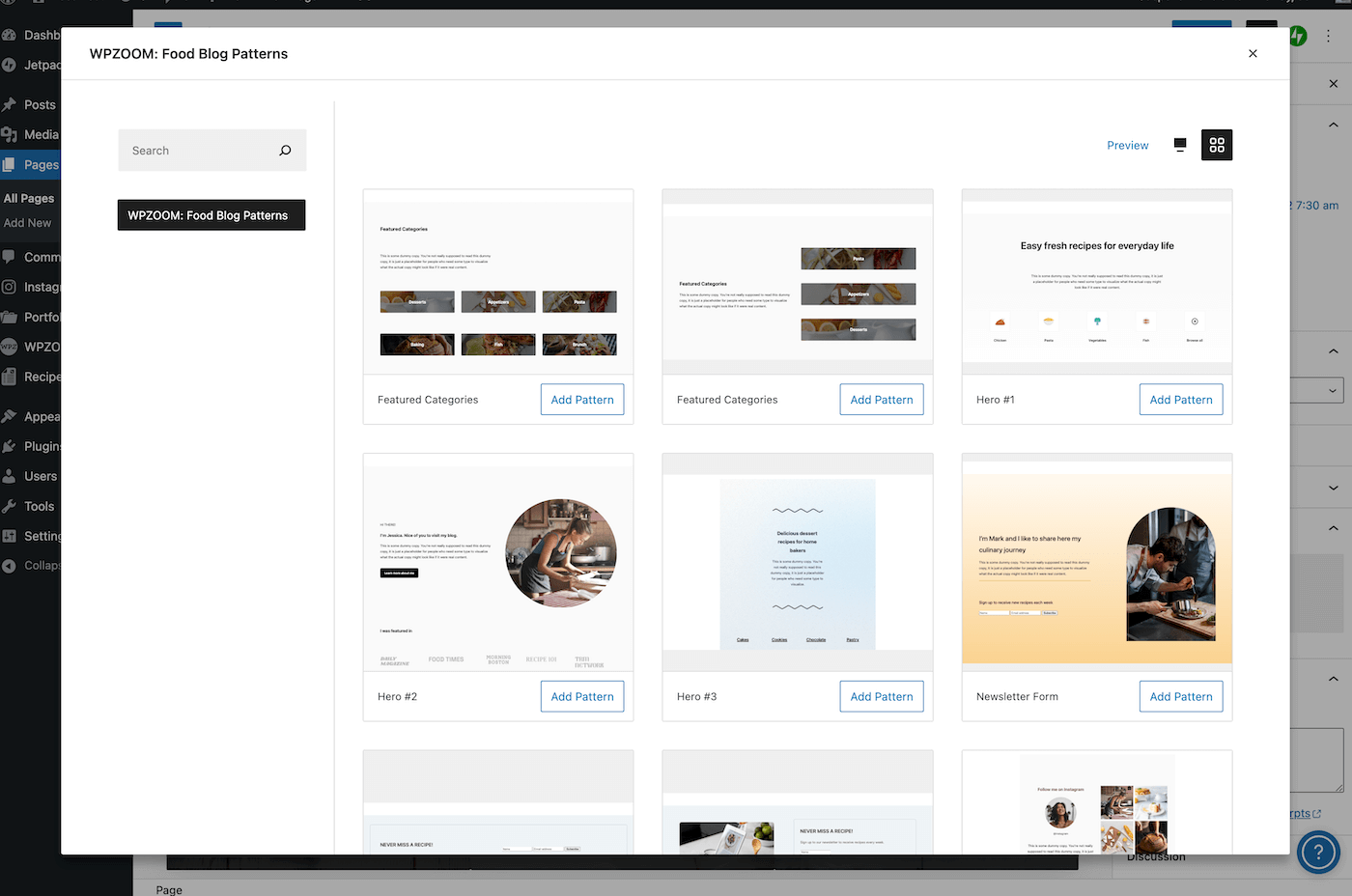
Patterns Library
Changelog
1.0.6
- Minor bug fix
1.0.5
- Minor bug fix
1.0.4
- Minor bug fix
1.0.3
- Minor bug fixes
1.0.2
- Minor bug fix
1.0.1
- Fixed an issue with the group block inner container
1.0.0
- Initial plugin release