

Block Plugin Update
This plugin blocks the updates for specific plugins. You can select the plugins from plugin setting page.
Plugin info
Maintenance & Compatibility
Maintenance score
Possibly abandoned • Last updated 449 days ago • 19 reviews
Is Block Plugin Update abandoned?
Possibly abandoned (last update 449 days ago).
Compatibility
Similar & Alternatives
Explore plugins with similar tags, and compare key metrics like downloads, ratings, updates, support, and WP/PHP compatibility.
Description
This Plugin blocks updates from a specific plugin.
You can select the plugins you want to block for updates from Block Plugin Update under Settings or tick them all to remove all plugin updates.
If you still any problem visit our support forum or you can write to us directly using our contact form.
Plugin you may like
* Use Any Font
* WP Armour Anti Spam Plugin
* jQuery Validation for Gravity Forms
* jQuery Validation For Contact Form 7
* Any Mobile Theme Switcher
* Featured Image In RSS Feed
* Add Tags And Category To Page
Installation
- Search Block Plugin Updates and click on Install.
- Activate the plugin through the ‘Plugins’ menu in WordPress.
- Tick the plugins to block updates from Block Plugin Update under Settings
Frequently Asked Questions
You need to logout and login to get the proper effect.
Review feed
Great tool for not updating a plugin who stop working on my server
Works!
Does not work in a multisite environment
Simple, clean, works
Screenshots
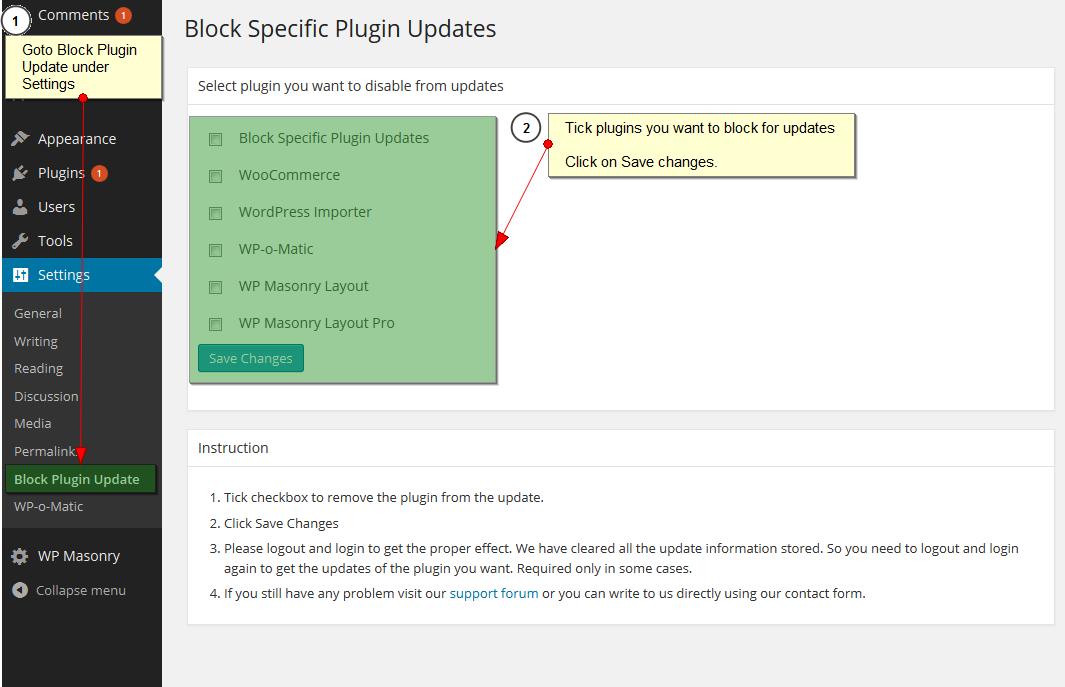
Admin Setting
Changelog
3.3.2
- add WP Nonce for Settings page.
3.3.1
- Fixed error when all plugins are unchecked.
3.3
- Tested with 6.0.1
- Clean UI
3.2
- Tested with 5.8.2
3.1
- Fix plugin list update issue after save.
3.0
- Tested with 5.3.2
2.2
- Tested with 4.5.3
- Added Settings link in plugin list
2.1
- Tested with 4.2.3
2.0
- Tested with 4.1.1
1.0
- Supports now wordpress 3.7
0.1
- First Release