

Block Styler For Gravity Forms
Embed & style gravity forms within the gutenberg editor. Add styles for gravity forms border, background, title, description, inputs, labels, plac …
Plugin info
Maintenance & Compatibility
Maintenance score
Stale • Last updated 362 days ago
Is Block Styler For Gravity Forms abandoned?
Likely maintained (last update 362 days ago).
Compatibility
Similar & Alternatives
Explore plugins with similar tags, and compare key metrics like downloads, ratings, updates, support, and WP/PHP compatibility.
Description
Style gravity forms with the gutenberg block editor. Get real-time feedback on the style updates within the super fast gutenberg editor.
This plugin provides a gutenberg block called Gravity Form Styler Refer to screenshot 1. You can embed a gravity form and set all the gravity form shortcode parameters. You can also style the gravity forms button‘s background, text typography, margin, padding, border and border radius.
We also offer a premium version of this plugin.
Premium version provides additional styling options. Refer screenshot 3 and the overview video below.
Here is a brief overview of the plugin with the free & premium options enabled.
Installation
- Download the plugin from https://wordpress.org/plugins/block-styler-for-gravity-forms/
- Upload & activate the plugin via the WordPress admin. To learn more refer to this guide
Frequently Asked Questions
Plugin depends on Gravity Forms (affiliate link)
Yes. Details on the premium version can be found at https://wptools.app/wordpress-plugin/gutenberg-block-styler-for-gravity-forms/
We offer a FREE TRIAL for the premium version.
Review feed
Screenshots

How to add the
Gravity Form Stylergutenberg block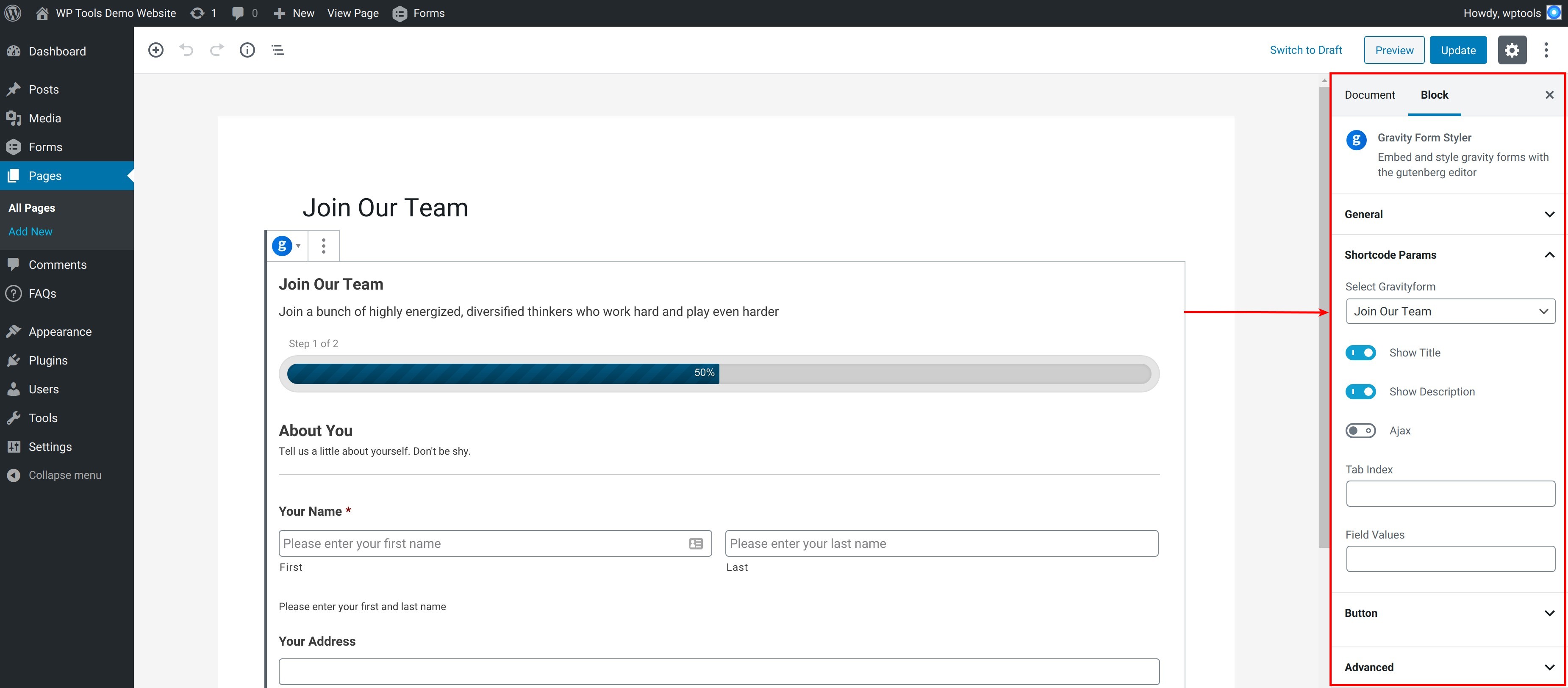
Gravity forms styling gutenberg blocks options for the free version

Gravity forms styling gutenberg blocks options for the premium version
Changelog
6.4.1
- Updated: Freemius SDK
6.4.0
- php8.1 compatible
- WordPress compatible
- Freemius upgrade
6.3.0
- Freemius SDK upgrade
6.2.1
- Freemius SDK upgrade
6.2.0
- Fixed code sniffer issues
- Upgraded freemius v2.5.4.2
6.1.0
- Changed gravity forms block’s server side mechanism
6.0.0
- Working with latest version of gravity forms.
5.0.0
- Final Working version
- Gravity forms style options for button
[//]: # fs_premium_only_begin
4.0.0
- Added gravity forms style options for input, label, footer, confirmation message, form & field validation errors.
3.0.0
- Added gravity forms style options for progress bar, section
2.0.0
- Added gravity forms style options for wrapper, title, description
[//]: # fs_premium_only_end
1.0.0
- Initial version with freemius integration