

Block Temporary Email
This plugin stops users from giving you disposable or fake email addresses when signing up. This helps reduce spam and fraud.
Plugin info
Maintenance & Compatibility
Maintenance score
Possibly abandoned • Last updated 638 days ago • 7 reviews
Is Block Temporary Email abandoned?
Possibly abandoned (last update 638 days ago).
Compatibility
Similar & Alternatives
Explore plugins with similar tags, and compare key metrics like downloads, ratings, updates, support, and WP/PHP compatibility.
Description
This plugin will verify every email address submitted by users.
It’ll automatically detect and block disposable, temporary email addresses.
It’ll give a nice warning message when users are signing up, logging in,
or changing email to a temporary email.
The plugin checks the domain name using a service named
IsTempMail.
If a domain name is blocked, it will be stored into a local blacklist.
You can also manage your own local whitelist and blacklist to allow or
disallow certain domains.
The plugin integrates with the WordPress built-in function is_email().
It works seamlessly with other plugins including WooCommerce,
Contact Form 7, Gravity Form, Jetpack/Grunion contact forms, Kadence Blocks Forms as well as
other formbuilders and ecommerce plugins and WordPress’ own registration form.
Installation
Sign up and get your API token at IsTempMail.
Upload the plugin to your blog, then click Activate it under Plugins > Installed Plugins.
Then enter the API token at your WordPress Dashboard > Settings > IsTempMail.
Frequently Asked Questions
No, we don’t. The plugin will only send the domain part of email address to validate.
Yes, the plugin is free to use. IsTempMail also offers a free plan that will be sufficient
for most blogs. You will be notified when you use more credits than included in the free plan.
A downtime is very unlikely, the IsTempMail service has outstanding availability of 99.99%
over the last 6 months.
But the plugin was developed to be stable in the unlikely event of a temporary downtime. It
will continue to work, validating emails using your local blacklist and whitelist. Your users
will be able to sign up, log in and comment on your blog just fine.
Existing users registered with fake email addresses won’t be able to log in to your blog when
the plugin is activated. Be prepared for users contacting you regarding this topic. Usually
people who used a disposable email address won’t come back to your website though.
Review feed
Screenshots
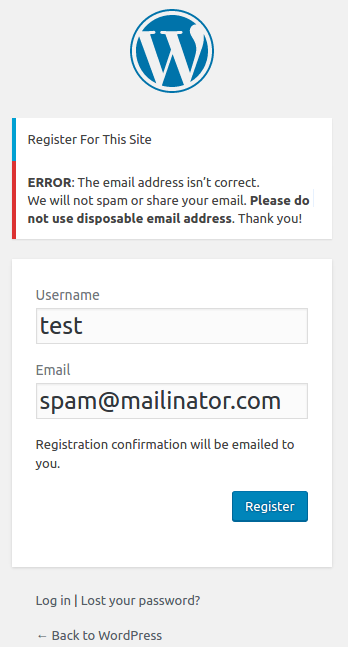
Disposable email address blocked during sign up

Temporary email address blocked when updating profile

Settings to manage your own blacklist and whitelist
Changelog
1.7.4
Tested with WordPress 6.6
1.7.3
Tested with WordPress 6.4.3
1.7.2
Improve support for forms and advanced forms built with Kadence Blocks
1.7.1
Add support for advanced forms built with Kadence Blocks
1.7
Add support for forms built with Kadence Blocks
Tested with WordPress 6.4.2
1.6.3
Tested with WordPress 6.4.1
1.6.2
Tested with WordPress 6.3.2
1.6.1
Tested with WordPress 6.3.1
1.6
Fix a bug during plugin uninstallation
Add option to disable validating logins (premium)
1.5.2
Tested with WordPress 6.2
1.5.1
Tested with WordPress 6.1.1
Updated a typo and readme
1.5
You can now disable email checking on a certain POST payload e.g. add
_xoo_el_form=login to stop checking email on login popup.
1.4
- Update API request format.
- Separate IsTempMail blacklist and your own local blacklist.
1.3
In prior versions, it’ll check all emails passed to is_email() function.
You can now change the hook behavior to check only emails submitted via browsers (POST/GET values).
1.2
If a domain name has no MX record and doesn’t resolve to any IP address, it will be marked as “unresolvable”
and the email will be considered as invalid. It helps in preventing some typos like gmail.con or gmail.comm.
1.1
Add local blacklist and whitelist.
1.0
First version