

Blocks for GitHub
Easily display your GitHub profile, organization, repositories, and more within the WordPress Block Editor aka "Gutenberg".
Plugin info
Maintenance & Compatibility
Maintenance score
Possibly abandoned • Last updated 496 days ago
Is Blocks for GitHub abandoned?
Possibly abandoned (last update 496 days ago).
Compatibility
Similar & Alternatives
Explore plugins with similar tags, and compare key metrics like downloads, ratings, updates, support, and WP/PHP compatibility.
Description
Seamlessly integrate GitHub content into your WordPress website using the block editor. This lightweight plugin lets you showcase GitHub profiles, organizations, and repositories with just a few clicks.
Key Features
-
GitHub Profile Block: Display any GitHub user profile complete with:
- Profile picture and bio
- Location and website information
- Follow button with follower count
- Customizable display options
-
Repository Block: Showcase GitHub repositories with:
- Repository description and statistics
- Star count and fork information
- Last update timestamps
- Customizable repository display options
-
Flexible Display Options:
- Show/hide various profile elements (bio, location, website, etc.)
- Customize repository information display
- Control header background images
- Adjust profile name display
Perfect For
- Developers showcasing their GitHub projects
- Organizations displaying their open-source contributions
- Portfolio websites
- Development blogs
- Project documentation sites
Contributing
This is an open-source project and we welcome contributions of all kinds! Whether you’re fixing bugs, improving documentation, or proposing new features, your help is welcome.
- View the source code on GitHub
- Found a bug? Open an issue
- Want to contribute? View our contribution guidelines
Installation
Installation is easy!
Install right through the block editor or via the WordPress plugin directory search in your WordPress website.
- Upload the plugin files to the
/wp-content/plugins/directory, or install the plugin through the WordPress plugins screen directly. - Activate the plugin through the ‘Plugins’ screen in WordPress
- Look for the GitHub blocks in your block editor
- Start adding GitHub profiles and repositories to your posts and pages!
Frequently Asked Questions
While you don’t need a GitHub account to install the plugin, you’ll need to know the GitHub username or repository information you want to display.
Currently, the plugin only displays public GitHub repositories and profiles.
Each block has its own settings panel in the block editor sidebar. You can toggle various display options like showing/hiding the bio, location, website, follower count, and more.
Yes! You can add as many GitHub profile or repository blocks as you need to a single page or post.
No, the plugin is designed to be lightweight and efficient, making API calls only when necessary to fetch GitHub data.
The plugin caches GitHub data to ensure optimal performance while keeping information relatively fresh.
Great! Please open an issue on GitHub to report bugs or suggest new features.
Review feed
Screenshots
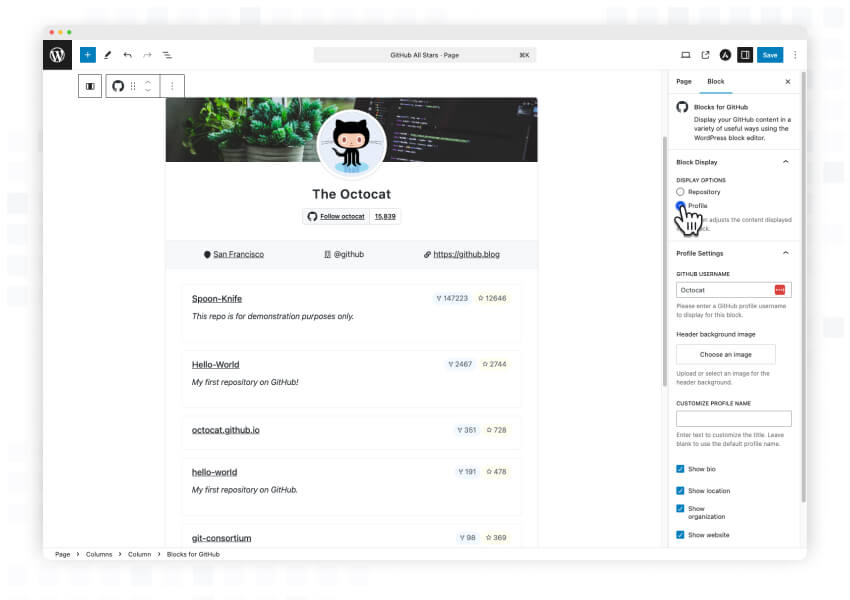
Display and configure any GitHub profile or organization within the WordPress block editor. Customize the display options to show exactly what you want your visitors to see.
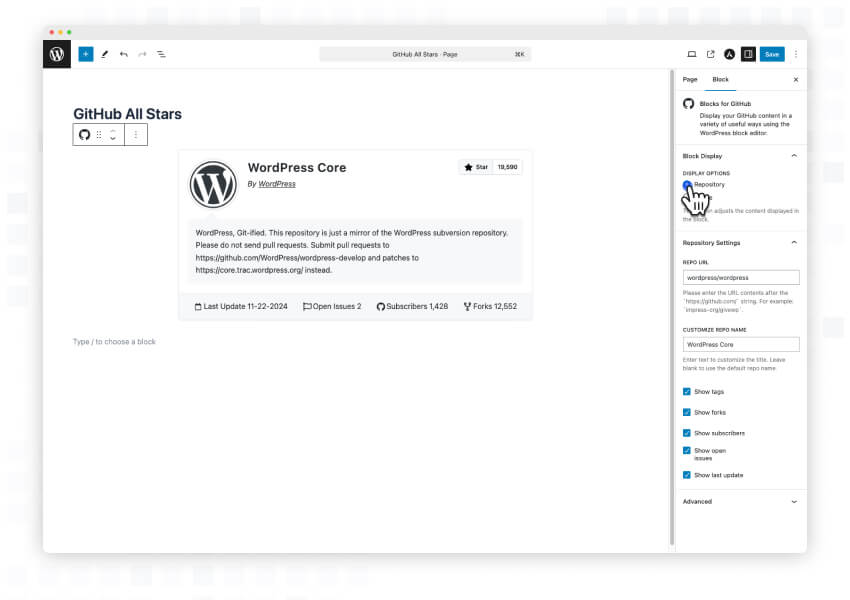
Have a repo that you want to showcase? No problem! Display any GitHub repository within the WordPress block editor. Show repository stats, descriptions, and more with easy configuration options.
Changelog
1.0.0
- Initial Release – Yippee!
- Added GitHub Profile Block
- Added Repository Display Block
- Implemented customizable display options
- Added caching for optimal performance
- Included responsive design for all block displays