

Plugin info
Maintenance & Compatibility
Maintenance score
Possibly abandoned • Last updated 2191 days ago • 5 reviews
Is Blog Post Filter abandoned?
Possibly abandoned (last update 2191 days ago).
Compatibility
Similar & Alternatives
Explore plugins with similar tags, and compare key metrics like downloads, ratings, updates, support, and WP/PHP compatibility.
Description
Blog Post Filter is a plugin that allow the site administrator selects which categories should be shown on the site frontpage. Only posts that are in the selected categories would be shown on the site main loop.
Major features of Blog Post filter include:
- Simplicity: In contrast with similar plugin this plugin is very simple and easy to use.
- Efficiency: The plugin has a minimum processing overhead on the site.
- Multilingual: Supports Persian and English admin page translation.
Installation
- Upload
sloth-category-filterdirectory to the/wp-content/plugins/directory - Activate the plugin through the ‘Plugins’ menu in WordPress
- Select the categories int the setting page in the posts section.
- You’re done!
Frequently Asked Questions
Does a post would be shown if just some of it’s categories are selected.
Yes, every post that has at least one selected category in it’s categeory list would be shown on the front page.
How can I report bugs or contribute to the plugin?
You can send an email to the [email protected].
Review feed
Simple and effective
Screenshots
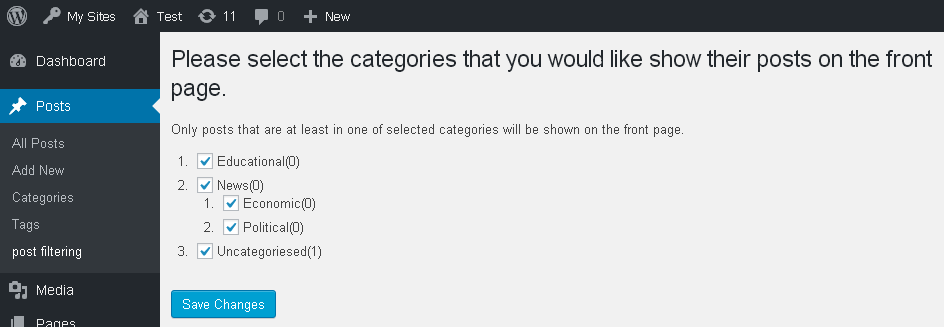
Preview of the Blog Post Filter's admin page (v1.0.1).

Preview of the Blog Post Filter's admin page (v1.1.0).

Persian translation of the plugin (v1.1.0).
Changelog
1.1.0
- Added an option to filter sticky posts.
1.0.1
- Minor bug fix.
1.0.0
- Fist version.