

Magazine Companion
A Collection of Post Blocks and tools for Blogs, Newspapers and Magazine websites.
Maintenance 60/100136d since update
Active installs
90
Downloads
2,086
Reviews
0
Age
2.5y
Plugin info
Total downloads: 2,086
Active installs: 90
Total reviews: 0
Average rating: 0
Support threads opened: 1
Support threads resolved: 1 (100%)
Available in: 1 language(s)
Contributors: 1
Last updated: 11/17/2025 (136 days ago)
Added to WordPress: 9/26/2023 (2 years old)
Minimum WordPress version: 6.0
Tested up to WordPress version: 6.8.3
Minimum PHP version: 7.0
Maintenance & Compatibility
Maintenance score
Maintained • Last updated 136 days ago • Support resolved 100%
60/100
Is Magazine Companion abandoned?
Likely maintained (last update 136 days ago).
Compatibility
Requires WordPress: 6.0
Tested up to: 6.8.3
Requires PHP: 7.0
Similar & Alternatives
Explore plugins with similar tags, and compare key metrics like downloads, ratings, updates, support, and WP/PHP compatibility.
Otter Blocks – Gutenberg Blocks, Page Builder for Gutenberg Editor & FSE
Rating 4.7/5 (238 reviews) • Active installs 300,000
Page Builder Gutenberg Blocks – CoBlocks
Rating 4.3/5 (105 reviews) • Active installs 300,000
Stackable – Page Builder Gutenberg Blocks
Rating 4.9/5 (495 reviews) • Active installs 100,000
GutenKit – Page Builder Blocks, Patterns, and Templates for Gutenberg Block Editor
Rating 4.5/5 (39 reviews) • Active installs 50,000
Gutentor – Gutenberg Blocks – Page Builder for Gutenberg Editor
Rating 4.6/5 (90 reviews) • Active installs 30,000
BlockSpare — News, Magazine and Blog Addons for (Gutenberg) Block Editor
Rating 4.9/5 (29 reviews) • Active installs 10,000
Description
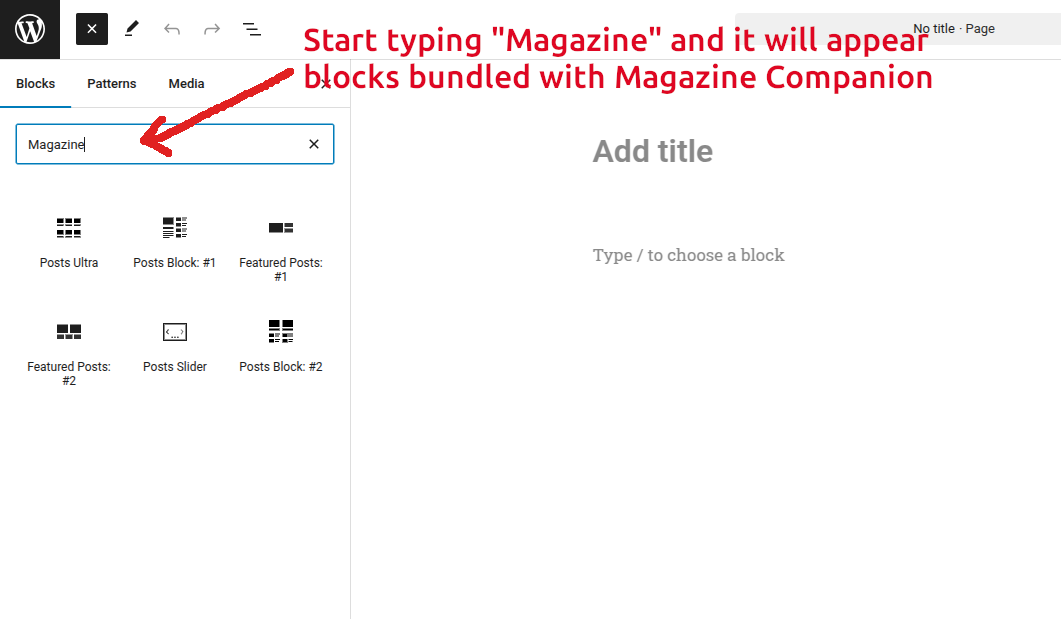
A collection of blocks developed for WordPress Gutenberg editor. All of these blocks are specially for all kinds of publishing websites like Blogs, Newspapers and Magazines. Organize and display your posts on your frontpage using blocks provided in Magazine Companion. Currently there are six blocks available.
Installation
- Upload the plugin files to the
/wp-content/plugins/bnm-blocksdirectory, or install the plugin through the WordPress plugins screen directly. - Activate the plugin through the ‘Plugins’ screen in WordPress.
- Go to Dashboard > Pages > Add New.
- Click the + icon to add Blocks to the page.
- Search for the word “Magazine Companion” and it will list all the blocks included in the Magazine Companion Plugin.
- Add your preferred Magazine Companion Blocks to the page.
Frequently Asked Questions
No FAQ available
Review feed
No reviews available
Screenshots


Changelog
1.2.5
- Updated block apiVersion from 2 to 3.
- Fixed margin and padding control issues.
1.2.4
- Fixed an authenticated stored XSS vulnerability in the headerHtmlTag and titleHtmlTag attributes by validating tag names.
- Added 3 different layouts for slider.
- Updated swiper library to 12.0.3
- Added block style “Borders” for the core “Columns” block.
- Updated wordpress scripts from 24.0.0 to 30.27
1.2.3
- Added a control to select specific posts for a block.
- Fixed category select control re-render issue.
1.2.2
- Fixed featured image size select not working in Post Block 2
- Improved featured image size select control.
- Added key prop to articles on all blocks.
1.2.1
- Added PHP classes auto loading for demo importer files.
- Changed slider directory.
- Changed default image sizes on blocks.
1.2.0
- Renamed the plugin from “BNM Blocks – Post Blocks and Tools for Blogs, News, and Magazine Websites” to “Magazine Companion”.
- Few CSS fixes.
- Removed tab-index from post thumbnails.
1.1.0
- Added demo import functionality.
- Renamed the plugin from “BNM Blocks” to “BNM Blocks – Post Blocks and Tools for Blogs, News, and Magazine Websites”.
1.0.3
- Changed css folder.
1.0.2
- Added a common stylesheet.
1.0.1
- New: Removed “Post Block: Style #3” block and added “Posts Ultra” block.
- New: Added section titles for blocks.
- Fix: Fixed undefined value issue in format_value_for_type() function in CSS_Utility class.
- Fix: Fixed duplication issues in Inspector Color Controls.
- Fix: Renamed Classess and function names.
- Fix: Fixed direct file access issues.
- Fix: Fixed escaping issues in template-functions.php
1.0.0
- Initial Release