

Wbcom Designs – BuddyPress Post from Anywhere
Transform any page into a community engagement hub! Let your members share updates, connect, and interact from anywhere on your website with just one …
Plugin info
Maintenance & Compatibility
Maintenance score
Stale • Last updated 247 days ago • 1 reviews
Is Wbcom Designs – BuddyPress Post from Anywhere abandoned?
Likely maintained (last update 247 days ago).
Compatibility
Languages
Similar & Alternatives
Explore plugins with similar tags, and compare key metrics like downloads, ratings, updates, support, and WP/PHP compatibility.
Description
Turn Every Page Into a Social Hub!
BuddyPress Post from Anywhere revolutionizes community engagement by breaking down barriers. Instead of limiting your members to posting only from their profile pages, this powerful plugin lets them share updates, thoughts, and connect with others from ANY page on your website!
Why You’ll Love This Plugin:
* One Simple Shortcode – Just add [bppfa_postform] anywhere you want community interaction
* Strategic Placement – Add posting forms to landing pages, blog posts, course pages, or product pages
* Boost Engagement – Make it easier for members to participate and share
* Easy Setup – No complex configuration required
* Mobile Friendly – Fully responsive design works perfectly on all devices
Perfect for:
* Online courses (let students share thoughts after lessons)
* E-commerce sites (customers can share product experiences)
* Membership sites (increase community interaction)
* Blog sites (turn readers into active community members)
* Corporate websites (team collaboration and updates)
THEME – WORDPRESS THEME WITH OUTSTANDING BUDDYPRESS SUPPORT
- FREE BuddyPress Theme: BuddyX – Offers unique layouts with clean code and easy-to-customize options giving you a whole new way to visualize BuddyPress.
OUR ADON PLUGINS TO FURTHER IMPROVE YOUR BUDDYPRESS OR BUDDYBOSS PLATFORM COMMUNITY
Check out free community add-ons by Wbcom Designs:
- Wbcom Designs – BuddyPress Member Reviews Allow members to add ratings or feedback to other community members.
- Wbcom Designs – BuddyPress Group Reviews Allow members to add ratings or feedback to BuddyPress groups.
- Wbcom Designs – BuddyPress Activity Social Share Allow members to share activities on their social profiles like Facebook, Twitter, What’s App, LinkedIn with OG metadata.
- Wbcom Designs – Private Community with BP Lock A plugin to make your community private and only accessible to logged-in users. It also allows you to keep select pages or the component public.
- Wbcom Designs – BuddyPress Job Manager Allows your to integrate WP Job Manager plugin to BuddyPress.
- Wbcom Designs – Check-ins for BuddyPress Activity Allow members to add their location or post their Check-ins updates to activity.
- Wbcom Designs – BuddyPress Favorite Notification Allow members to be notified after any like or favorite on their BuddyPress activity.
- Wbcom Designs – Shortcodes & Elementor Widgets For BuddyPress It offers shortcodes and elementor widgets for the activity listing, member’s directory display, and the group’s directory on any post/page.
Check out paid community add-ons by Wbcom Designs:
- Wbcom Designs – BuddyPress Hashtags Allows members to use hashtags in BuddyPress or BuddyBoss Platform activities and bbPress topics..
- Wbcom Designs – BuddyPress Polls It allows you to extend BuddyPress or BuddyBoss Platform Activity for members to publish Polls with various options and works perfectly for individual activities and group activities.
- Wbcom Designs – BuddyPress Quotes It allows the feature to let members post their activity updates with interactive background selection such as colors and images set by the site administrator to tell a more expressive story.
- Wbcom Designs – BuddyPress Status & Reaction Allow your members to set a status icon and tagline on their profile and offer a big set of icons to react to published activities.
- Wbcom Designs – BuddyPress Profanity Allow you to censor content in your community! Easily Censor all the unwanted words in activities, private messages contents by specifying a list of keywords to be filtered.
- Wbcom Designs – BuddyPress Sticky Post Allows site administrators to prioritize certain activities over others. It lets admin pin-up site-wide and group activities to the top of the activity list.
- Wbcom Designs – BuddyPress Auto Friends Allow the site admin to select global friends for all his members and add bulk global friends.
- Wbcom Designs – Shortcodes & Elementor Widgets For BuddyPress Pro It offers shortcodes and elementor widgets with various argument parameters for the activity listing, member’s directory display, and the group’s directory on any post/page.
EXPERT SUPPORT
We are ready to provide incredible support. Ask your questions at contact us directly.
Installation
⚡ Quick & Easy Setup – Get started in under 2 minutes!
Method 1 – WordPress Dashboard (Recommended):
1. 📥 Go to Plugins Add New Upload Plugin
2. 📁 Choose your downloaded plugin file
3. 🚀 Click Install Now then Activate
4. ✨ Add [bppfa_postform] anywhere you want the posting form
5. 🎉 Done! Your community can now post from anywhere!
Method 2 – Manual Upload:
1. 📁 Extract the plugin zip file
2. 📤 Upload the folder to /wp-content/plugins/
3. ✅ Activate via Plugins menu
4. 🎯 Use the shortcode [bppfa_postform] on any page
Need help? Our expert team is ready to assist! Contact us for personalized support or Custom Development.
Frequently Asked Questions
Yes, this plugin works as a powerful enhancement to BuddyPress or BuddyBoss Platform. You’ll need one of these community plugins installed first to unlock the magic!
Absolutely! Simply use the shortcode [bppfa_postform] anywhere you want to add a beautiful, engaging activity posting form. It’s that easy!
100% yes! The plugin is fully responsive and works perfectly on phones, tablets, and desktops. Your community members can engage from any device.
Not at all! We use intelligent asset loading – CSS and JavaScript files only load on pages where you actually use the shortcode. This means zero impact on your site’s performance.
Definitely! The plugin respects your theme’s styling and provides CSS classes for easy customization. Plus, it includes RTL support for Arabic, Hebrew, and other right-to-left languages.
We’re here to help! Visit wbcomdesigns.com for expert support, comprehensive documentation, and video tutorials. Our friendly team responds quickly to all inquiries.
Review feed
Screenshots
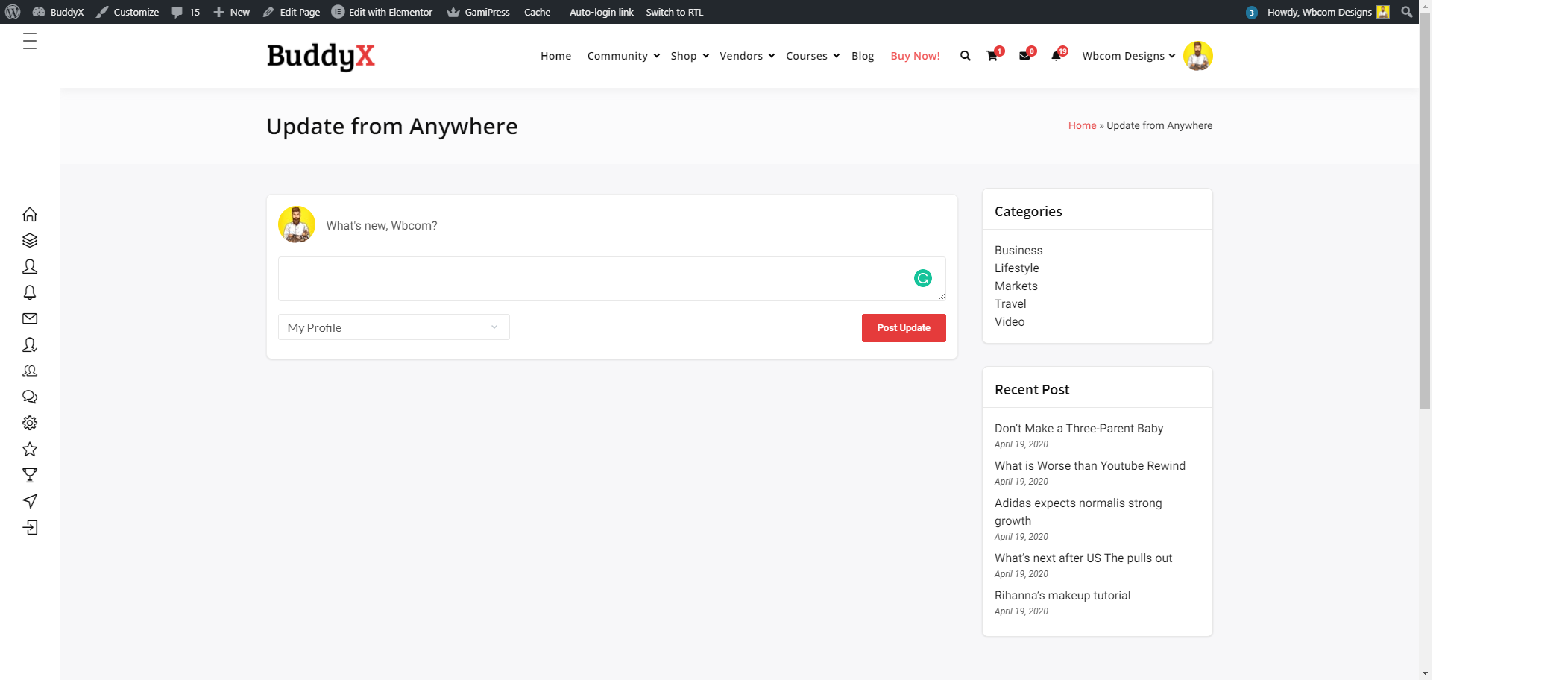
It is displaying Post Form After adding shortcode in page/posts screenshot-1.png
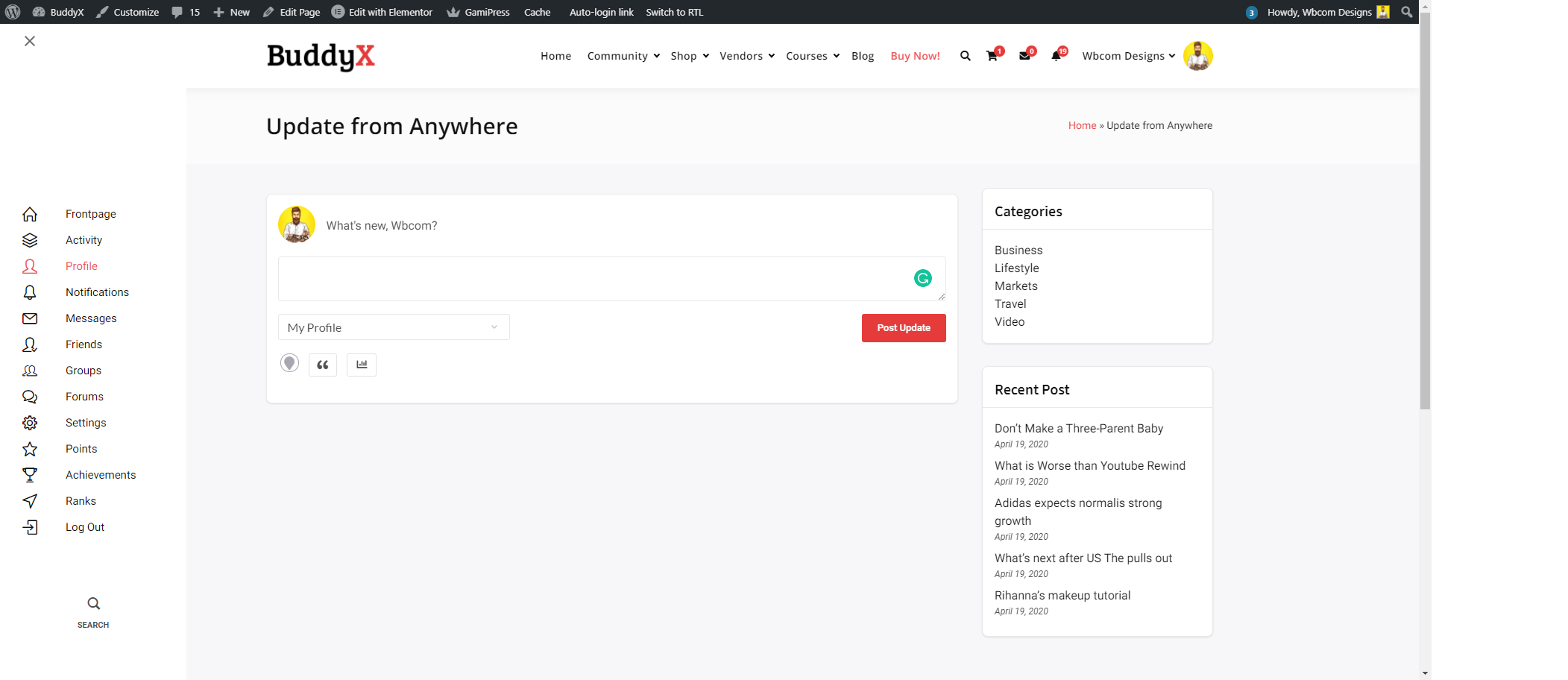
It is displaying Post Form After adding widgets screenshot-2.png
Changelog
1.5.6
- New: Complete UI overhaul with modern BuddyPress/BuddyBoss design compatibility
- New: Inline feedback system replaces old popup notifications for better UX
- New: Always-visible share controls for improved accessibility
- Enhanced: Professional form layout with improved avatar and content alignment
- Enhanced: Better responsive design with mobile-first approach
- New: Dark mode support for modern themes
- Improved: Significantly reduced JavaScript and CSS file sizes (38% JS, 23% CSS reduction)
- Improved: Cleaned up codebase by removing unused animations and deprecated code
- Fixed: BuddyBoss Platform compatibility issues
- Fixed: Submit button and group selector alignment issues
- Fixed: Textarea height now properly set to 90px for better content visibility
- Fixed: Options section no longer hides after posting, ensuring feedback messages remain visible
1.5.5
- New: Intelligent asset loading – CSS/JS only loads where needed for better performance
- New: Full RTL (Right-to-Left) language support for Arabic, Hebrew, and other RTL languages
- Enhanced: Improved security with better data validation and sanitization
- Improved: Significant performance optimizations
- Enhanced: Better user experience with friendlier messaging and notifications
- Fixed: Various minor bugs and compatibility improvements
- Improved: Better mobile responsiveness and touch interactions
- Enhanced: More engaging and customer-friendly interface language
1.5.3
- Fix: BP v12 Fixes
- Fix: Clean up the code
1.5.2
- Fix: phpcs issue
1.5.1
- Fix: (#50) Fixed when update activity not showing messages without any text
1.5.0
- Fix: phpcs issue
- Fix: textarea issue
- Fix: white space issue
- Fix: (#46) Fixed remove white space from post form textarea
1.4.0
- Fix: #37 Fixed PHPCS Errors
- Fix: Update bppfa_site_url to bppfa_url
- Fix: Group post not submit in group and also fixed broken image issue
1.3.0
- Fix: (#32) Fixed shortcode layout conflict for buddy boss dashboard page
- Fix: Update bp-post-from-anywhere-public.js
- Fix: success message icon alignment fixed
- Fix: Update plugin url path
1.2.0
- Fix: Fixed Load Newest Activity count issue
- Fix: Removed Post from Anywhere widget
- Fix: Update activity post form UI, added missing icons images
- Fix: Fixed White space issue in text area
- Fix: Fixed shortcode html issue in admin side
- Fix: Fixed: Activity Post any where to submit activity
- Fix: Added extended option filter to enable to display additional option
- Fix: Fixed #19 – Post button do not work
- Fix: Fixed #21 – The cursor starts from the middle of the text box
1.1.0
- Fix: Admin notice for review
1.0.1
- Bp 4.3.0 compatibility check.
1.0.0
- first version.