

BP Simple Private
A simple Private Content settings plugin for BuddyPress or the BuddyBoss Platform.
Plugin info
Maintenance & Compatibility
Maintenance score
Stale • Last updated 349 days ago • 11 reviews
Is BP Simple Private abandoned?
Likely maintained (last update 349 days ago).
Compatibility
Similar & Alternatives
Explore plugins with similar tags, and compare key metrics like downloads, ratings, updates, support, and WP/PHP compatibility.
Description
A simple Private Content settings plugin for BuddyPress or the BuddyBoss Platform.
This plugin allows administrators to select whether posts, pages and sections can be viewed by non-logged-in users.
Your front page or home page will always be Public.
If a user is logged in – this plugin will have no effect on them.
It:
- will redirect non-logged-in users trying to access private content to your front page or home page
- provides a Settings screen in wp-admin: Settings > BP Simple Private
- allows an admin to select which post types and BuddyPress or BuddyBoss components are Private
- provides a Private checkbox in the upper right corner of every page, post, and custom post type selected in Settings
Spanish translation included, thanks to pablocusto
For more information about using this plugin, please visit: PhiloPress – BP Simple Private
Important: Please deactivate other privacy plugins and disable any privacy hacks on your site before activating this plugin. Otherwise there may be conflicts.
If you would like support for:
- entering a custom redirection url
- bbPress
- multi-site
- disabling BuddyPress RSS Feeds
- the option to set a post type to ‘private’ on a site-wide basis
Then you may be interested in BP Simple Private Pro
For more plugins, please visit PhiloPress
Installation
-
Unzip and then upload the ‘bp-simple-private’ folder to the ‘/wp-content/plugins/’ directory
-
Activate the plugin through the ‘Plugins’ menu in WordPress
-
Go to Settings -> BP Simple Private and select your options.
Individual pages and posts can be set to Private via a Private checkbox in the upper right corner of every page, post, and custom post type.
Go to httsp://www.philopress.com/products/bp-simple-private/ for more details about usage.
Frequently Asked Questions
Yes. Tested with the latest version of the BuddyBoss Platform and theme
No. Available in Pro version at: BP Simple Private Pro
Review feed
Control privacy easily
Screenshots
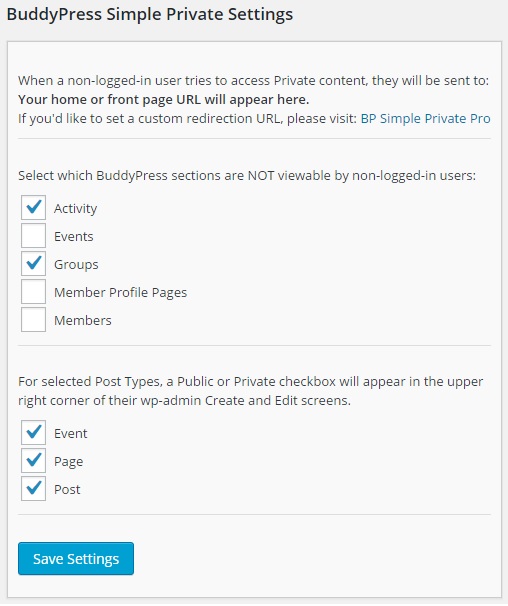
Shows the Settings page
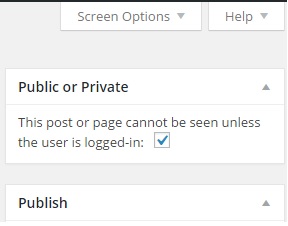
Shows the Public or Private checkbox
Changelog
2.3
- fixes a bug when the BP Classic pluign is active
2.1
- Tested with WP 5.4
- bp_current_component() can return empty for some custom components, so now we also check the bp_uri
2.0
- Tested with WP 5.0
- Tested with Gutenberg
1.4
- Tested with WP 4.2 and BP 2.7.2
1.3
- Adds Spanish translation .po, cleans up English .pot
1.2
- Fixes error re opening PHP bracket
1.1
- Tweak to avoid a Notice in PHP 7
1.0
- Initial release.