

Brand Coupons for WooCommerce
This plugin displays your brand-restricted discount coupons automatically on the product pages of your WooCommerce store.
Plugin info
Maintenance & Compatibility
Maintenance score
Possibly abandoned • Last updated 1890 days ago
Is Brand Coupons for WooCommerce abandoned?
Possibly abandoned (last update 1890 days ago).
Compatibility
Developers
Similar & Alternatives
Explore plugins with similar tags, and compare key metrics like downloads, ratings, updates, support, and WP/PHP compatibility.
Description
Brand Coupons for WooCommerce allows you to automatically display brand-restricted discount coupons on the product pages of your WooCommerce store.
Features
-
Show brand specific coupons on your product pages.
-
A promotional banner will be automatically displayed under the “Add to cart” button, including the coupon code and description.
-
Product brands and coupon brand restrictions can be managed thanks to the most popular free plugin, “Perfect Brands for WooCommerce“, so you probably won’t need to make additional changes to your WooCommerce store.
-
You will be able to comply with the requirements of suppliers that do not allow showing sale prices and request to apply special offers through discount coupons.
-
The final discounted price will be displayed along with the coupon code on the product page, and will be updated based on the chosen product variation.
-
Fully compatible with multi-language and multi-currency WooCommerce stores (WPML, Polylang, TranslatePress, Weglot, GTranslate, etc.), as well as simple, variable and virtual products.
-
The coupon banner has generic styles to fit all types of WordPress/WooCommerce themes, but you can also customize it using the CSS code editor included in the plugin settings page.
-
In case your WooCommerce store is highly customized or does not use the standard template for product pages, you can set custom CSS selectors that will be used to correctly get the base price of the products.
Instructions
- Install and activate the “Perfect Brands for WooCommerce” plugin.
- Add new brands and assign them to your products.
- Create discount Coupons with brand restrictions.
- Promotional banners will automatically be displayed on product pages, including the code and description of each coupon.
Requirements
- PHP 5.6 or higher
- WordPress 4.7 or higher
- WooCommerce 3.0 or higher
- Perfect Brands for WooCommerce 1.5 or higher
Installation
Method 1
- Log in to your WordPress admin panel, go to “Plugins > Add New”, search for “Brand Coupons for WooCommerce” and click “Install now”.
- Once installed, click “Activate”.
Method 2
- Download and unzip the plugin file.
- Upload the plugin folder to the
/wp-content/plugins/directory. - Activate the plugin through the “Plugins” menu in WordPress.
“Brand Coupons for WooCommerce” will add a new section called “Brand Coupons” in the WordPress administration menu, in which you can see instructions on how to use the plugin and configure the settings.
Frequently Asked Questions
There are other plugins like “YITH WooCommerce Brands Add-on” (Premium Version) that also allow adding brand restrictions to WooCommerce coupons. In this case you can contact us and hire our web development service, which for a small fee will adapt the plugin to the requirements of your WooCommerce store.
Unfortunately we do not offer a premium version for now, but you can contact us and request our web development service to make any changes or improvements to the plugin.
You can help by translating the plugin into all languages.
Review feed
Screenshots
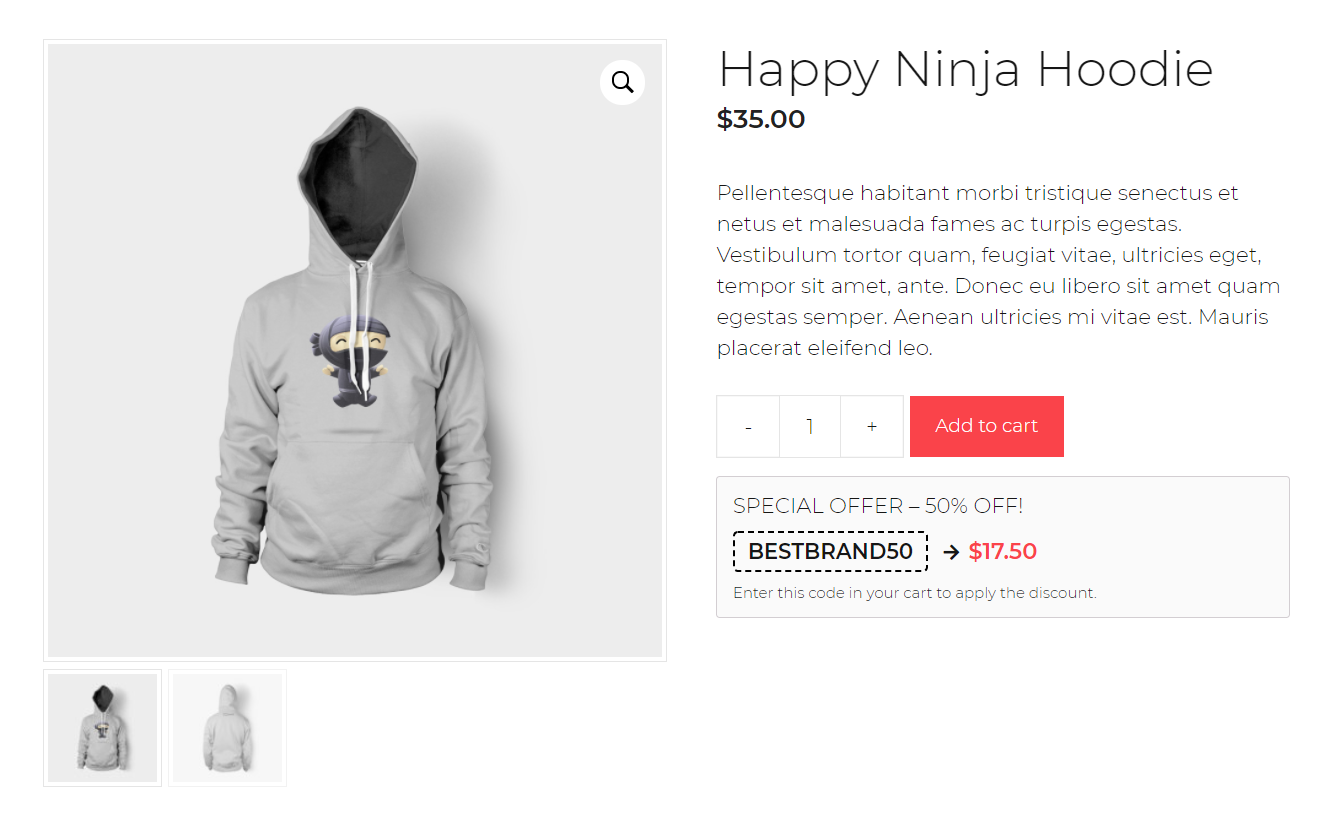
Discount coupon on product page

Brand-restricted coupon configuration

Plugin settings page
Changelog
1.0.1
- Fix: display banner.
1.0.0
- Initial release.