

Brilliant Directories Sync for WooCommerce
Sync WooCommerce customers seamlessly with Brilliant Directories using this integration plugin.
Plugin info
Maintenance & Compatibility
Maintenance score
Stale • Last updated 248 days ago • 2 reviews
Is Brilliant Directories Sync for WooCommerce abandoned?
Likely maintained (last update 248 days ago).
Compatibility
Similar & Alternatives
Explore plugins with similar tags, and compare key metrics like downloads, ratings, updates, support, and WP/PHP compatibility.
Description
Sync WooCommerce customers seamlessly with Brilliant Directories using this integration plugin.
Key Benefits for WooCommerce Users
- Turn Customers into Directory Members – Automatically add new WooCommerce buyers as members in Brilliant Directories.
- Send Email Newsletters – Use Brilliant Directories’ built-in email marketing tools to engage your customers.
- Organize Members with Tags – Auto-assign tags to WooCommerce customers for targeted email campaigns.
- Sell Premium Memberships – Convert WooCommerce customers into paid directory members.
- Centralize Customer Data – Manage all users in one system instead of separate lists.
- Fully Automated Syncing – No need for manual data entry—set it and forget it.
Key Features
- Sync New WooCommerce Customers – Automatically create new members in Brilliant Directories when they register or checkout.
- Manual & Scheduled Syncs – Sync existing customers instantly or set up automated syncs daily, weekly, or monthly.
- Custom Membership Assignments – Map WooCommerce customers to specific Brilliant Directories membership plans.
- Flexible Account Statuses – Automatically set new accounts as Active or Inactive.
- Welcome Email Integration – Choose whether new members receive a welcome email upon creation.
- Tag Assignments – Automatically assign tags to new members for better segmentation.
No more manual data transfers—this plugin keeps your WooCommerce customers auto-magically synced with Brilliant Directories.
External Services
This plugin embeds an iframe from Brilliant Directories to provide tutorial videos, FAQs, and additional plugin-related information within the plugin settings page.
Service: Brilliant Directories
What data is sent:
When accessing the plugin settings page, the plugin loads an iframe from https://get.brilliantdirectories.com/wordpress-woocommerce-plugin-iframe.
This iframe may load resources such as Google Fonts, YouTube videos, and stylesheets from external sources.
A session management cookie is set by Brilliant Directories for maintaining session security.
Privacy & Terms:
Brilliant Directories Privacy Policy
Brilliant Directories Terms of Service
Support
If you have any issues or need help, please visit our support forum or contact us at [email protected].
Installation
- Upload the plugin files to the
/wp-content/plugins/brilliant-directories-sync-for-woocommercedirectory, or install the plugin through the WordPress plugin screen. - Activate the plugin through the ‘Plugins’ screen in WordPress.
- Go to the plugin settings page by navigating to Brilliant Directories in the WordPress admin sidebar.
- Add your Brilliant Directories API key and configure other necessary settings.
Frequently Asked Questions
Yes, a Brilliant Directories account is required to sync WooCommerce customers. You can create a free account at https://www.brilliantdirectories.com/free-trial.
You can generate your API key from your Brilliant Directories dashboard. Follow this guide: https://support.brilliantdirectories.com/support/solutions/articles/12000088768.
When the plugin is installed, there is an area to submit feedback and report issues directly within the settings. Our team prioritizes critical issues and popular feature requests.
The plugin syncs WooCommerce customers to your Brilliant Directories website automatically on new registrations or through manual and scheduled syncs.
Yes, you can run a manual sync to import all existing WooCommerce customers into Brilliant Directories.
The plugin skips existing email addresses to prevent duplicate accounts.
Yes, you can choose to sync both registered users and guest checkouts in the settings.
Yes, you can define the Membership Plan ID that synced users will be assigned to in Brilliant Directories.
You can enable or disable automatic welcome emails based on your settings.
Currently, the plugin is not tested on WordPress Multisite, but we may add support in a future update.
If you disable the plugin, syncing will stop, but all previously synced members will remain in Brilliant Directories.
Review feed
A Simple Yet Powerful Tool for WooCommerce Users
Screenshots
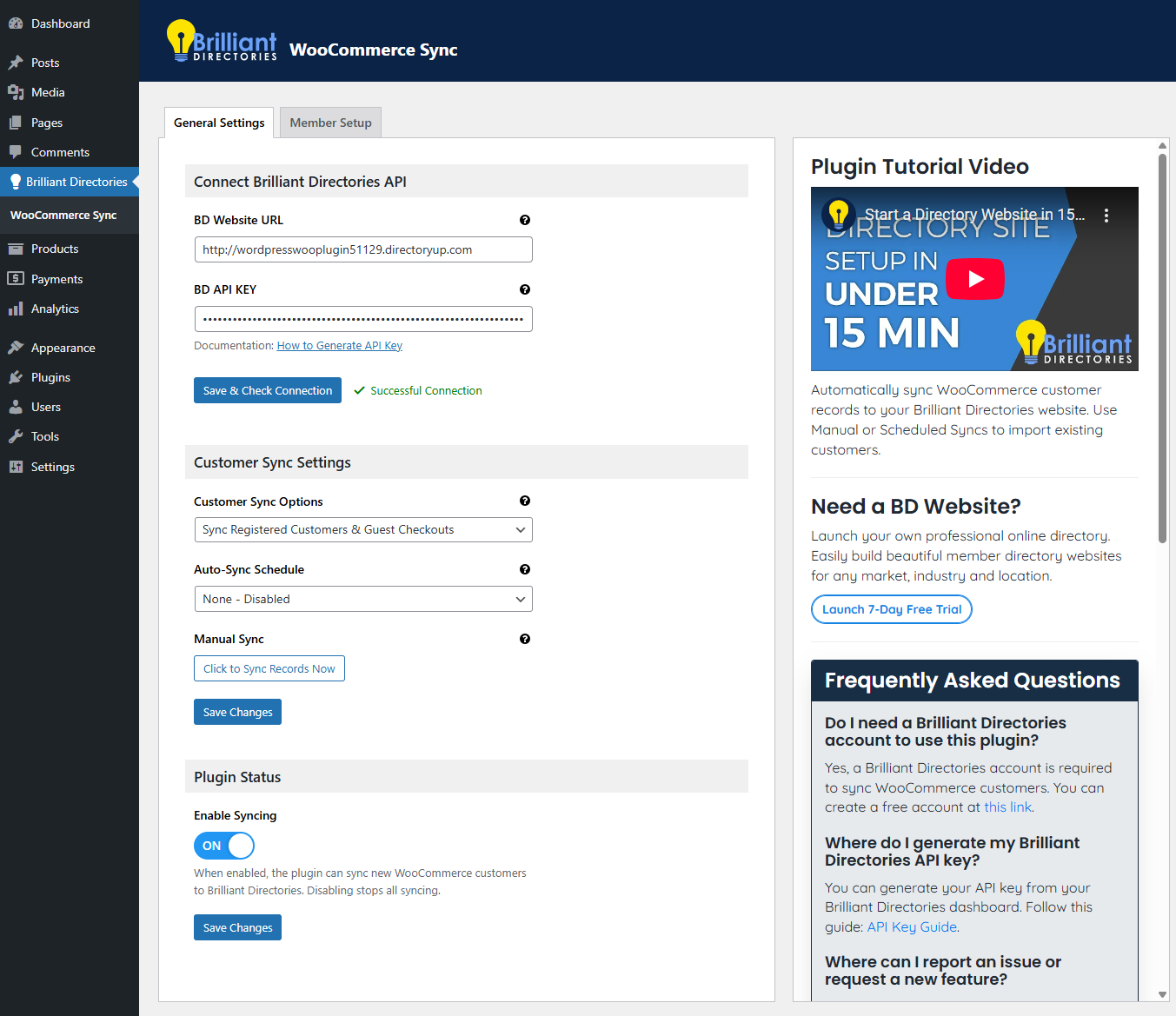
Screenshot of the General settings.
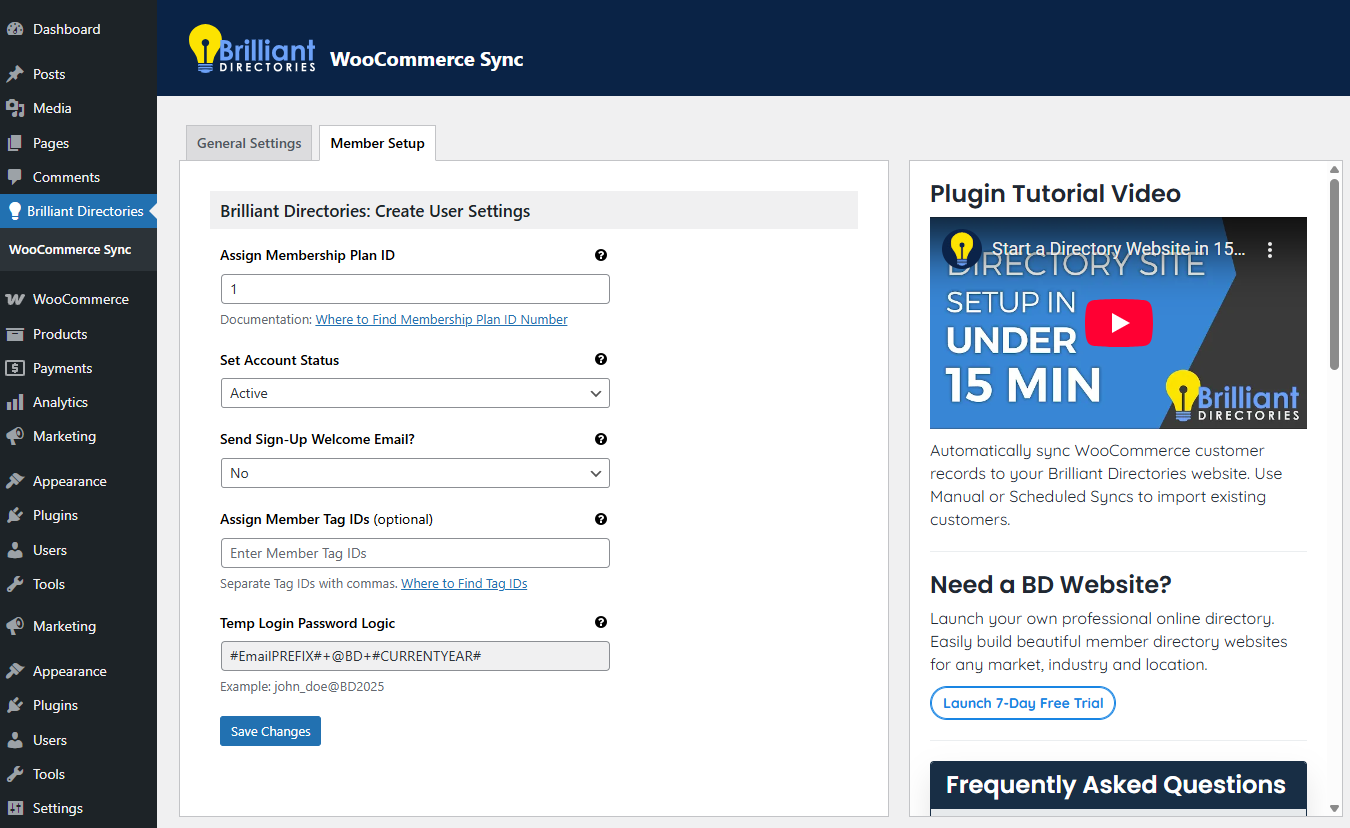
Screenshot of the Member setup.
Changelog
1.0.5
- Bug fixes and improvements.
1.0.4
- Optimized Help text for URL field to guide users.
1.0.3
- API Field Validation Improvements: Enhanced validation logic for API fields to ensure more accurate and secure data handling.
1.0.2
- New feature: Ability to assign membership plan ID based on specific product purchased.
1.0.1
- Performance improvements: Reduced sync batch size for stability.
- Compatibility improvements for Brilliant Directories menu integration.
1.0.0
- Initial release of the plugin.
- Features include syncing WooCommerce customers to Brilliant Directories, admin menu, and settings page.