

Broken Links Remover
Automatically remove the bad and broken links from the view of human visitors and search engine robots.
Maintenance 22/1005426d since update
Active installs
100
Downloads
22,367
Reviews
1
Age
17.7y
Plugin info
Total downloads: 22,367
Active installs: 100
Total reviews: 1
Average rating: 5
Support threads opened: 0
Support threads resolved: 0 (0%)
Available in: 1 language(s)
Contributors: 1
Last updated: 5/26/2011 (5426 days ago)
Added to WordPress: 7/29/2008 (17 years old)
Minimum WordPress version: 2.3
Tested up to WordPress version: f
Minimum PHP version: f
Maintenance & Compatibility
Maintenance score
Possibly abandoned • Last updated 5426 days ago • 1 reviews
22/100
Is Broken Links Remover abandoned?
Possibly abandoned (last update 5426 days ago).
Compatibility
Requires WordPress: 2.3
Tested up to: f
Requires PHP: f
Similar & Alternatives
Explore plugins with similar tags, and compare key metrics like downloads, ratings, updates, support, and WP/PHP compatibility.
Top Story Schema
Rating 0.0/5 (0 reviews) • Active installs 10
Masdetalles Share
Rating 0.0/5 (0 reviews) • Active installs 0
Post to Google My Business (Google Business Profile)
Rating 4.9/5 (154 reviews) • Active installs 10,000
Keyword Statistics
Rating 4.0/5 (2 reviews) • Active installs 300
SEO-Tool – Keyword Density Checker
Rating 5.0/5 (1 reviews) • Active installs 200
Description
Automatically remove the bad and broken links from the view of human visitors and search engine robots.
Some features:
- Broken Links Remover removes(hides) bad/broken links from the requestor’s(search engine or human) view
- Bad/broken links dashboard
Installation
- Unzip into your
/wp-content/plugins/directory. If you’re uploading it make sure to upload
the top-level folder. Don’t just upload all the php files and put them in/wp-content/plugins/. - Activate the plugin through the ‘Plugins’ menu in WordPress
- Visit your options (Options – Broken Links Remover) for WordPress 2.3.x, (Settings – Broken Links Remover) for WordPress 2.5.x
If you have to upgrade manually simply repeat the installation steps.
Frequently Asked Questions
Please read these FAQs before requesting
**[Support]
Review feed
No reviews available
Screenshots
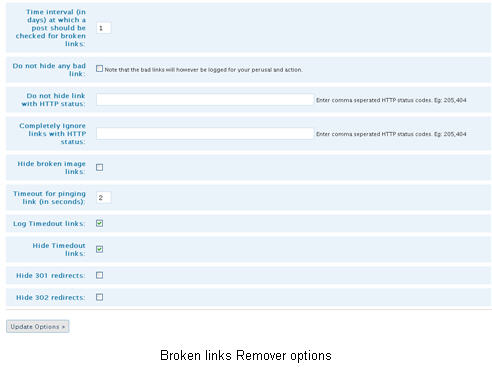
Broken links remover options (settings) panel

Broken links remover management panel
Changelog
No changelog available