

Browser Theme Color
Add the 'theme-color' meta tag to your website for a seamless user experience on Android & iOS with our easy-to-use plugin.
Plugin info
Maintenance & Compatibility
Maintenance score
Stale • Last updated 312 days ago • 1 reviews
Is Browser Theme Color abandoned?
Likely maintained (last update 312 days ago).
Compatibility
Similar & Alternatives
Explore plugins with similar tags, and compare key metrics like downloads, ratings, updates, support, and WP/PHP compatibility.
Description
Discover a powerful solution for enhancing your website’s user experience across multiple platforms with our simple, lightweight, and effective plugin that adds the “theme-color” meta tag. Compatible with Android, iOS, and Windows Phone, our plugin is designed based on Google guidelines to ensure a seamless user experience on all devices.
In addition to its seamless compatibility, our plugin is fully customizable, allowing you to style it to match your brand’s unique identity. With the option to choose from a variety of colors, you can easily tailor the “theme-color” meta tag to perfectly complement your website’s design and layout.
When you install the plugin for the first time, the color is automatically set to #23282D, which is the standard WordPress color. From there, you can easily customize the tag to match your brand, ensuring a fully immersive user experience that keeps visitors coming back for more.
Don’t settle for a subpar user experience on mobile devices. Elevate your website’s design and functionality with our “theme-color” meta tag plugin today, for free!
Installation
This section describes how to install the plugin and get it working.
- Upload
browser-theme-colordirectory to the/wp-content/plugins/directory - Activate the plugin through the ‘Plugins’ menu in WordPress
- Go to the “Browser Color” settings page
- Choose the color you want and style it to match your style!
Frequently Asked Questions
You can set the color in the plugin settings screen (Settings -> Browser Color).
Review feed
Browser Theme Color
Screenshots

Theme example in Android multitasking developers.google.com
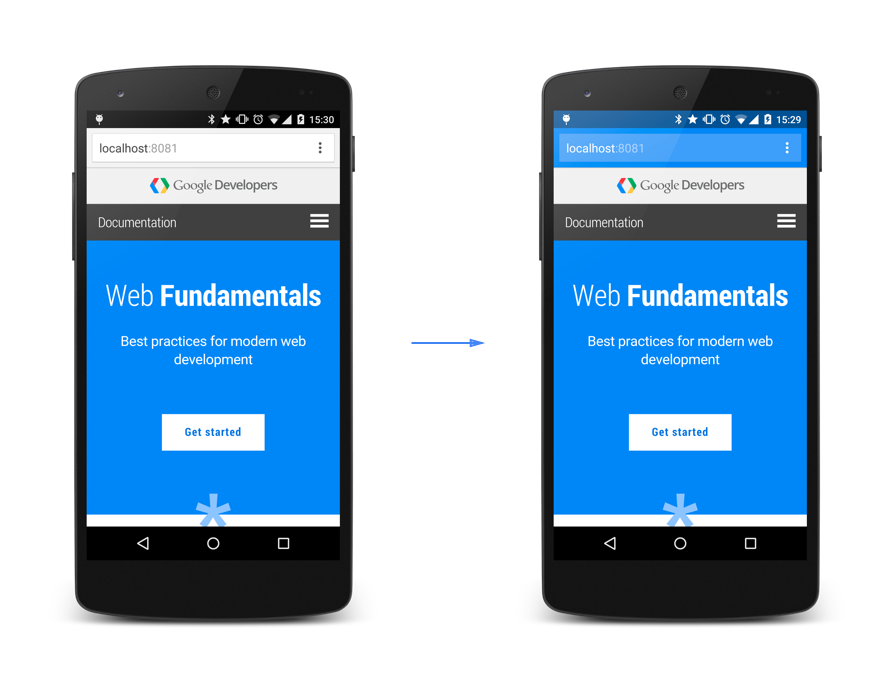
Topbar example in Android Chrome developers.google.com
Changelog
1.5 2025-05-26
- Tested up to latest WP
- Refactored plugin to use an object-oriented approach for better maintainability.
- Improved code security and WordPress best practices (escaping, sanitization, capability checks).
- Enhanced the settings page UI and validation.
- Integrated the color picker initialization as inline JavaScript for reliability.
- Cleaned up and modernized code style throughout the plugin.
1.4.1 2024-05-24
- Minor changes
- Tested up to latest WP
1.3 20230217
- Minor changes
- Tested up to latest WP
1.2.3 20220621
- Minor improvements
- Tested up to WP 6.0
1.2.2 20201002
- Minor improvements
1.2.1 20200430
- Compatibility check
- Minor improvements
1.2 05.09.2017
- Tested with WP 4.8
1.1 10.01.2017
- Tested with WP 4.7
1.0 9.06.2016
- First release, enjoy!