

Brozzme Plugins Thumbnails
Add thumbnail column to plugins list table in the admin plugins page even they are not in the repository.
Plugin info
Maintenance & Compatibility
Maintenance score
Possibly abandoned • Last updated 1618 days ago • 3 reviews
Is Brozzme Plugins Thumbnails abandoned?
Possibly abandoned (last update 1618 days ago).
Compatibility
Similar & Alternatives
Explore plugins with similar tags, and compare key metrics like downloads, ratings, updates, support, and WP/PHP compatibility.
Description
Add thumbnail column to plugins displays thumbnails for WordPress plugins on the plugins list page, on admin (wp-admin/plugins.php).
Brozzme Add Plugins Thumbnails would help to easily identify plugins. Add your own thumbnails for premiums or personal plugins.
Just activate plugin to see thumbnail.
Options
- Icon width and height
- Round icon
- Reset transients
- Transient expiration
- Add your special thumbnails
Behaviour
- thumbnail from wordpress.org repository
- thumbnail fallback with text, random colors or your own thubnails
- specials links to the thumbnails
- transients
Installation
- Upload “brozzme plugins thumbnails” to the “/wp-content/plugins/” directory.
- Activate the plugin through the “Plugins” menu in WordPress.
- Manage options in Brozzme->Plugin Icons if needed.
Frequently Asked Questions
Review feed
Good idea and work fine
Pratique, bien vue.
Screenshots
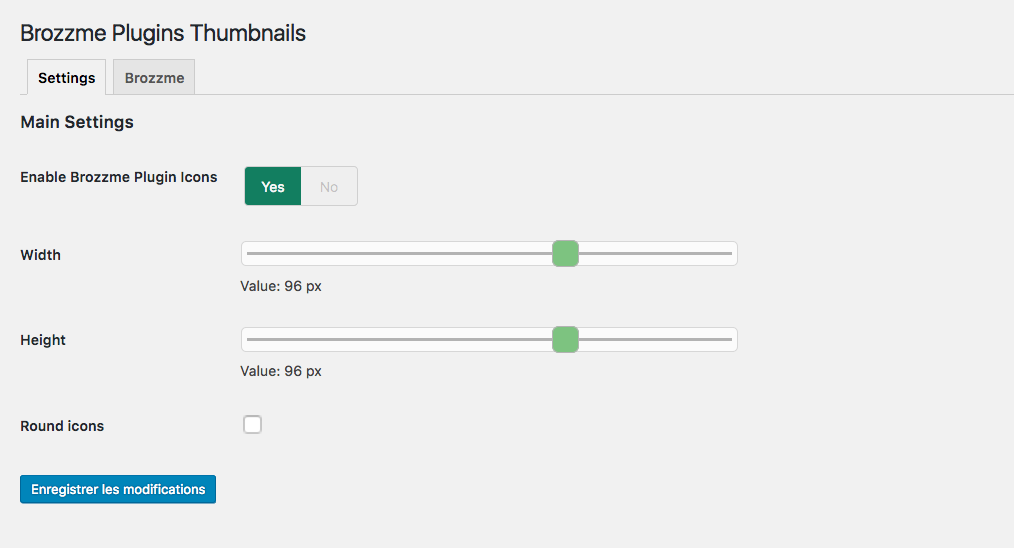
Thumbnails settings screenshot-1.png.

Default thumbnail screenshot-2.png.

Round thumbnails screenshot-3.png.

Changelog
1.4.5
- compatibility fix with other plugin
1.4.2
- bugfixe on Brozzme plugins css
1.4
- add filter for premium or unknow plugin
- add setting page for specials plugins
- delete transient
- curl functions replace with wp_get_remote
1.0
- Initial release.