

BuddyPress Simple Events
A simple Events plugin for BuddyPress or the BuddyBoss Platform.
Plugin info
Maintenance & Compatibility
Maintenance score
Stale • Last updated 348 days ago • 12 reviews
Is BuddyPress Simple Events abandoned?
Likely maintained (last update 348 days ago).
Compatibility
Similar & Alternatives
Explore plugins with similar tags, and compare key metrics like downloads, ratings, updates, support, and WP/PHP compatibility.
Description
A simple Events plugin for BuddyPress or the BuddyBoss Platform.
This plugin allows members to create, edit and delete Events from their profile.
It:
- provides a tab on each members’ profile for front-end creation, editing and deletion
- has an option to use the Google Places API for creating locations
- has an option ro use Google Maps to show Event location
- creates a custom post type called ‘event’
- uses WP and BP templates that can be overloaded
- includes a widget
It does NOT have:
- ticketing
- calendars – BUT should work with any WP Calendar that supports assigning custom post types
- recurring events
If you would like support for…
- search
- a map showing all Events
- a Settings screen for Map options
- an end Date
- Images
- an Attending button
- an option for assignment to a Group
… then you may be interested in BuddyPress Simple Events Pro
For more plugins, please visit PhiloPress
Installation
-
Upload the zip on the Plugins > Add screen in wp-admin
-
Activate the plugin through the ‘Plugins’ menu in WordPress
-
Go to Settings -> BP Simple Events and enter your Google Maps API Key. If you don’t have a Key – See the FAQ
Frequently Asked Questions
Yes, if you select to use that option. If you need help, read this tutorial Google Maps API Key
This is due to a difference between English and European preference re date format.
The fix is simple.
Open this file in a text editor:
bp-simple-events-pro/inc/js/events.js
Find: dateFormat: ‘DD, MM d, yy’
For Europe, change it to: dateFormat: ‘dd-mm-yy’ Or whatever you prefer
You will then need to :
* upload the edited events.js file
* clear your browser cache ( just the files ) to insure that the js file reloads
* edit any existing Events and reset the date
No.
Yes – if the Calendar supports assigning custom post types
Yes, by using the filter hook.
Place this function in your theme > functions.php
    function pp_events_category_filter( $args ) {
        $args = array( "child_of" => -1 );
        return $args;
    }
    add_filter( "event_cat_args_filter", "pp_events_category_filter", 1, 1 );
Review feed
For me useless
Screenshots
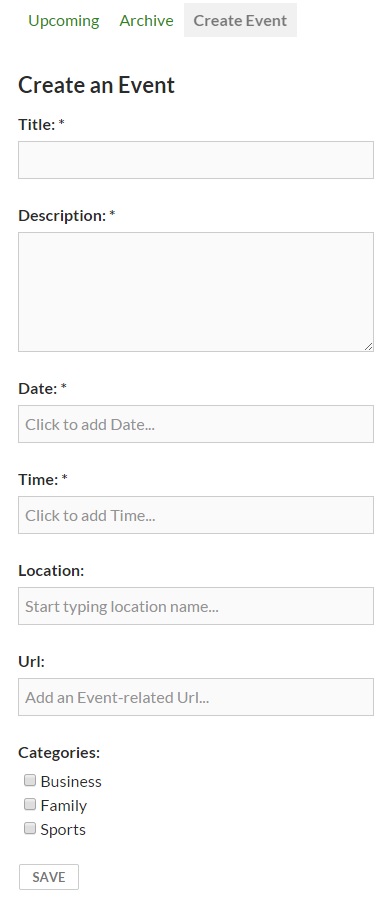
Shows the front-end Create an Event screen on a member profile
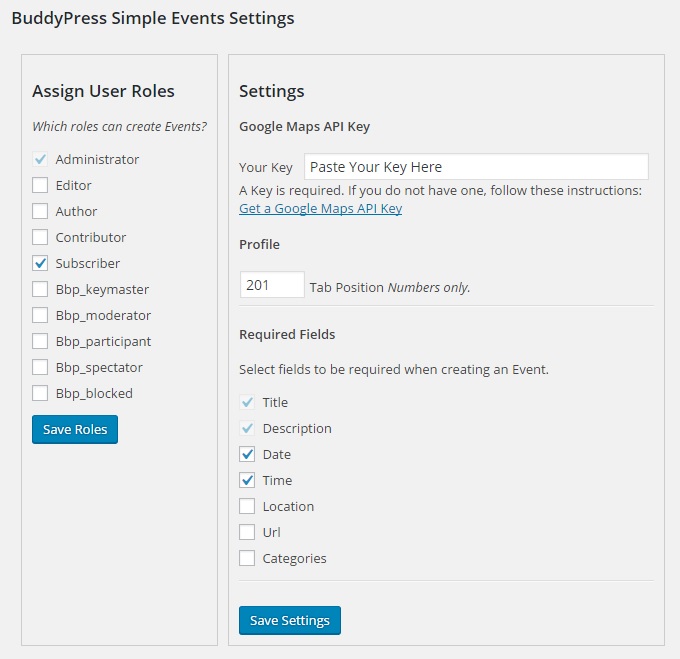
Shows the Dashboard > Settings screen
Changelog
6.1
- improved templates
5.2
- improved time-picker
5.1
- improve Activity entry for a new Event
5.0
- add support for the BuddyBoss Platform
- add an option to NOT use Google Maps and thereby avoid the required Google key
- include missing gettext strings
4.2
- fix bug: do not show Event tab on user profile if the user role cannot create Events
4.1
- Fixes bug re removal of all assigned categories
- Adds a filter hook for listing categories: ‘event_cat_args_filter’
- Remove ‘Categories’ label from the screen if there are no assigned categories
4.0
- Add support for Gutenberg
3.3
- Tested with WP 5.0
3.2
- Fix bug re the_content filter prevent conflicts in some themes.
3.1
- Tweak the_content filter so that it does not conflict with some other plugins.
3.0
- Change template loading process. Use filter on the_content rather than load full template. This should be more compat with themes.
2.2.5
- Fix status when Event is restored from Trash, set to ‘publish’
2.2.3
- Fix PHP Warning re incorrect function name in filter hook
2.2
*
2.1
- fixed bug re timestampSave post_date as the Event Start date so that Calendar plugins can be used
2.0
- Added requirement for Google Maps API Key
1.4.4
- tested in WP 4.3
1.4.3
- close the recent XSS vulnerability found in add_query_arg
1.4.2
- fix bug in WP templates filter
1.4.1
- typo in single template filter
1.4
- Tested in WP 4.2 & BP 2.2.3.1, tweak subnav creation, replace template_redirect with template_include
1.3.4
- Check if BP is activated
1.3.2
- Use trash hook instead of delete hook for cleanup on Event deletion
1.3
- Add multisite support, improved cleanup on trash
1.2
- Add file missing from last release.
1.1
- Refactored as a component.
1.0
- Initial release.