

Bulk Delete Comments
Effortlessly bulk delete comments or delete all comments from your WordPress site. Manage comments by type, post, or category with one-click cleanup o …
Plugin info
Maintenance & Compatibility
Maintenance score
Stale • Last updated 325 days ago • 11 reviews
Is Bulk Delete Comments abandoned?
Likely maintained (last update 325 days ago).
Compatibility
Similar & Alternatives
Explore plugins with similar tags, and compare key metrics like downloads, ratings, updates, support, and WP/PHP compatibility.
Description
Bulk Delete Comments is a powerful WordPress plugin designed to help you efficiently manage and clean up comments on your site. Whether you need to delete all comments at once or target specific comment types like spam, unapproved, or trash, this plugin provides an easy and effective solution.
Key Features:
- Delete All Comments: Remove all comments on your website in one click.
- Delete Comments by Type: Quickly delete spam, approved, unapproved, and trash comments.
- Delete Comments by Post: Choose a specific post and remove all associated comments.
- Delete Unapproved Comments by Category: Clean up unapproved comments within specific categories.
- Hide Comments Globally: Disable or hide all comments site-wide without deleting them.
This plugin is perfect for bloggers, website owners, and administrators who want to keep their comment section clean and organized.
Plugin Options Location:
You can find all plugin options in your WordPress Dashboard under:
Settings Bulk Delete Comments
How It Works:
- Install and activate the plugin.
- Go to Settings Bulk Delete Comments in your WordPress dashboard.
- Select the action you want to perform: delete all comments, clean by type, or target posts/categories.
- Click the “Delete” button, and the plugin will clean up your comments instantly.
Installation
- Upload the plugin files to the
/wp-content/plugins/bulk-delete-commentsdirectory, or install the plugin through the WordPress plugins screen directly. - Activate the plugin through the ‘Plugins’ screen in WordPress.
- Navigate to Settings Bulk Delete Comments in your WordPress dashboard.
- Use the options to bulk delete comments or filter them by type, post, or category.
Frequently Asked Questions
You can access the plugin options from your WordPress Dashboard under Settings Bulk Delete Comments.
Yes, once comments are deleted, they cannot be restored. Be sure to back up your database if needed.
Yes, you can target specific posts and delete all comments associated with them.
Yes, the plugin includes an option to globally hide comments across your site without removing them.
Yes, you can choose to delete spam comments specifically.
No, it does not.
Review feed
working Great
Screenshots
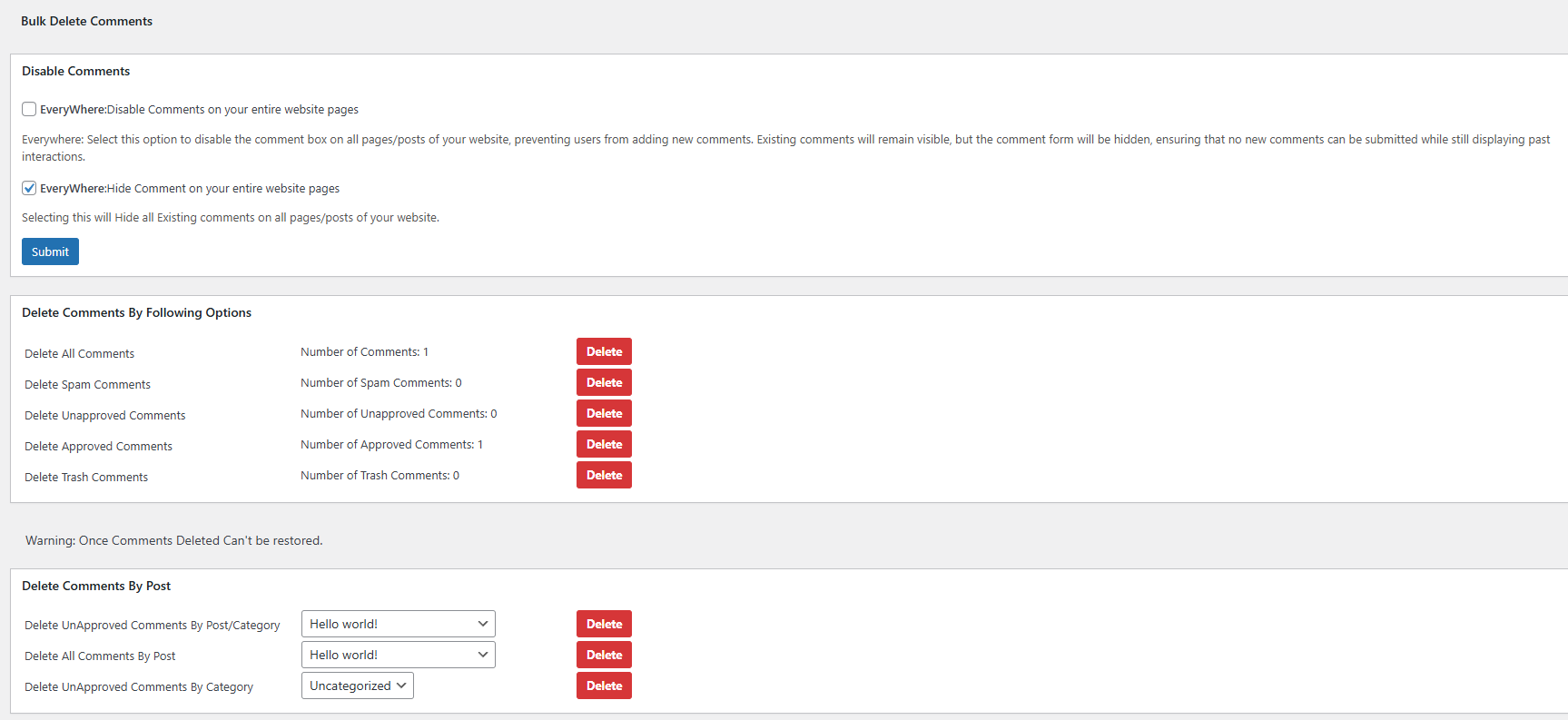
screenshot-1.png
Changelog
2.3
- Moved Plugin options from the main sidebar to inside WordPress Dashboard Settings Bulk Delete Comments.
2.2
- Fixed Errors and Warnings. Ensure your plugin is up to date for the best performance and stability.
2.1
- Changed the admin page style.
- Updated the confirmation box message on the admin page.
1.4
- Option to disable the comment box and hide the comments on the frontend.
- Optimized the comments count functionality.
1.3
- Code optimization and fixed comments count issues.
1.2
- Added a count display for comments to be deleted.
- Improved interface and added a delete confirmation dialog.
1.1
- Improved interface compared to the previous version.
1.0
- Initial version to delete comments based on their status (e.g., Trash, Unapproved).