

Bulk Delete Users by Keyword
Efficiently manage your WordPress users with keyword-based bulk deletion capabilities.
Plugin info
Maintenance & Compatibility
Maintenance score
Stale • Last updated 285 days ago • 1 reviews
Is Bulk Delete Users by Keyword abandoned?
Likely maintained (last update 285 days ago).
Compatibility
Similar & Alternatives
Explore plugins with similar tags, and compare key metrics like downloads, ratings, updates, support, and WP/PHP compatibility.
Description
The Bulk Delete Users by Keyword plugin provides administrators with a powerful tool for cleaning up user databases by allowing bulk deletion based on specific keywords. Perfect for removing spam accounts, inactive users, or performing database maintenance.
Key Features:
– Advanced keyword filtering across multiple user fields (username, email, display name)
– Batch processing for handling large user databases efficiently
– Real-time progress tracking during deletion operations
– Comprehensive safety warnings and confirmations
– Customizable batch sizes for optimal performance
Enhanced Functionality in Version 2.0:
– AJAX-powered processing for smooth operation
– Detailed progress reporting
– Support for multiple search fields
– Improved user interface
– Better error handling and notifications
Features
Core Functionality
- Keyword-based user filtering and deletion
- Batch processing for large datasets
- Multi-field search (username, email, display name, nickname)
- Progress tracking during operations
Safety Features
- Explicit warning messages
- Confirmation dialogs
- Nonce verification for all operations
- Capability checks
Performance
- Optimized database queries
- Configurable batch sizes
- Memory-efficient processing
License
GNU General Public License v2.0 or later
Privacy Notice
This plugin does not collect any user data or transmit information to external servers. All operations occur entirely within your WordPress installation.
Installation
Automatic Installation
- Navigate to “Plugins > Add New” in your WordPress admin
- Search for “Bulk Delete Users by Keyword”
- Click “Install Now” and then “Activate”
Manual Installation
- Download the plugin ZIP file
- Go to “Plugins > Add New > Upload Plugin” in WordPress
- Upload the ZIP file
- Click “Install Now” and then “Activate”
After Installation
- Navigate to “Bulk Delete Users” in the admin menu
- Configure your search criteria
- Execute the deletion process
Frequently Asked Questions
The plugin searches for your keyword in multiple user fields: username, email, display name, and nickname. Partial matches are included.
No, this is a permanent deletion. Always maintain regular backups of your database.
For most sites, 100-500 users per batch works well. Larger sites may benefit from smaller batches (50-100).
Yes, but users will only be deleted from the current site in the network.
Review feed
Screenshots
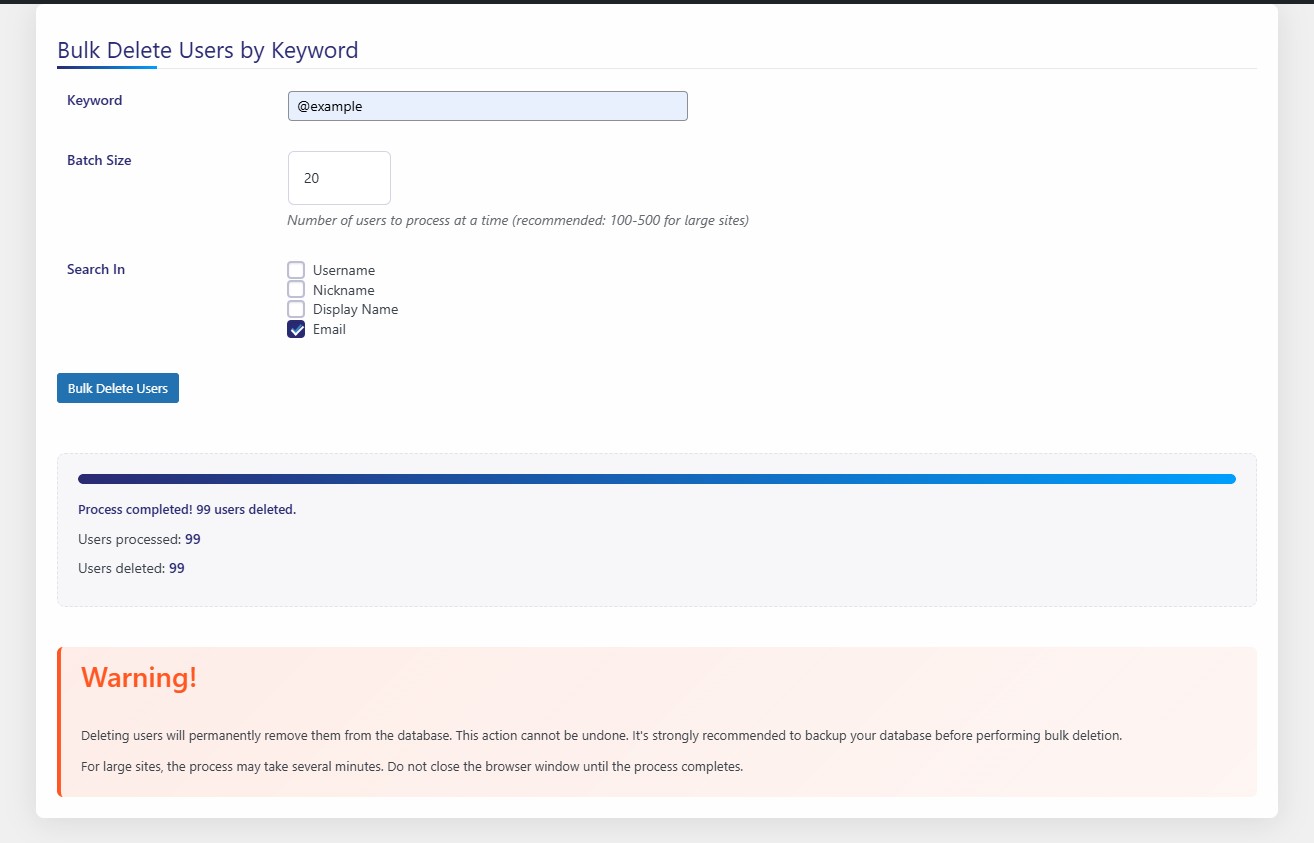
Main plugin interface showing keyword input and options
Changelog
2.0
- Complete rewrite with AJAX processing
- Added progress tracking
- Enhanced search capabilities
- Improved user interface
- Better error handling
1.0
- Initial release with basic functionality