

Buying Buddy IDX CRM – Real Estate MLS Plugin
Transform your WordPress site into a powerful real estate platform with seamless MLS integration, IDX search, and built-in CRM - no databases or techn …
Plugin info
Maintenance & Compatibility
Maintenance score
Stale • Last updated 330 days ago • 5 reviews
Is Buying Buddy IDX CRM – Real Estate MLS Plugin abandoned?
Likely maintained (last update 330 days ago).
Compatibility
Similar & Alternatives
Explore plugins with similar tags, and compare key metrics like downloads, ratings, updates, support, and WP/PHP compatibility.
Description
Serving real estate professionals since 2004, Buying Buddy® transforms real estate websites by combining powerful IDX/MLS integration with an intelligent CRM system designed specifically for real estate professionals. Our solution seamlessly embeds into your WordPress site with zero technical hassle.
All data is hosted on Buying Buddy servers. All you need to do is install the plugin. Buying Buddy does not require any databases or other complex technical prerequisites.
- See Connection to Buying Buddy Service below for details.
- Learn more about Buying Buddy IDX solutions
Try it free for 30 days – no credit card required! Install now and get instant access to our demo MLS data.
Why Choose Buying Buddy?
- Zero Technical Setup Required – No databases, no complex configuration
- Works With Any WordPress Theme – Compatible with Elementor, DIVI, and all major builders
- SEO Optimized – Automatic indexable property pages with proper meta tags
- Fast Loading – Optimized code and CDN delivery for speed
- Built-in Lead Generation – Convert visitors into qualified leads
- Integrated CRM – Track leads and automate follow-up
Core Features
SEO-Optimized IDX Listings
* Each property gets a unique, long-tail URL optimized for Google indexing
* Supports schema markup for improved search engine visibility
* Clean, semantic HTML optimized for search engines
* Automated meta descriptions and tags
* Local SEO optimization
Customizable Real Estate Widgets
* Advanced MLS search with customizable filters
* Display properties filtered by zip code, price range, or school district
* Multiple display layouts (Grid, List, Map, Carousel)
* Custom search forms and filters
* Brand-matching design options
Mobile-Friendly Property Search
* Responsive design for all devices
* Touch-friendly map controls
* Fast-loading property galleries
* Intuitive mobile navigation
* Optimized lead capture forms
Advanced Lead Generation & CRM
* Built-in lead capture forms
* Automated lead nurturing
* Email marketing automation
* Client portal for saved searches
* Property alerts and notifications
Marketing Tools
* Custom property showcase pages
* Neighborhood and market area pages
* Office and agent roster displays
* Market reports and statistics
* Mortgage calculator
Effortless WordPress Integration with IDX Widgets
Easily embed any IDX component using simple shortcodes in your posts, pages, or sidebars:
- Property search forms
- Search results with map
- Property details
- Featured listings grid/carousel
- Interactive maps
- Market reports
- Quick search
- Lead capture forms
- Agent profiles
- Office directory
- Mortgage calculator
See live examples of Buying Buddy IDX integration
SEO & Performance
* Automatically generated property pages
* Proper meta tags and structured data
* Clean, semantic HTML
* Fast-loading CDN delivery
* Mobile-first design
Professional-Grade Features
For Agents
* Showcase active and sold listings
* Create custom market area pages
* Generate qualified leads
* Automate follow-up
For Teams
* Team roster and profiles
* Lead routing and assignment
* Team activity tracking
* Shared client database
For Brokers
* Office directory
* Agent management
* Brand consistency
* Multi-office support
Connection to Buying Buddy Service
The Buying Buddy service provides the plugin with access to your MLS data feed and your account preferences. When the plugin is installed, it will connect to the Buying Buddy service (your account) for validation, data and settings as follows:
- Buying Buddy JavaScript and CSS files are loaded from AWS Cloudfront servers
- Google Maps JavaScript API is loaded from Google servers
- All form submissions and interactions submit data using the Buying Buddy service API to https://www.mbb2.com.
- See the Buying Buddy service Privacy Policy
- See the Buying Buddy service Terms of Service
The installation process will create a Buying Buddy account for you if you do not have one.
Easy to Use Widgets
Embed any of these components anywhere on your site with simple shortcodes:
- Property search forms
- Search results with a map
- Property details
- Featured listings grid/carousel
- Interactive maps
- Community pages
- Market reports
- Quick search
- Lead capture forms
- Agent profiles
- Office directory
- Mortgage calculator
Installation
Quick Start Guide
- Install and activate the plugin
- Choose “Free Trial” or enter your activation key
- Watch your site transform with IDX integration
- Customize widgets and displays as needed
The plugin automatically creates:
* Required system pages (hidden from menus)
* Sample property search page
* Example listing showcase pages
* Lead capture forms
* Agent/team pages
Automatic Installation
- Go to Plugins > Add New
- Search for “Buying Buddy”
- Click “Install Now” then “Activate”
- Follow the setup wizard
Manual Installation
- Download buying-buddy-idx-crm.zip
- Upload through WordPress plugin uploader
- Activate and follow setup wizard
Frequently Asked Questions
No! Buying Buddy is designed for real estate professionals, not developers. Our plugin handles all technical aspects automatically.
Yes! Buying Buddy works with any WordPress theme or page builder including:
* Elementor
* DIVI
* Beaver Builder
* Genesis
* Any standard WordPress theme
Data updates automatically through our secure cloud platform – no maintenance required. Most MLS feeds update hourly.
Yes! Use our theme editor to match your brand:
* Custom colors
* Font selection
* Layout options
* CSS customization available
Built-in SEO optimization includes:
* Unique property URLs
* Proper meta tags
* Structured data
* Clean, semantic HTML
* Mobile-friendly design
- Built-in lead capture forms
- Social sign-in options
- Automatic lead routing
- Email/SMS notifications
- Full CRM integration
Yes! Get 30 days free access with demo MLS data. No credit card required.
Review feed
Screenshots

Display search results with an interactive map for intuitive property searching
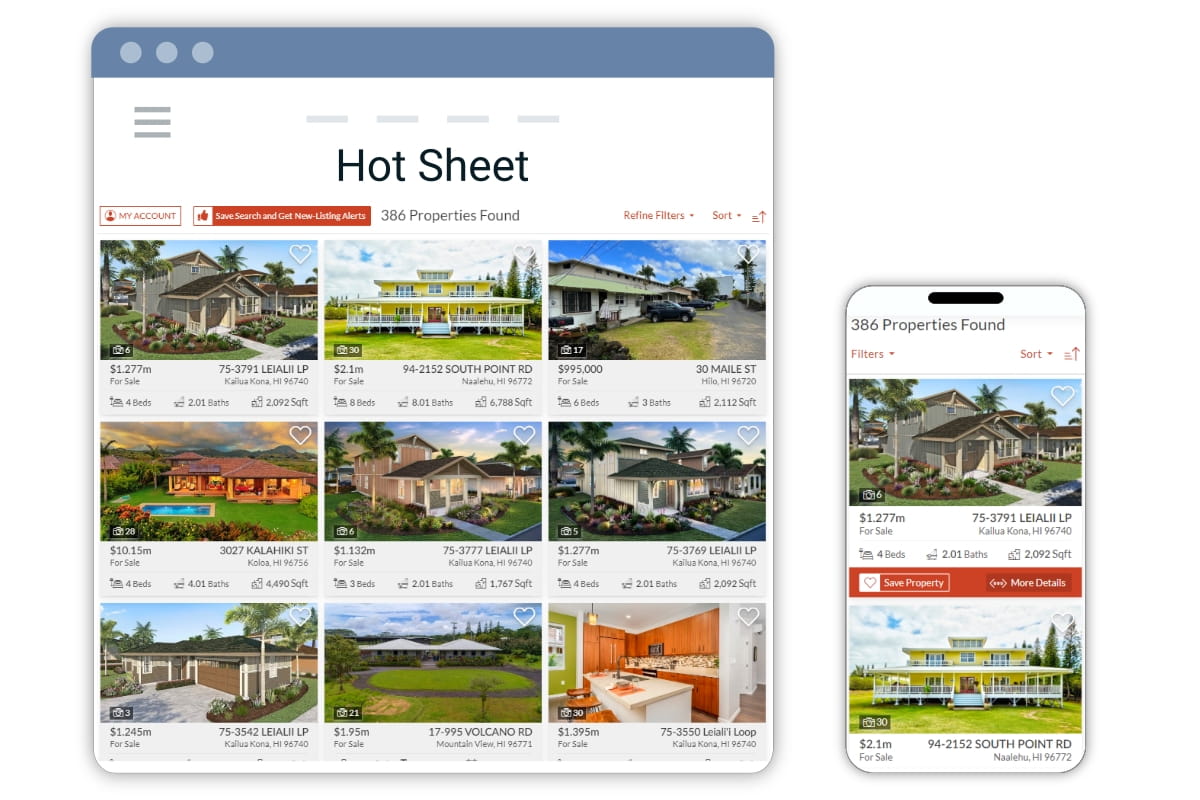
Showcase listings in a professional grid layout to attract more buyers

Highlight featured properties with an eye-catching carousel to increase engagement

Present comprehensive property details that convert visitors into leads

Offer flexible list views with advanced filters for targeted property searches

Embed customizable search forms to capture qualified leads anywhere on your site

Build credibility with detailed market reports and local statistics

Present your team professionally with an organized agent directory

Showcase agent success with profiles featuring active and sold listings
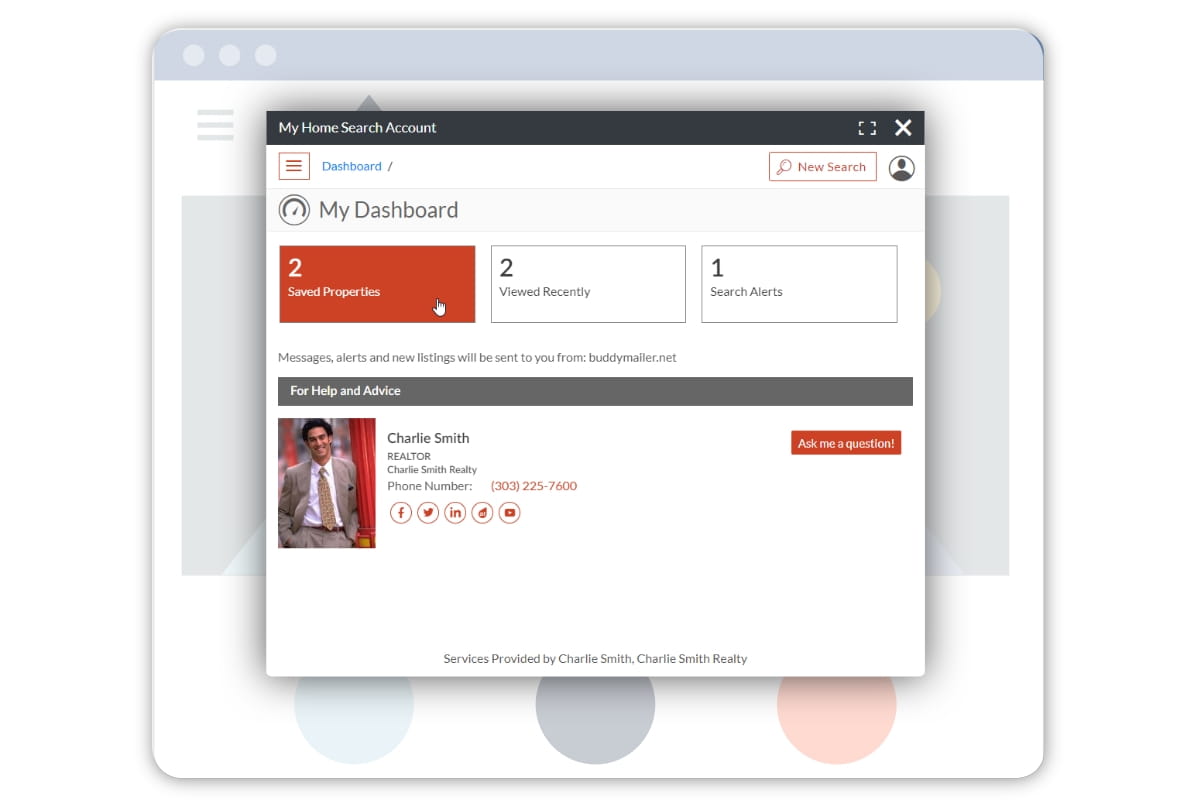
Keep clients engaged with a personalized property search portal

Customize widgets easily to match your brand and website design

Manage leads effectively with the integrated CRM dashboard
Changelog
2.2.3
- Improved Google Maps JS Library Detection & Loading
2.2.2
- SEO improvements for Community pages
- Update Google Maps already loaded detection
2.2.1
- Added Version to the HTML head
- Add backwards compatibility for SearchResults widget
2.2.0
- Fixed a bug with Google Maps not loading
- Fixed a bug that showed incorrect theme colors
- Fixed a bug that prevented the results widget from displaying correctly
2.1.0
- Add Plugin Settings Panel
2.0.1
- Remove warnings message in debug panel
2.0.0
- Performance optimizations for widgets
- Security Enhancements
- Updated widget syntax
- New Community pages function
- Flexible slugs for OfficeRoster widget
- Improved support for version and widget pages tracking between plugin and Buying Buddy dashboard
1.2.6
- Fixed bug with the property detials page metadata
1.2.5
- Replace $_SERVER[“HTTP_HOST”]
1.2.4
- Performance optimizations for widgets
- Updated filters to support data-filter to remove conflicts with wysiwyg tools
1.2.3
- Removed Warning Message When Disabling Office Roster Rewrite Rules
1.2.2
- Added Ability to Disable the Office Roster Widget
1.2
- Fixes to the activation process
- Enhanced navigation options
- Improved reactivation handling
1.1.13
- Fixed bug when updating activation key
- Add foundation pages when activating an existing account
1.1.12
- Free trial period changed to 30 days.
1.1.11
- Support for WordPress 6.6
1.1.10
- Buying Buddy settings page moved to top level in Admin sidebar
1.1.9
Included option to set Express sites feature for accounts which have subdomain websites.
1.1.8
- Set User-Agent when making http request to Buying Buddy
1.1.7
- Style changes to settings area for plugin.
1.1.6
- Updates to layout of Settings page of plugin
1.1.5
- Updates to the debug functionality in the plugin
1.1.4
- Added tutorials to settings area for plugin.
1.1.1
- Fix bug with activation of trial account
1.1.0
- Updates to support and help information
1.0.9
- Updates to support WordPress Multisite. Clearing cache to show the currently selected Buying Buddy theme.
1.0.8
- Removed styles from old version of the plugin.
1.0.7
- Fixed issue with valid activation key being reset in some scenarios.
1.0.6
- Fixed issue with filters in WordPress shortcodes
1.0.5
- Fixed issues for customers activating the plugin when using the old version of the plugin. Changes to cookie handling for widgets.
1.0.4
- Including the version of the Buying Buddy plugin in the initialization call.
1.0.3
- Fixes to the activation process for existing customers. Updates to the instructions on the readme.txt
1.0.2
- Performance optimizations
1.0.1
- Fixes to the plugin auto update process and updated messaging on the Settings page.
1.0
- Launch of public version of the Buying Buddy plugin.