

Cackle Live Chat
Cackle Live Chat allows your visitors to communicate with your operators be logged through social networks so that operators will always have informat …
Plugin info
Maintenance & Compatibility
Maintenance score
Possibly abandoned • Last updated 4358 days ago
Is Cackle Live Chat abandoned?
Possibly abandoned (last update 4358 days ago).
Compatibility
Similar & Alternatives
Explore plugins with similar tags, and compare key metrics like downloads, ratings, updates, support, and WP/PHP compatibility.
Description
Cackle Live Chat allows your visitors to communicate with your operators be logged through social networks so that operators will always have
information about visitors: name, email, social network link, operating system, browser, IP, referer, current address
Cackle Live Chat Plugin
- Integrates Cackle Chat Widget to all WordPress pages
- Use [cackle_live_chat_disable] shortcode to disable Cackle Chat on special WordPress posts or pages
Cackle Live Chat Features
- Log in visitors through social networks
- Information about visitors: name, email, social network, operating system, browser, IP, referer, current address
- Online, offline form chat
- Preserving the history when re-entering
- Active sales (automatic invitation)
- Ability to specify the welcome message of the operator
- Set the name and photo of the operator
- Operator rating
- Simultaneous consultation visitors
- Online, offline operator status
- The ability to transfer the chat to another operator
- Appearance settings: color of the badge, color of the chat, setting of the text
- Website operator application and Desktop client for Windows
- Ability to customize live chat design through css on your site
Cackle ( http://cackle.me ) social platform have more than 27 000 sites installed their widgets and includes comments, chat, poll, login and review widgets.
Installation
- Download
cackle-live-chatto/wp-content/plugins/directory - Register account and check “Try it for free for 5 days” and Live Chat widget on http://cackle.me/pricing
- Create chat widget on http://cackle.me on tab ‘Widget’->Live chat
- Please, find line with “..widget: ‘Chat’,id: ‘your id’ in js code and paste it to Cackle Chat Plugin’s settings
Frequently Asked Questions
All questions send to [email protected]
Review feed
Screenshots
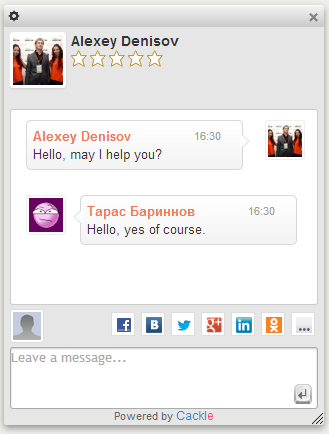
Cackle Live Chat
Changelog
1.01
- Initial release