

CampaignBay – Automated Discount Campaigns & Flash Sales for WooCommerce
Automated Discount Campaigns & Flash Sales for WooCommerce
Plugin info
Maintenance & Compatibility
Maintenance score
Maintained • Last updated 116 days ago
Is CampaignBay – Automated Discount Campaigns & Flash Sales for WooCommerce abandoned?
Likely maintained (last update 116 days ago).
Compatibility
Similar & Alternatives
Explore plugins with similar tags, and compare key metrics like downloads, ratings, updates, support, and WP/PHP compatibility.
Description
Move beyond basic coupons and revolutionize your WooCommerce store’s promotions with CampaignBay.
CampaignBay is a powerful, user-friendly marketing tool that empowers you to create sophisticated, automated discount campaigns directly from your WordPress dashboard. Whether you’re running a Black Friday flash sale, rewarding customers for bulk purchases, or creating urgency with a limited-time offer, CampaignBay provides the robust features you need to drive sales and engage customers.
With its intuitive dashboard, flexible campaign types, and high-performance discount engine, you get unparalleled control over your marketing strategy without sacrificing site speed.
Key Features:
- Multiple Campaign Types: Create classic Scheduled Sales, tiered Quantity Discounts, urgency-driven Early Bird offers, and popular BOGO (Buy X Get X) deals.
- Advanced Analytics Dashboard: Get an instant, data-rich overview of your campaign performance. Track total discount value, sales from campaigns, and discounted orders with interactive charts.
- Flexible Targeting: Apply discounts to your entire store, specific products, or categories, with powerful exclusion rules for precise control.
- Full Scheduling & Automation: Set specific start and end dates for your campaigns. Our reliable, automated system handles activation and expiration using a robust WP-Cron and failsafe mechanism.
- Intelligent Stacking Logic: Configure powerful rules for how your discounts interact with each other and with native WooCommerce coupons.
- Customizable Display: Tailor promotional messages on product and cart pages with dynamic placeholders (e.g.,
{percentage_off},{buy_quantity}). - Performance Optimized: Built with a multi-level caching system to ensure your storefront remains fast and responsive, even with complex rules active.
For detailed setup and usage instructions, visit our Official Documentation.
Want to see it in action? Check out our Live Demo.
Need help? Visit our Support Forum.
Live Demo
Experience the power of CampaignBay firsthand on our interactive demo site. See how campaigns look on the frontend and explore the admin dashboard.
Use Cases
CampaignBay is designed to help you achieve specific business goals. Here are just a few examples of what you can build:
-
Launch New Products with a Bang: Create an Early Bird Discount offering a steep discount to the first 50 customers to generate instant buzz and social proof.
-
Increase Average Order Value (AOV): Implement a tiered Quantity Discount like “Buy 3+, get 10% off; Buy 5+, get 20% off” and use the built-in cart notices to encourage customers to add more to their cart.
-
Run Holiday Flash Sales: Set up a Scheduled Discount for your entire store that automatically starts at midnight on Black Friday and ends precisely on Cyber Monday.
-
Clear Out Old Inventory: Run a “Buy 2, Get 1 Free” BOGO Campaign on last season’s styles to quickly move stock without devaluing your brand.
-
Create Simple Wholesale Tiers: Use Quantity Discounts on specific product categories to offer wholesale-style pricing to all your customers without needing a separate plugin.
-
Targeted Promotions: Apply a discount to a specific product category to promote a new line or run a brand-specific sale.
Installation
- From your WordPress dashboard, navigate to Plugins Add New.
- In the search field, type “CampaignBay” and press Enter.
- Find the CampaignBay plugin in the search results and click “Install Now”.
- After installation, click the “Activate” button.
- Look for the new “CampaignBay” menu in your admin sidebar to get started!
Frequently Asked Questions
Yes, CampaignBay is an add-on for WooCommerce and cannot function without it.
You need WordPress 5.8+, PHP 7.0+, and an active WooCommerce installation.
We’re happy to help! Please visit our official support forum at wpanchorbay.com/support to ask questions, report issues, or suggest new features.
Absolutely. CampaignBay includes a dedicated analytics dashboard with real-time metrics and interactive charts to monitor the effectiveness of your promotions.
You can create Scheduled Discounts (fixed or percentage), Quantity Based Discounts (tiered pricing), Early Bird Discounts (based on order count), and BOGO (Buy X Get X) offers.
Yes. By default, only the single best discount applies to a product. However, you can enable stacking for both CampaignBay campaigns and native WooCommerce coupons in the Settings Cart Settings tab.
CampaignBay uses WordPress Cron, backed by a failsafe mechanism, to automatically start and stop campaigns based on the dates you define. This ensures your promotions run reliably on time.
Review feed
Screenshots
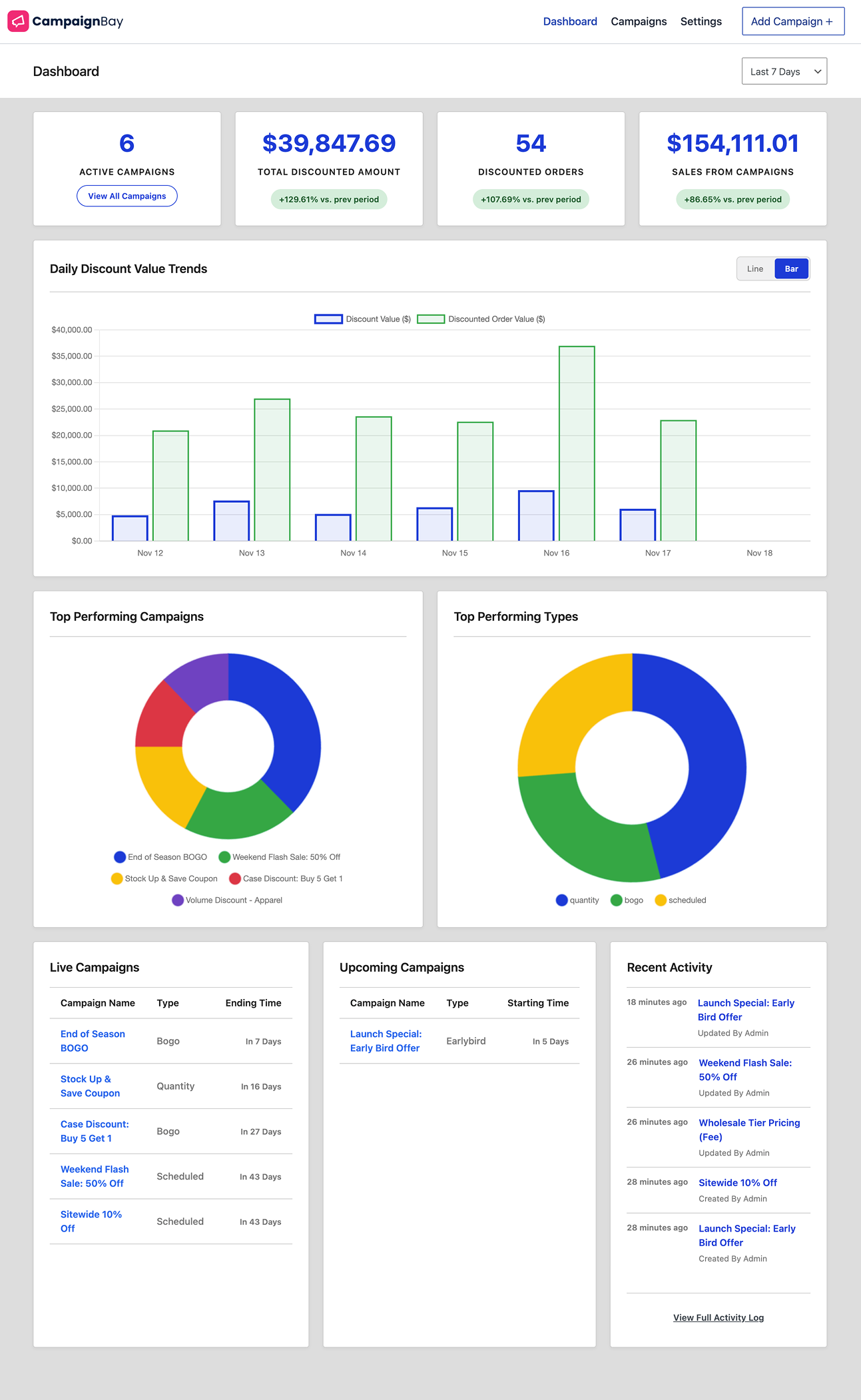
See Your Performance at a Glance. The main Dashboard, showing key metrics (KPIs) and interactive performance charts.

Fine-Tune Your Promotions. The campaign editor, where you can modify every aspect of an existing campaign.

Manage All Your Campaigns. The "All Campaigns" table view, with powerful options for filtering, sorting, and bulk actions.

Visual Campaign Management. The alternative Grid View for the "All Campaigns" page, offering a card-based overview of each promotion.

Take Full Control. The global Settings page, showing the tabbed interface for configuring all plugin options.

Customize Product Page Display. The Product Settings tab, for customizing discount message formats and quantity table visibility.

Customize the Quantity Discount Table. The modal editor for changing the appearance, columns, and labels of the pricing table.

Configure Cart Logic. The Cart Settings tab, with powerful options for coupon and campaign stacking.

Advanced Plugin Control. The Advanced Settings tab for plugin data management.

Frontend Product View. A single product page showing a quantity discount pricing table.

Frontend Cart View. Discounts are applied directly to products in the cart, showing strikethrough pricing and the total savings for each item.
Changelog
Changelog
1.0.5
- Enhancement: Major architectural improvement to BOGO (Buy One, Get One) discounts. Free products are now added as a separate, zero-price line item in the cart. This provides greater clarity for customers and significantly enhances compatibility with third-party plugins.
- FIX: Corrected an issue where discount messages for variable products were not formatted correctly on the product page.
1.0.4
- FIX: Error at new activation on 1.0.3 version.
1.0.3
- FIX: Minor bug fixes and stability improvements for the admin interface.
1.0.2
- Enhancement: Added an interactive Tour Guide to help new users navigate the “Add Campaign” interface.
1.0.1
- Enhancement: Updated the plugin display name to “CampaignBay – Automated Discount Campaigns & Flash Sales for WooCommerce” for better clarity and searchability in the WordPress repository.
- Refactor: Migrated the admin interface scripts from JavaScript to TypeScript for improved long-term stability, code quality, and maintainability.
1.0.0
- Initial release of CampaignBay.