

Plugin info
Maintenance & Compatibility
Maintenance score
Stale • Last updated 349 days ago
Is Canonical Pages abandoned?
Likely maintained (last update 349 days ago).
Compatibility
Languages
Similar & Alternatives
Explore plugins with similar tags, and compare key metrics like downloads, ratings, updates, support, and WP/PHP compatibility.
Description
Quickly enable, customize, or disable the canonical meta tag on your pages. Yoast SEO, Rank Math, and All in One SEO plugins are supported.
Additional Info
This plugin allows you to quickly enable, customize, or disable the rel="canonical" meta tag in your posts and pages.
A canonical URL is the preferred version of a webpage that search engines like Google should prioritize over other duplicate or similar URLs. It helps prevent duplicate content in searches and ensures that search engines index and rank the most important page.
Features
- Enable or Disable if page includes the
rel="canonical"meta tag - Set a custom Canonical URL
- Configure the Canonical URL for the blog home page
Supported SEO Plugins
The following plugins work with this plugin:
– Yoast SEO
– Rank Math SEO
– All in one SEO SEO
– Slim SEO
Don’t see your favorite SEO plugin? Please let us know.
Contributors
Angelo Mandato, Founder and CTO of Painless Analytics – Plugin author
Installation
Automatic Plugin Installation
Install using the built-in plugin installer:
- Go to Plugins > Add New.
- Type in “Canonical Pages” in Search Plugins box.
- Find “Canonical Pages” in the search results.
- Click Install Now to install the WordPress Plugin.
- Click Activate to activate it.
Manual Plugin Installation
- Download this plugin to your computer.
- Extract the plugin zip file (or compressed folder).
- With your FTP program, upload the plugin folder to the wp-content/plugins folder in your WordPress directory online.
- Go to Plugins screen and find “Canonical Pages” plugin in the list.
- Click Activate to activate it.
Frequently Asked Questions
Yes, you can disable or specify a custom Canonical URL
Yes, you can disable or specify a custom Canonical URL
Yes
Yes
It may not be necessary if you are accustomed to the functionality built into your SEO plugin.
Currently SEOPres, SEO Simple Pack, SmartCrawl WordPress SEO, and Squirrly SEO are not supported.
Yes, for the SEO plugins supported. Please see the list of supported SEO plugins.
Review feed
Screenshots
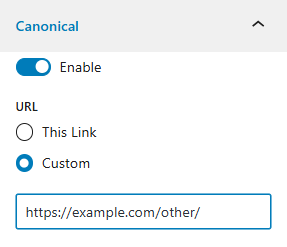
Canonical options during page editing
Changelog
1.0
Released on 2025-04-19
Official release of plugin
0.0.4
Released on 2025-04-18
Setup plugin on GitHub and action to publish on WordPress.org
0.0.3
Released on 2025-04-12
Issues addressed for wordpress.org submission review process
0.0.2
Released on 2025-04-07
Bug fixes and added CHANGELOG.md
0.0.1
Released on 2025-04-07
Initial release of Canonical Pages plugin
Full Version History
Please see the changelog on Github.