

Easy Social Like Box – Popup – Sidebar Widget
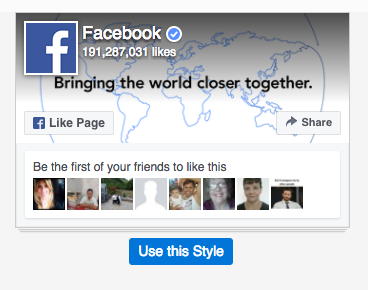
WP Facebook Like Box Plugin enables you to display the facebook page likes in sidebar widget or popup. Display like button for the posts.
Plugin info
Maintenance & Compatibility
Maintenance score
Stale • Last updated 323 days ago • 18 reviews
Is Easy Social Like Box – Popup – Sidebar Widget abandoned?
Likely maintained (last update 323 days ago).
Compatibility
Developers
Similar & Alternatives
Explore plugins with similar tags, and compare key metrics like downloads, ratings, updates, support, and WP/PHP compatibility.
Description
WP Facebook Like Box is a social plugin that enables Facebook Page owners to attract and gain Likes from their own website. The Facebook Like Box WordPress Plugin enables helps users to:
-
See how many users already like your Page, and which of their friends like it too
-
Read recent posts from the Page
-
Like the Page with one click, without needing to visit the Page.
-
Add like button for the posts.
-
Add a shortcode to display the facebook like box on any page or post.
-
Add a shortcode to display the facebook posts like on any page or post.
-
Translation enabled by using I18n.
Note: To get Best “Facebook Like Box plugin” output use width is 292px & Height is 210px.
Support
Thanks for downloading and installing my plugin.
Support Page: https://johnn.info/
If you have any suggestions or feedback, please post it in the following link.
Translation
Translation is enabled for this plugin. If someone interested in translating this plugin please visit the following link and post in the comments section with your contact email. Thanks.
Translated languages
-
Danish (Translated by Simon Bogh)
-
French (Translated by Laurent Verpeet)
-
German (Translated by Peter Kaulfuss)
-
Hungarian (Translated by Varanka Zoltan)
-
Italian (Transalted by Claudio Chesselli)
-
Spanish (Translated by Oscar S. G. Saldarriaga)
-
Tamil (Translated by Vinoj Cardoza)
Installation
-
Download the plugin.
-
Upload to your blog (/wp-content/plugins/).
-
Activate it.
-
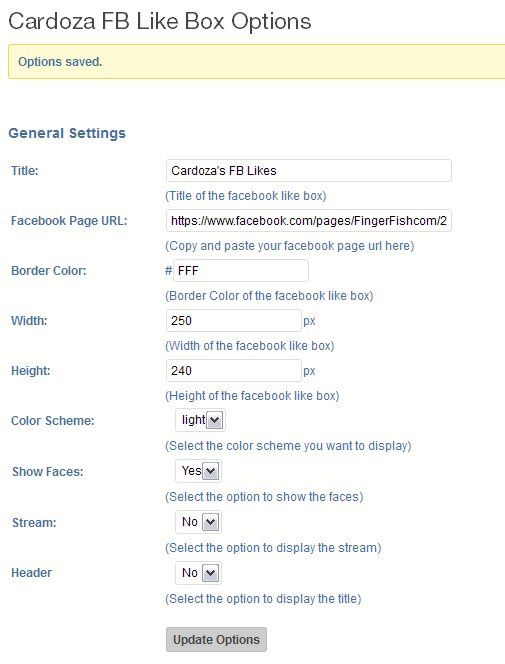
Click the Appearance menu and click the FB Like Box.
-
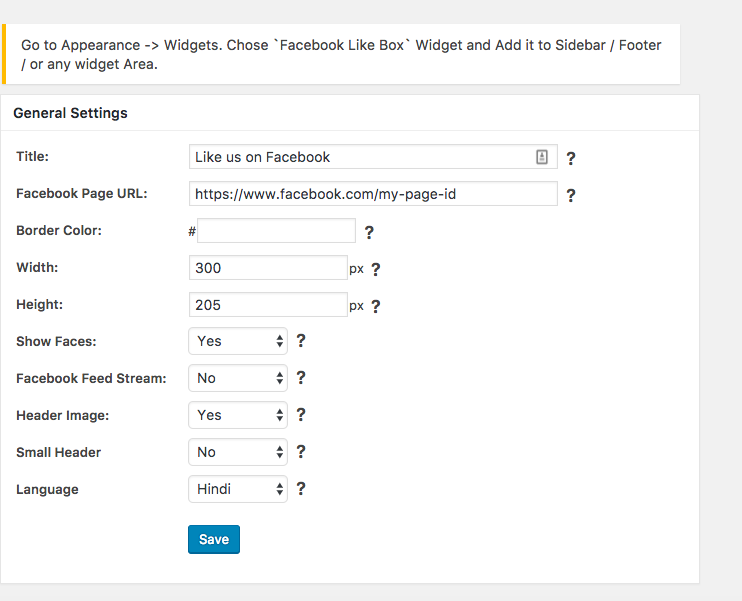
Fill in the options.
-
Then go to widget and drag and drop WPAdvanced Facebook Like Box in the area you want to display the plugin.
You’re done!
Uninstalling is as simple as deactivating the plugin.
Frequently Asked Questions
How do I display the facebook like box in the pages or posts?
Just copy and paste the code below on the page or post you want to display the facebook like box.
[cardoza_facebook_like_box]
How do I specify different width and height for facebook like box in the pages or posts?
For example if you want to specify the dimensions of width 600px and height 200px for facebook like box in the pages or posts, you have to include the short code in the following format.
[cardoza_facebook_like_box width=”600″ height=”200″]
Note: If you dont specify width and height, by default it will take dimensions from the facebook options you specified.
Note: Don’t include any px or pt with the dimesnion values you are specifying.
How do I display the facebook posts like in the pages or posts?
Just copy and paste the code below on the page or post you want to display the facebook posts like button.
[cardoza_facebook_posts_like]
if you have any queries post it at https://johnn.info/
Review feed
Reviews most welcome!
Screenshots
screenshot-1.png
screenshot-2.gif
screenshot-3.png
Changelog
Version 4.7
- Remove empty lines at end to prevent headers already sent.
Version 4.6
- Added data tab options for facebook page.
- Optimize the shortcode settings
Version 4.5
- Optimize Widget Implemention.
- Fixed Minor css Issues
Version 4.1
- Fixed Security Bugs.
Version 3.1
-
Added the tabs section[timeline,events,message]
-
Added the popup advanced settings such as show on home page only,show for logged in visitor etc.
Version 3.0
- New Feature: Added Facebook Popup [Lightbox] modal
Version 2.10
-
Fixed Security Bugs
-
Temporarily removed Custom CSS importer.
-
Added option to Change Language
-
Kept
WPAdvanced Facebook Like Box Optionsunder Primary Settings Menu in Admin Panel -
Fixed Padding Issue
-
Removed Ads [Affiliate Links] from Admin Panel
Version 2.9.1
fixed below bugs which caused due to New Facebook Preview option.
-
reply and quick edit options not working on comments page.
-
images stopped showing in Media Library
-
Youst SEO Settings Pasge not working
-
New Post Text View not working.
-
Scheduled Posts option not working
-
conflicting with some backup plugin
-
problem in screen options and setting privacy
-
MENU options not working fine
Version 2.9
-
Tested compatibility with WordPress 4.7.3
-
Added New Custom CSS Feature
-
Added More options to customise Like Box.
Version 2.8.8
- Tested compatibility with WordPress 4.6.1
Version 2.8.7
- Tested compatibility with WordPress 4.5.3
Version 2.8.6
- Tested compatibility with WordPress 4.4.2