

Cart66 to Mailchimp
Send customer emails to a Mailchimp list at the completion of a Cart66 transaction. Customer will receive a confirmation email from Mailchimp.
Maintenance 20/1004618d since update
Active installs
10
Downloads
1,913
Reviews
0
Age
13.1y
Plugin info
Total downloads: 1,913
Active installs: 10
Total reviews: 0
Average rating: 0
Support threads opened: 0
Support threads resolved: 0 (0%)
Available in: 1 language(s)
Contributors: 1
Last updated: 8/10/2013 (4618 days ago)
Added to WordPress: 2/25/2013 (13 years old)
Minimum WordPress version: 2.8.2
Tested up to WordPress version: 3.5.2
Minimum PHP version: f
Maintenance & Compatibility
Maintenance score
Possibly abandoned • Last updated 4618 days ago
20/100
Is Cart66 to Mailchimp abandoned?
Possibly abandoned (last update 4618 days ago).
Compatibility
Requires WordPress: 2.8.2
Tested up to: 3.5.2
Requires PHP: f
Similar & Alternatives
Explore plugins with similar tags, and compare key metrics like downloads, ratings, updates, support, and WP/PHP compatibility.
Cart66 Lite Advance Sales Report Lite
Rating 0.0/5 (0 reviews) • Active installs 10
Cart66 Cloud Aweber
Rating 0.0/5 (0 reviews) • Active installs 10
Cart66 Also Bought
Rating 5.0/5 (2 reviews) • Active installs 0
Wonderflow
Rating 0.0/5 (0 reviews) • Active installs 0
Description
Send customer emails to a Mailchimp list at the completion of a Cart66 transaction. Customer will receive a confirmation email from Mailchimp to opt-in.
Installation
To Install Cart66 to Mailchimp
- Download the cart66-to-mailchimp.zip file
- Extract the zip file so that you have a folder called ‘cart66-to-mailchimp’
- Upload the ‘cart66-to-mailchimp’ folder to the
/wp-content/plugins/directory - Activate the plugin through the ‘Plugins’ menu in WordPress
- Configure your settings in the Settings panel
To Uninstall Cart66 to Mailchimp
- Deactivate Cart66 to Mailchimp thorugh the ‘Plugins’ menu in WordPress
- Click the “delete” link to delete the Cart66 to Mailchimp plugin. This will remove all of the Cart66 to Mailchimp files from your plugins directory and will delete the data used by Cart66 to Mailchimp.
Frequently Asked Questions
No FAQ available
Review feed
No reviews available
Screenshots
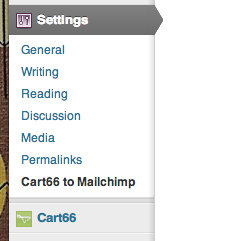
Cart66 to Mailchimp Settings Page

Cart66 to Mailchimp Options Page
Changelog
No changelog available