

Plugin info
Maintenance & Compatibility
Maintenance score
Stale • Last updated 325 days ago • 20 reviews
Is Catch IDs abandoned?
Likely maintained (last update 325 days ago).
Compatibility
Languages
Similar & Alternatives
Explore plugins with similar tags, and compare key metrics like downloads, ratings, updates, support, and WP/PHP compatibility.
Description
Catch IDs is a simple and light weight plugin to show the Post ID, Page ID, Media ID, Links ID, Category ID, Tag ID and User ID in the Admin Section Table. This plugin was initially develop to support our themes features slider. Then we thought that this will be helpful to all the WordPress Admin Users. Just activate and catch IDs in your page, post, category, tag and media pages.
Check out our new modular plugin Catch Web Tools. Power up your WordPress site with powerful features that were till now only available to Catch Themes users. We currently offer Webmaster Tools, Open Graph, Custom CSS, Social Icons, Catch IDs and basic SEO Optimization modules and will be adding more.
Usage
- Just install and activate.
Installation
The easy way (via Dashboard) :
- Go to Plugins > Add New
- Type in the Catch IDs in Search Plugins box
- Click Install Now to install the plugin
- After Installation click activate to start using the Catch IDs
- Go to Catch IDs from Dashboard menu
- Now you will get ID’s column in your post, page, category, tag and media panel
Not so easy way (via FTP) :
- Download the Catch IDs
- Unarchive Catch IDs plugin
- Copy folder with catch-ids.zip
- Open the ftp \wp-content\plugins\
- Paste the plug-ins folder in the folder
- Go to admin panel => open item “Plugins” => activate Catch IDs
- Go to Catch IDs from Dashboard menu
Frequently Asked Questions
Review feed
Excellent
Brilliant
Simple, Useful Plugin
Screenshots
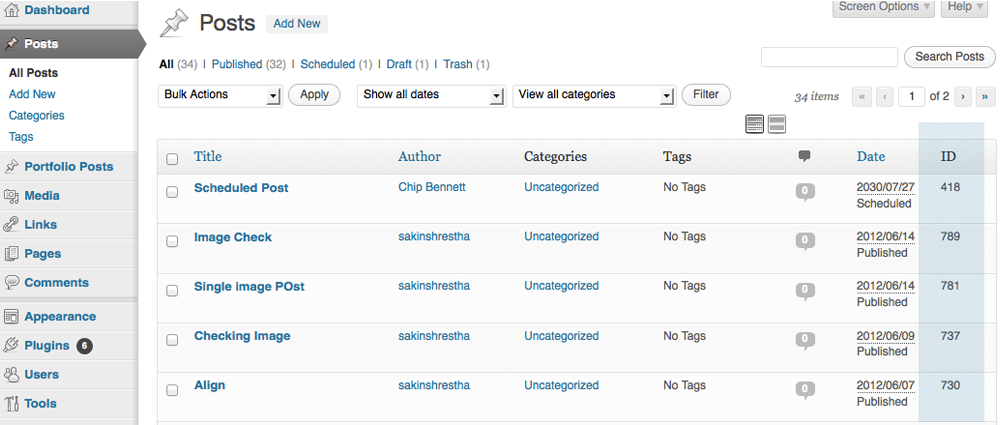
Edit Posts Page

Edit Media Library

Edit Categories
Changelog
2.7.2 (Released: May 12, 2025)
- Compatibility check up to version 6.8
2.7.1 (Released: April 16, 2024)
- Bug Fixed: Deprecation notice in PHP 8.2
- Compatibility check up to version 6.5
2.7 (Released: November 15, 2023)
- Compatibility check up to version 6.4
2.6 (Released: November 03, 2022)
- Compatibility check up to version 6.1
2.5 (Released: February 24, 2022)
- Compatibility check up to version 5.9
2.4 (Released: September 15, 2021)
- Bug Fixed: Security issue on ajax calls
2.3 (Released: July 23, 2021)
- Compatibility check up to version 5.8
2.2 (Released: March 04, 2021)
- Compatibility check up to version 5.7
2.1 (Released: Aug 19, 2020)
- Bug Fixed: Issue in add new theme page
2.0 (Released: March 10, 2020)
- Compatibility check up to version 5.4
1.9 (Released: November 12, 2019)
- Compatibility check up to version 5.3
1.8 (Released: May 31, 2019)
- Added: Option to turn off Catch Themes and Catch Plugin tabs
- Updated: Compatibility to WordPress version 5.2
- Updated: Catch Themes and Catch Plugins tabs displaying code
1.7 (Released: February 21, 2019)
- Compatibility check up to version 5.1
1.6 (Released: December 12, 2018)
- Added: Catch Themes and Catch Plugins tabs in Add themes and Add plugins page respectively
- Added: Themes by Catch Themes section under Themes panel in customizer
- Compatibility check up to version 5.0
1.5 (Released: May 07, 2018)
- Update: Moved domain from catchthemes.com to catchplugins.com
- Compatibility check up to version 4.9.5
1.4.8
- Compatibility check up to version 4.9.4
- Added: Toggle ID column option to display in selected pages
1.4.7
- Compatibility check up to version 4.9
1.4.6
- Compatibility check up to version 4.8
1.4.5
- Compatibility check up to version 4.7
1.4.4
- Fixed: ID column display issue in mobile devices
1.4.3
- Compatibility check up to version 4.6
= 1.4.2
* Compatibility check up to version 4.5
= 1.4.1
* Changed: ID column width size to support upto 8 digit ids
* Changed: http to https in links
= 1.4
* Bug Fixed: IDs not showing in category and tags page(Reported by wwkipday)
= 1.3
* Update: Made the ID column sortable
* Code Optimization
= 1.2.6
* Compatibility check up to version 4.4
= 1.2.5
* Translation ready update
= 1.2.4
* Compatibility check up to version 4.3
= 1.2.3
* Compatibility check up to version 4.1
* Added plugin icons
= 1.2.2
* Compatibility check up to version 3.9.2
= 1.2.1
* Fixed ID not showing in Taxonomies (Reported by Lesley)
= 1.2
* Check WordPress compatibility up to version 3.9.1
= 1.1
* Check WordPress compatibility up to version 3.7.1
= 1.0
* Initial Public Release