

Categories in Hierarchical Order
Categories in Hierarchical Order plugin maintains the hierarchical order of categories list in the Category tab under your WordPress Admin Post Editor …
Plugin info
Maintenance & Compatibility
Maintenance score
Possibly abandoned • Last updated 1939 days ago • 14 reviews
Is Categories in Hierarchical Order abandoned?
Possibly abandoned (last update 1939 days ago).
Compatibility
Similar & Alternatives
Explore plugins with similar tags, and compare key metrics like downloads, ratings, updates, support, and WP/PHP compatibility.
Description
Gutenberg Editor already maintains the parent-child relationship when you select a category. So the child doesn’t move at the top in the category meta box. So this plugin isn’t required if you’re using the Gutenberg Editor.
Categories in Hierarchical Order plugin applies to WordPress Classic Post Editor only.
This plugin contains functionality to let you maintain default hierarchical order of categories when you select and save them for a post in your WordPress Admin Classic Post Editor.
The selected category/categories, to which a post belongs, are by default pushed at the top in the Category tab while saving the post. Whereas activating Categories in Hierarchical Order plugin will keep the position of selected category/categories unchanged as per their parent/child relationship.
For support, use support page available here or visit the page at our official website. A GitHub repo is also there to post issues, contribution and feature requests.
Installation
This section describes how to install the Plugin and get it working.
e.g.
- Install Categories in Hierarchical Order plugin either via the WordPress.org plugin directory or by uploading the categories-in-hierarchical-order folder to
/wp-content/plugins/directory at your server - Activate the Plugin through the ‘Plugins’ menu in WordPress
- You are ready
Frequently Asked Questions
Is this plugin compatible with custom taxonomies?
Yes, this plugin supports custom taxonomy
Is there any setting option with this plugin?
No, this plugin hasn’t any setting
Does the plugin work on Gutenberg Editor too?
No. This is for Classic Editor only.
Review feed
Works great!
Great!
Perfect
Brilliant!
Screenshots
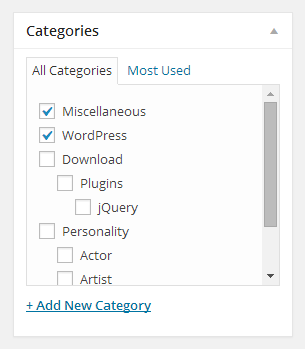
WordPress default category order

Category hierarchy maintained by the plugin
Changelog
1.3.1
- Security improvement by blocking direct file access
1.3
- GitHub and support links updated
- Tested up to WordPress version 5.6 with Classic Editor
1.2
- Changed the Class constructor for compatibility to PHP 7
1.1
- Tested to support latest WordPress version
1.0
- Maintain category hierarchical order