

Category Excluder Widget
This widget allows you to easily create a specific category list. You can exclude any categories you please.
Plugin info
Maintenance & Compatibility
Maintenance score
Possibly abandoned • Last updated 5120 days ago
Is Category Excluder Widget abandoned?
Possibly abandoned (last update 5120 days ago).
Compatibility
Similar & Alternatives
Explore plugins with similar tags, and compare key metrics like downloads, ratings, updates, support, and WP/PHP compatibility.
Description
A simplistic plugin that allows for the furthur customization of your category list. This will allow you to create a custom category list which will show the categories you want, and will hide the categories you do not want. For example, say you have a particular category you don’t want to be displayed named “Announcements”. You can use this plugin to display all of your other categories, except the category “Announcements”. You are not limited to just excluding one category; you can exclude multiple categories. Essentially, this plugin provides more functionality to your category list.
Installation
- Upload the *.zip copy of this plugin into your WordPress through your ‘Plugin’ admin page.
- Activate the plugin through the ‘Plugins’ menu in WordPress
- Place the widget in your desired sidebar through the “widgets” admin page
Frequently Asked Questions
Where is the ?widgets? admin page?
The ?widgets? admin page is found in the administrator part (wp-admin) of your WordPress site. Go to Appearance > Widgets
How do I find the category ID number?
First go to your Posts > Categories in the administrator part (wp-admin) of your WordPress site. Click the category you desire to find its ID. Its ID number should then be displayed in the URL section of your browser. (It should say $tag_ID= followed by your category ID number.
Review feed
Screenshots
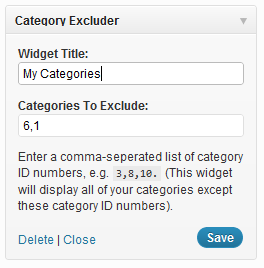
Category Excluder settings screen.

Category Excluder in the plugins screen.
Changelog
1.1
- Fixed minor ID issue
1.0
- Initial Release