
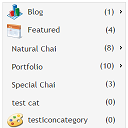
Category and Subcategory List Widget
This widget allows to add/update icons for category or icon for custom taxonomy. It lists Categories in horizontal menu pattern.
Plugin info
Maintenance & Compatibility
Maintenance score
Maintained • Last updated 122 days ago • 3 reviews
Is Category and Subcategory List Widget abandoned?
Likely maintained (last update 122 days ago).
Compatibility
Similar & Alternatives
Explore plugins with similar tags, and compare key metrics like downloads, ratings, updates, support, and WP/PHP compatibility.
Description
WordPress press widget to list category and subcategories of posts/custom taxonomies of custom post types.
Features
-
It allows users to add custom icons for category or for subcategory or for custom taxonomies
-
It lists categories and subcategories in user-friendly horizontal pattern. Please refer screenshots.
-
Category icons can be edited/removed/update with new icons under edit category or under edit custom taxonomy admin screen
-
Admin settings of this widget has facility control display on/off for category icons
-
Admin settings of this wiget has facility to show/hide count of posts in categories
-
Admin settings of this widget has facility to show/hide empty categories in widget
-
Title of widget can be customized in widget settings
-
Compatible with blocks under widgets section
My Links
Installation
Download this plugin and activate it
Go to appearence -> Widgets and select Category and subcategory list widget and move to left or right side bar.
Under widget settings, set appropriate following options,
Set the required option to show or hide empty categories, show or hide count, select custom taxonomy or default category and Save it
Set the required option to show/hide category icosn
Verify it in front end screens in right/left side bar according to your settings.
Frequently Asked Questions
Review feed
Screenshots

screenshot-1.png

screenshot-2.png

screenshot-3.png

screenshot-4.png

screenshot-5.png

screenshot-6.png

screenshot-7.png

Changelog
7.3
Compatible with WordPress 6.9. Tested upto 6.9 WordPress version
6.0
Update: Category icons upload option will also be available for custom taxonomies and compatible with latest WordPress version 6.1.