

Contact Form 7 Submission Summary & PDF Print
Show a printable summary of Contact Form 7 submissions. Let users review and print their form data instantly. Upgrade to Pro for PDF export and brandi …
Plugin info
Maintenance & Compatibility
Maintenance score
Stale • Last updated 247 days ago • Support resolved 0% • 4 reviews
Is Contact Form 7 Submission Summary & PDF Print abandoned?
Likely maintained (last update 247 days ago).
Compatibility
Similar & Alternatives
Explore plugins with similar tags, and compare key metrics like downloads, ratings, updates, support, and WP/PHP compatibility.
Description
Give users the power to view and print their Contact Form 7 submission summary within seconds!
Contact Form 7 Summary and Print is a lightweight yet powerful add-on that allows users to view a summary of the form data they submitted and print it using a simple “Print Summary” button.
You can also add a custom message that will appear after form submission — making the process more informative and polished.
🛠️ How It Works
After installation, the plugin adds a new menu:
Contact > Summary & Print
- Click the menu and configure the plugin settings.
- When users submit a form, they’ll see a structured summary of their input.
- If enabled, the “Print Summary” button appears for quick printing.
Want to disable printing? Simply leave the Print Button Label field empty.
Features
✅ Display a summary of the user’s submitted form
✅ Add a “Print Summary” button to the confirmation screen
✅ Enable/disable the print button
✅ Show a custom message after form submission
✅ Works with any existing Contact Form 7 forms
💎 PRO Features
Upgrade to CF7 Summary and Print Pro to unlock premium PDF capabilities:
- 📄 View summary in PDF format
- 🖼️ Add your logo to the PDF
- 📍 Set logo position (left, center, right)
- 🏷️ Add a custom PDF header title
- 💧 Apply a watermark to the PDF
- ⬇️ Allow users to download the PDF
Installation
To add a WordPress Plugin using the built-in plugin installer:
Go to Plugins > Add New.
- Type in the name \”Contact Form 7 Summary and Print\” in Search Plugins box
- Find the \”Contact Form 7 Summary and Print\” Plugin you wish to install.
- Click Install Now to install the WordPress Plugin.
- The resulting installation screen will list the installation as successful or note any problems during the install.
If successful, click Activate Plugin to activate it, or Return to Plugin Installer for further actions.
Frequently Asked Questions
Upgrade to the Pro version for PDF export, branding, and watermark options.
If the field’s labels are not appearing on Summary Page, you need to wrap that field within Contact Form 7 label
There is no option for this in the plugin, but you can add your custom CSS to change the style according to your need.
Yes, leave the “Print Button Label” field empty in the plugin settings.
Review feed
Screenshots
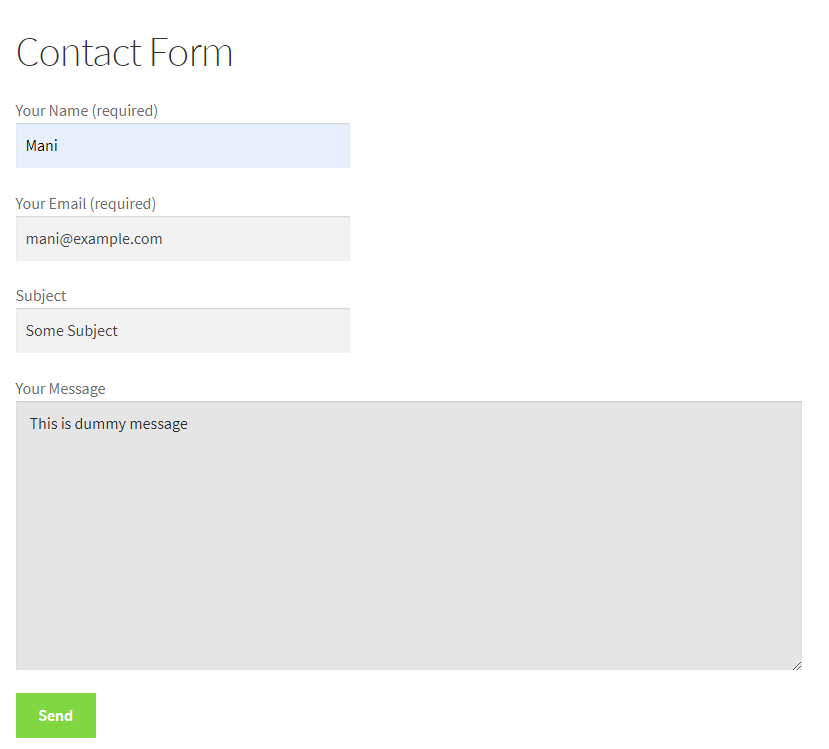
Before Form Submit

After Form Submit

Form Summary with custom message

CF7 Settings
Changelog
1.3.1
- New – Added Download PDF filename field
- Fixed – PDF Text overlapping on logo
1.3.0
- New – More options for Watermark text
- New – Compatible with php v8.0+
1.2.9
- Fix – Broken URL
1.2.8
- Tested up to WordPress 6.8+
- Freemius SDK updated to the latest version.
1.2.7
- Freemius SDK updated to the latest version.
1.2.6
- Minor bug fixes
1.2.5
- Tested up to latest WordPress
1.2.4
- Add – Add tabs in settings page
- Fix – Some fields are not supported on summary page
1.2.3.5
- Compatible with WP v6.1.1
1.2.3.4
- Compatible with WP 6.0
1.2.3.3
- Fix – Errors when no settings found
1.2.3.2
- Fix – JS error when no form found
1.2.3.1
- Fix – All forms not displaying in settings dropdown
1.2.3
- New – Added bullets for checkboxes and radio boxes on summary page
- Fix – Checked checkboxes not displaying on summary page
- Fix – Email field not printing
- Tweak – Remove old Summary & Print tab
1.2.2
- Tested upto WordPress 5.7
- Fix – Summary not showing in some cases
- Improvement – Some UI Tweaks
1.2.1
- New – Added option to select CF7 forms for summary
- Fix – Php errors & warnings
1.2
- New – Settings moved under Contact Fom 7 menu
- Fix – Compatible with WPBakery and other composer/builder plugins
- Fix – Print button capture page content area.
1.1.2
- Improvement – Hide / Show message area depending on their settings.
- Improvement – Code Quality
1.1.1
- Fix – Fatal error issue when adding new form
- Tested with WP 5.3.2
1.1
- New – New Setting for adding message on summary page.
- New – Option to add message with field’s values on summary page instead of form data.
1.0.1
- Improvement – Use Contact Form 7 class to show Summary.
1.0.0
- Initial release.