

Chamber Dashboard CRM
Store contact information about people. Designed to work with the Chamber Dashboard Business Directory so you can associate people with organizations/ …
Plugin info
Maintenance & Compatibility
Maintenance score
Possibly abandoned • Last updated 1829 days ago • 1 reviews
Is Chamber Dashboard CRM abandoned?
Possibly abandoned (last update 1829 days ago).
Compatibility
Languages
Similar & Alternatives
Explore plugins with similar tags, and compare key metrics like downloads, ratings, updates, support, and WP/PHP compatibility.
Description
Chamber Dashboard CRM is a part of the Chamber Dashboard collection of plugins and themes. You can create people records and associate them with members/businesses with a designated role. It is designed to meet the needs of chambers of commerce and membership organizations.
With Chamber Dashboard CRM, you can:
- create a database of the people in your organization
- if you have the Chamber Dashboard Business Directory installed, you can associate people with businesses and track their role within the business
- keep track of people’s activities, such as meeting attendance, event attendance, conversations, donations, etc.
- display the people associated with each business/member in the Business Directory
- display the people in a certain category
- integrate with the Member Updater plugin to let members update their listings
- create board/staff member pages
You can learn more at chamberdashboard.com
For full instructions about how to use the plugin, go to Chamber Dashboard Documentation
Installation
Using The WordPress Dashboard
- Navigate to the \’Add New\’ in the plugins dashboard
- Search for \’chamber dashboard crm\’
- Click \’Install Now\’
- Activate the plugin on the Plugin dashboard
Uploading in WordPress Dashboard
- Navigate to the \’Add New\’ in the plugins dashboard
- Navigate to the \’Upload\’ area
- Select
chamber-dashboard-crm.zipfrom your computer - Click \’Install Now\’
- Activate the plugin in the Plugin dashboard
Using FTP
- Download
chamber-dashboard-crm.zip - Extract the
chamber-dashboard-crmdirectory to your computer - Upload the
chamber-dashboard-crmdirectory to the/wp-content/plugins/directory - Activate the plugin in the Plugin dashboard
Frequently Asked Questions
Probably! We are definitely interested in making this as useful as possible for chambers of commerce, so please let us know what features you need! You can use the contact form at chamberdashboard.com/contact
Don’t hesitate to contact us if you have questions!
Review feed
Screenshots
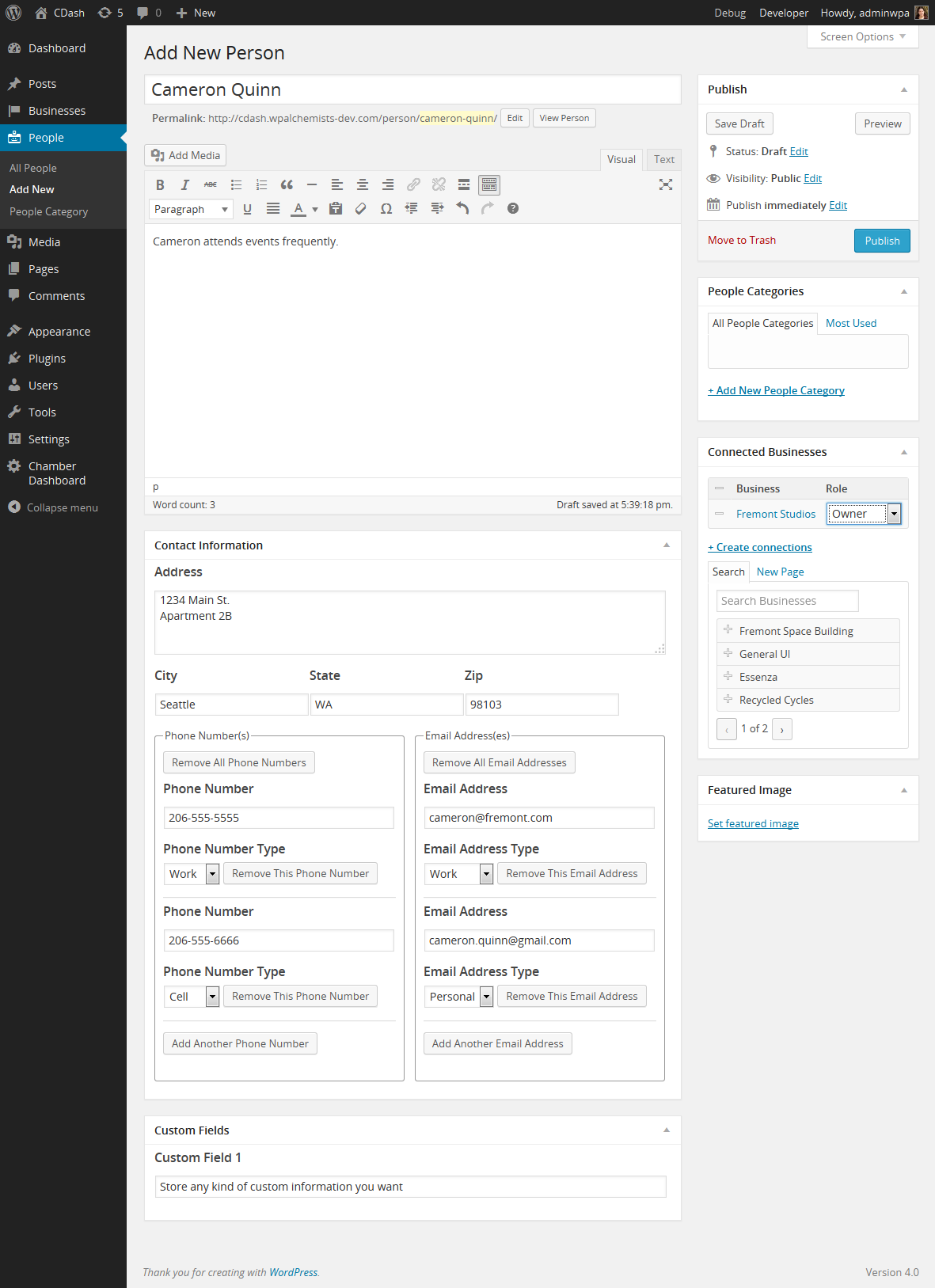
Entering people record

Displaying board members/staff members on the front end
Changelog
1.5.6
- The people shortcode is now available as a Gutenberg block
1.5.5
- Fixed security issues
1.5.4
- Added a fix to make the plugin compatible with WP 5.5
1.5.3
- Updated the settings page
1.5.2
- Added option to link to people records in Business listings
- Removed the category requirement for people shortcode
1.5.1
- The technical details page now shows the correct version of the plugin
1.5.0
- Updated to work with the latest version of WordPress
- Added option to display custom fields on the front end
1.4.9
- Works with the latest version of WordPress and Gutenberg.
1.4.8
- Updated to work with the new version of Business Directory
1.4.7
- Updated some text in the options pages
1.4.6
- Added a shortcode to display People Activities
1.4.5
- Fixed error showing up when dependent plugins are deactivated
1.4.4.1
- Modified the people roles to work with the CRM importer
1.4.4
- Connected Businesses can be displayed with the people shortcode
- The metabox for connected businesses and connected people shows up below the post area
1.4.3
- Removed Freemius Integration
- Compatible with WordPress 4.7.2
1.4.2
- compatibility with premium version
1.4.1
- Freemius integration
1.4
- added filters to display contact information on businesses
1.3
- updated settings page to use settings API better
- fixed bug on repeating fields on settings page
- added actions to work with advanced importer
- added shortcode to display people in a given category
- added option to display person in business listing
1.2.3
- changes to language files to facilitate translations
1.2.2
- fixed bug that hid connected businesses
1.2.1
- fixed compatibility error
1.2
- Increased compatibility with other Chamber Dashboard plugins
1.1.1
- Minor bug fixes
1.1
- Can now track people’s activities
1.0
- First release