

Change Autosave Time
This plugin adds a new setting in the last position of Settings > General, this option will allow you to select the days that WordPress take to emp …
Plugin info
Maintenance & Compatibility
Maintenance score
Possibly abandoned • Last updated 1134 days ago • 2 reviews
Is Change Autosave Time abandoned?
Possibly abandoned (last update 1134 days ago).
Compatibility
Similar & Alternatives
Explore plugins with similar tags, and compare key metrics like downloads, ratings, updates, support, and WP/PHP compatibility.
Description
“Change Autosave Time” is a small plugin that allows you to select the time that WordPress take autosave your contents while editing. You can select the time in seconds at the bottom of Settings > General. This plugin wont work if the value is already defined elsewhere to avoid errors.
Features
- Allows to select the time that WordPress take autosave your contents while editing.
Installation
The Plugin can be installed in two ways.
Manual instalation
- Download and upload the plugin files to the /wp-content/plugins/change-autosave-time directory from the WordPress plugin repository.
- Activate the plugin through the ‘Plugins’ screen in WordPress admin.
- Go to Settings > General and scroll down to see the new option to configure it.
WordPress interface instalation
- Open the plugin Interface in the wordpress admin and click on “Add new”.
- In the Search box enter “Change Autosave Time” and hit Enter.
- Click on “Install” to install the plugin.
- Activate the plugin.
- Go to Settings > General to configure it.
Frequently Asked Questions
This plugin adds a new setting in the last position of Settings > General.
If you have defined the value elsewhere the plugin wont work to avoid errors.
There is a validation that checks if the input is correct so nothing wrong happens.
Review feed
Creator review
Funciona perfectamente
Screenshots
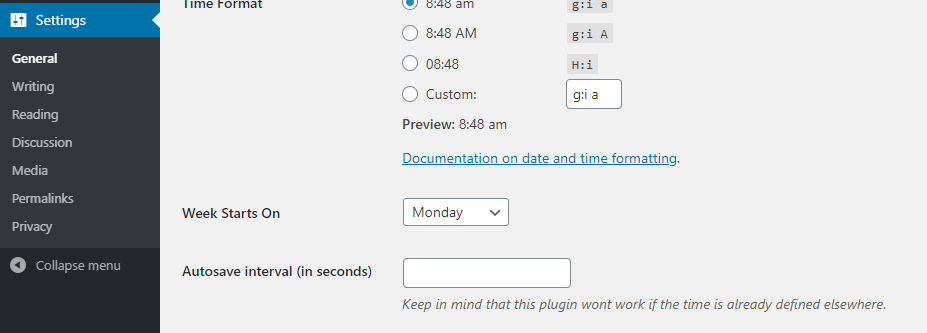
screentshot-1.png

screentshot-2.png