

Change Last Modified Date
Change or prevent updating Last Modified date for individual posts.
Plugin info
Maintenance & Compatibility
Maintenance score
Stale • Last updated 206 days ago • 12 reviews
Is Change Last Modified Date abandoned?
Likely maintained (last update 206 days ago).
Compatibility
Similar & Alternatives
Explore plugins with similar tags, and compare key metrics like downloads, ratings, updates, support, and WP/PHP compatibility.
Description
Using this plugin you can easily change or prevent updating the last modified date for each post. Controlling the last modified date can come in handy when you would like to control “order by last modified” for posts (or custom post type).
When this plugin is active it will enable Last modified date options in Status & Visibility panel in sidebar. Changing the modified date can be done by clicking the date link and selecting a new date for the post. It’s also possible to disable future updates of the last modified date by setting the “Freeze modified date” option to on.
Custom post types support
To update the last modified date, plugin is using “rest_pre_insert_{$post_type}” hook which is executed before “init” where other custom post types are usually registered. This is the reason why plugin is not aware of any additional post types other than those registered by WordPress core. To support additional post types you can add constant in following format to wp-config.php:
define( 'CLM_DATE_POST_TYPES', ['post-type-slug-1', 'post-type-slug-2'] );
Custom post types are also required to have “custom-fields” support declared.
Support
For support or code contributions please refer to Github repo.
Installation
- Upload zip package to Plugins > Add New in admin of wordpress.
- Activate the plugin.
Frequently Asked Questions
Review feed
Do not work with gutenberg.
Currently does not work with classic editor
Screenshots
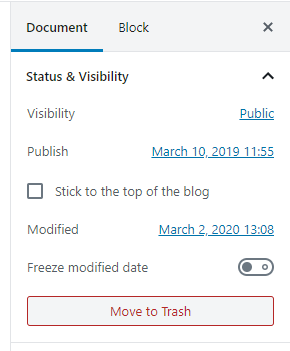
screenshot-1.png
Changelog
1.0
- Initial release.
1.2
- Remove unnecessary directory
1.3
- Rewrite the plugin for new block editor
1.4.2
- Fix plugin crashing for custom post types without custom fields support declared
1.4.3
- Update wp-scripts to v26.1.0
- Remove/update deprected props and functions
1.4.4
- Update wp-scripts to v26.1.0
- Revert back to using __experimentalGetSettings from @wordpress/date
1.4.5
- Use correct text domain
- Register translations via wp_set_script_translations()
1.4.6
- Fix timezone issue when displaying last modified date
- Use 12h format in datetime picker when appropriate
- Add button to copy published date
- Use official getSettings instead of __experimentalGetSettings from @wordpress/date
1.4.7
- Build files for production
1.4.8
- Fix GTM date so that it matches current time zone settings