

Maintenance 28/100618d since update
Active installs
0
Downloads
92,767
Reviews
1
Age
6.0y
Plugin info
Total downloads: 92,767
Active installs: 0
Total reviews: 1
Average rating: 5
Support threads opened: 0
Support threads resolved: 0 (0%)
Available in: 1 language(s)
Contributors: 1
Last updated: 7/23/2024 (618 days ago)
Added to WordPress: 4/8/2020 (5 years old)
Minimum WordPress version: 5.0
Tested up to WordPress version: 6.6.2
Minimum PHP version: 7.4
Maintenance & Compatibility
Maintenance score
Possibly abandoned • Last updated 618 days ago • 1 reviews
28/100
Is Chatter abandoned?
Possibly abandoned (last update 618 days ago).
Compatibility
Requires WordPress: 5.0
Tested up to: 6.6.2
Requires PHP: 7.4
Similar & Alternatives
Explore plugins with similar tags, and compare key metrics like downloads, ratings, updates, support, and WP/PHP compatibility.
HivePress Messages
Rating 3.7/5 (3 reviews) • Active installs 8,000
Popups – Submission Messages For Contact Form 7
Rating 4.7/5 (6 reviews) • Active installs 3,000
Contact Form 7 Translate Messages Extension
Rating 5.0/5 (9 reviews) • Active installs 1,000
WPC Smart Messages for WooCommerce
Rating 4.3/5 (6 reviews) • Active installs 1,000
BuddyPress Default Data
Rating 3.9/5 (22 reviews) • Active installs 500
Site Announcements
Rating 4.5/5 (4 reviews) • Active installs 400
Description
Chatter – WordPress chat to support your customers 24/7.
Installation
This section describes how to install the plugin and get it working.
e.g.
- Upload the plugin files to the
/wp-content/plugins/plugin-namedirectory, or install the plugin through the WordPress plugins screen directly. - Activate the plugin through the ‘Plugins’ screen in WordPress
- Use the Settings->Plugin Name screen to configure the plugin
- (Make your instructions match the desired user flow for activating and installing your plugin. Include any steps that might be needed for explanatory purposes)
Frequently Asked Questions
Yes
In the free version – only one chat manager
Yes
You can report security bugs through the Patchstack Vulnerability Disclosure Program. The Patchstack team help validate, triage and handle any security vulnerabilities. Report a security vulnerability.
Review feed
noobsdotgroup
This plugin is very good!
Undoubtedly this plugin is very good and cool
Only thing that I wanna ask from you is:
Can I add this chat widget on a page so that users can chat with me or other users on a page rather than in a widget on a fixed position.
?
Screenshots

Admin panel

Send email notification to the chat manager
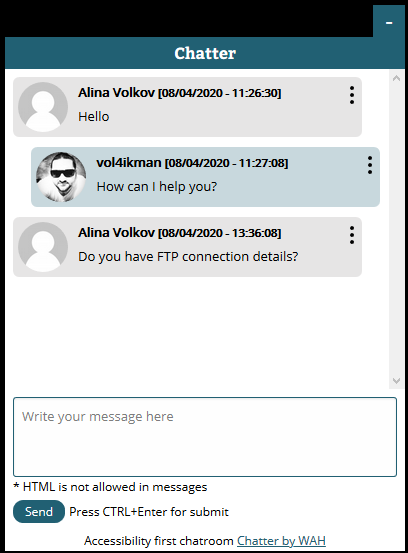
Front view
Changelog
1.0 – first release