

CheckBot
This antispam plugin provides very simple(one-click) and powerful captcha for your blog.
Plugin info
Maintenance & Compatibility
Maintenance score
Possibly abandoned • Last updated 4228 days ago • 2 reviews
Is CheckBot abandoned?
Possibly abandoned (last update 4228 days ago).
Compatibility
Similar & Alternatives
Explore plugins with similar tags, and compare key metrics like downloads, ratings, updates, support, and WP/PHP compatibility.
Description
CheckBot — simple one-click captcha-plugin created for people. It is very easy to use, and look nice, but at the same time, fully customizable, and quite seriously protect your blog from spam.
Features
- Antispam: The plugin uses javascript and randomly generates identifiers and field names, which allows the plugin to automatically filter out fine sent spam.
- Support languages: The plugin supports Russian and English languages.
- Fully customizable appearance.
- The plugin can be used immediately after installation, without additional configuration.
- You can configure the output plugin yourself anywhere on the page comments.
- If the user is not the correct picture, or even forgot to select it, the plugin will tell him about it, and, just in case it will write a comment.
Help
You may ask questions at the plugin page – http://deadblog.ru/checkbot/, or write me e-mail – [email protected].
Installation
Follow the steps below to install the plugin.
Easy install:
- Extract the plugin in wp-content/plugins/checkbot.
- Activate the plugin in the admin panel page “Plugins”.
Advanced install:
- Extract the plugin in wp-content/plugins/checkbot.
- Activate the plugin in the admin panel page “Plugins”.
- Go to the admin panel settings page CheckBot’a.
- Set on “The method of connecting plugin:” – “Manual”.
- Edit the template file “comments.php”, in a place where we want to bring plug-insert the line:
Frequently Asked Questions
How i can create image pack ?
It’s easy. Create a folder in the directory ‘images’. Put into 3 files with images in the format .jpg, whose names are 1, 2, 3 (like 1.jpg, 2.jpg, 3.jpg). The picture with the correct answer must be named 1.jpg. Create a style sheet style.css file and issue text.xx.txt, where xx – language (en – English, ru – Russian).
Review feed
Screenshots

CheckBot.
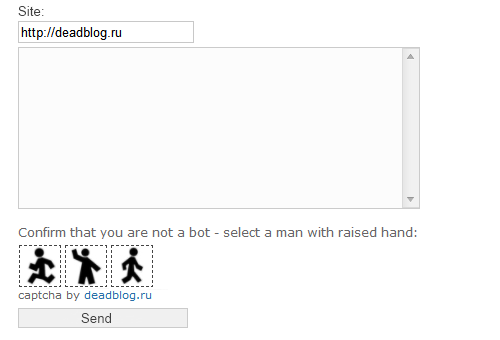
CheckBot in work :)

Settings.
Changelog
1.05
- Upg: update compatible to 4.0.
1.04
- Fix: now if selected image wrong, comment delete from trash;
- Fix: minor code fix.
1.03
- Add: now plugin support WordPress 3.5
- Fix: minor code fix.
- Fix: bug with upper case plugin file name.
1.02
- Add: link to WordPress Plugin Page.
- Add: new minor capabilities for further development.
- Fix: minor code fix.
- Fix: fix bug when a person is mistaken for a bot.
1.01
- Fix: error with not the right path to script.
- Fix: minor code fix.
- Improve: to improve the security, all data transmitted hidden (when viewing the source code for the page is no longer the right answer).
1.0
- First official version.