
Checkout Fields for Blocks
The Checkout Fields for Blocks plugin allows adding new fields to the checkout form.
Plugin info
Maintenance & Compatibility
Maintenance score
Maintained • Last updated 121 days ago • 8 reviews
Is Checkout Fields for Blocks abandoned?
Likely maintained (last update 121 days ago).
Compatibility
Languages
Similar & Alternatives
Explore plugins with similar tags, and compare key metrics like downloads, ratings, updates, support, and WP/PHP compatibility.
Description
Checkout Fields for Blocks is a plugin designed to customize the WooCommerce checkout form. The plugin allows adding new fields to the WooCommerce checkout page.

The plugin is a free WooCommerce checkout editor using visual blocks. It requires WooCommerce in version 8.3+ and a theme supporting blocks (block editor).
➡️➡️➡️ Download Checkout Fields for Blocks ⬅️⬅️⬅️
How does the plugin work?
You may customize the WooCommerce new block-based checkout form with new fields.
The plugin allows adding new fields to the WooCommerce checkout form. What’s more, it’s possible to use field general settings, options (for select), validation, display on, and advanced options (text input example).
How to add a new field to the WooCommerce block checkout?
-
Install and activate the plugin. Download Checkout Fields for Blocks
-
Edit the checkout page (more about WooCommerce checkout block).
-
Add a new field or fields to the form (field types below).
-
Use the field settings for checkout customization (options below).
-
Update the page.
Plugin features
✅ Add new checkout fields
You may add a paragraph, image, or separator (the default WooCommerce blocks). However, the plugin extends the number of available options (fields) for the checkout form. Adding a new field is integrated into the block search bar.
The new checkout block fields are also available under the “Checkout Block Fields” category when browsing all blocks.
✅ Field types
It’s possible to choose a new field with the search bar or from the list.
Checkout Fields for Blocks allows the following new fields (field types) for the form.
- Text input
- Number
- Url
- Checkbox
- Select
- Textarea
➡️➡️➡️ Download Checkout Fields for Blocks ⬅️⬅️⬅️
⚙️ Settings for checkout block fields
General settings depend on the field type:
For example, the textarea field comes with:
– Field name
– Meta name
– Label
– Placeholder
– Help text
☑️ Field validation
The plugin allows defining the validation for each field (text input example):
- Required (if the field is mandatory or optional)
- Phone
- URL
- Minimum length
- Maximum length
- Pattern
🎨 Display on settings for checkout block fields
It’s also possible to choose where to show the new checkout fields in WooCommerce.
- Order confirmation
- Admin order
- My Account order
- Order e-mail
➡️➡️➡️ Download Checkout Fields for Blocks ⬅️⬅️⬅️
⚙️ Advanced field settings
Finally, the plugin allows defining the css classes for each field.
🆓 More free plugins
Checkout Fields for Blocks is one of many free plugins from WP Desk. You may find more free plugins for WordPress and WooCommerce by clicking on the link below.
➡️➡️➡️ Free plugins for WordPress and WooCommerce ⬅️⬅️⬅️
Support
We provide limited support for the free version in the plugin Support Forum.
You may help us translate the plugin.
Data use policy
Learn about Use of Data Policy by WP Desk Plugins
Installation
You can install the plugin like any other WordPress plugin.
1. Download and unzip the latest release of the plugin.
2. Upload the entire plugin directory to your /wp-content/plugins/ directory.
3. Activate the plugin through the Plugins menu in the WordPress Administration.
You can also use WordPress uploader to upload the plugin zip file in the WordPress menu Plugins → Add New → Upload Plugin. Then go directly to point 3.
Frequently Asked Questions
The plugin allows adding new fields to the WooCommerce checkout form. New field types come with additional settings, for example, for field validation. The plugin is a checkout customizer for WooCommerce (from 8.3) for a theme supporting the block editor (blocks).
The plugin integrates with the newer versions of WooCommerce (from 8.3). It also requires a theme supporting blocks.
To customize the checkout page in an older version of WooCommerce, a theme without blocks, or when using the classic checkout shortcode, you may see Flexible Checkout Fields for WooCommerce.
Yes. You can check out our free WooCommerce plugins → or go directly to the following plugins:
- Flexible Invoices – PDF invoices for WordPress and WooCommerce.
- Custom Price – allows naming the product prices in WooCommerce.
- Flexible Checkout Fields – custom fields for the classic WooCommerce checkout page.
- Flexible PDF Coupons – PDF gift cards and vouchers in WooCommerce.
- Flexible Product Fields – custom fields for WooCommerce products.
- Flexible Quantity – new units of measure for WooCommerce products.
- Flexible Refund – manage refund requests in WooCommerce.
- ShopMagic – free email marketing in WordPress and WooCommerce (5 free add-ons)!
Please report security bugs found in the source code of the Checkout Fields for Blocks plugin through the Patchstack Vulnerability Disclosure Program. The Patchstack team will assist you with verification, CVE assignment, and notify the developers of this plugin.
Review feed
Screenshots
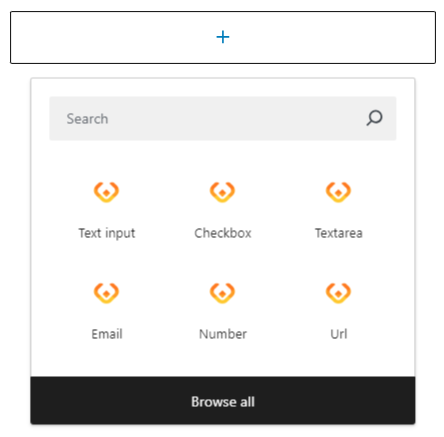
Adding a new field to the WooCommerce checkout form based on blocks.

New WooCommerce checkout blocks - custom fields example.

Checkout block fields for WooCommerce.

Edit the text input field.

General settings for the textarea field.

Input text validation options.

Display on options for new checkout fields.

Advanced settings.
Changelog
1.1.4 – 2025-12-03
- Added support for WordPress 6.9
- Added support for WooCommerce 10.4
1.1.3 – 2025-10-23
- Changed plugin links
1.1.2 – 2025-10-13
- Added Patchstack Vulnerability Disclosure Program
1.1.1 – 2025-10-07
- Added support for WooCommerce 10.3
1.1.0 – 2025-09-02
- Added integration hooks for Checkout Fields for Blocks – Conditional Logic for Fields plugin
- Fixed checkbox and texarea fields validation not triggering on “Place Order” button
- Improved validation system reliability across all field types
1.0.6 – 2025-07-01
- Added support for WooCommerce 10.0
1.0.5 – 2025-05-12
- Added support for WordPress 6.8
1.0.4 – 2025-03-07
- Added support for WooCommerce 9.8
1.0.3 – 2025-02-10
- Added support for WooCommerce 9.7
1.0.2 – 2024-12-16
- Added support for WordPress 6.7
- Added support for WooCommerce 9.5
1.0.1- 2024-10-15
- Add repo banner and icon
1.0.0 – 2024-10-10
- First Release