

Cities Shipping Zones for WooCommerce
WooCommerce plugin for turning the state field into a dropdown city field. To be used as Shipping Zones.
Plugin info
Maintenance & Compatibility
Maintenance score
Stale • Last updated 330 days ago • Support resolved 0% • 18 reviews
Is Cities Shipping Zones for WooCommerce abandoned?
Likely maintained (last update 330 days ago).
Compatibility
Developers
Similar & Alternatives
Explore plugins with similar tags, and compare key metrics like downloads, ratings, updates, support, and WP/PHP compatibility.
Description
WooCommerce plugin for turning the state field into a dropdown city field. To be used as Shipping Zones.
How To Use
- Plugin Settings: Choose the countries you want to apply the plugin on (see supported countries map above).
- WooCommerce General Settings: Update store location country / state.
- WooCommerce Shipping Settings: Create shipping zone with the desired locations and its shipping methods and drag it to the top of the list.
How It Works
- The title and the values of the built-in state field (which can be used inside shipping zones) will be changed to be as city field, on order creation the original city and state field (if applicable) will be populated based on the selected value.
Features
- Cities Shipping: Set shipping rates per city.
- Bulk Select Tool: Insert multiple states/cities into shipping zone at once.
- Cities Sales: Track the sales stats per city (Dashbaord => WooCommerce => Reports => Orders => Sales by city).
- Cities Shipping Calculator: Display the cities shipping calculator in any page using the [csz_cities] or [csz_cities template="popup"] shortcode
- Integrations: Delivery days per city, Minimum order amount per city, Discounts per city, Payment methods per city, Shipping methods for products per city, WooCommerce REST API.
Installation
Minimum Requirements
WordPress 5.2 or greater
PHP 7.0 or greater
WooCommerce 3.4 or greater
Automatic installation
- Go to your Dashboard => Plugins => Add new
- In the search form write: Condless
- When the search return the result, click on the Install Now button
Manual Installation
- Download the plugin from this page clicking on the Download button
- Go to your Dashboard => Plugins => Add new
- Now select Upload Plugin button
- Click on Select file button and select the file you just download
- Click on Install Now button and the Activate Plugin
Frequently Asked Questions
WooCommerce Shipping Zones settings: drag the shipping zones with cities to the top of the list.
The plugin doesn’t support the WooCommerce Cart/Checkout Blocks.
Make sure to not disable the fields: billing_country, billing_state, shipping_country, shipping_state.
Make sure to config the shop country in WooCommerce general settings.
Create shipping zone and select the country itself and drag this shipping zone to be under the shipping zone with the specific cities in the shipping zones list.
The cities list must be minimized. if it’s slow only in the frontend this could be done with the ‘Selling Locations’ option, otherwise with the ‘csz_cities’/’csz_states’ filters and consider using the ‘Custom City’ feature (instructions in docs).
Review feed
Screenshots

Cities Shipping Zones Plugin Settings
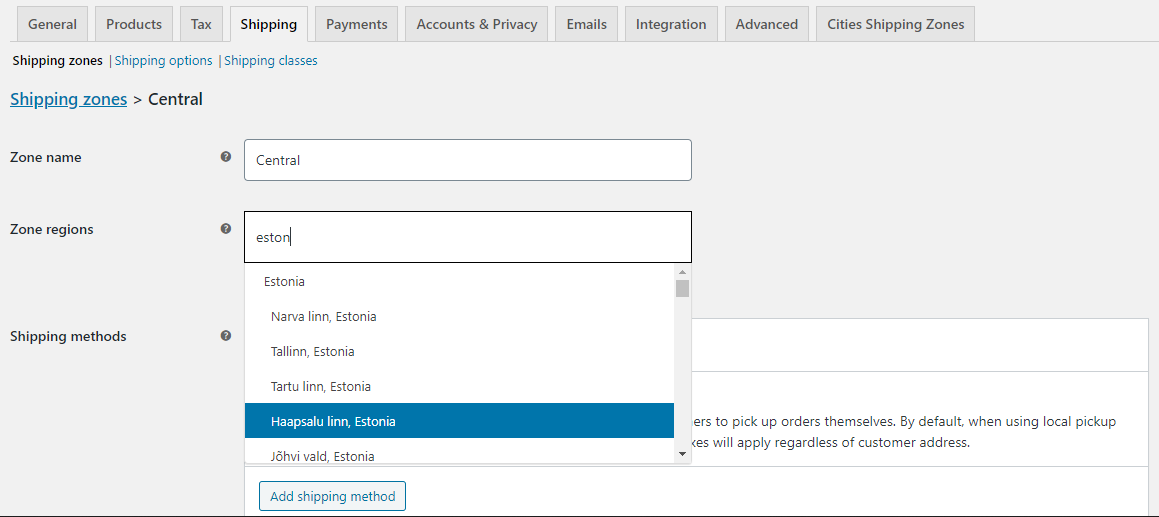
WooCommerce Shipping Zones Settings
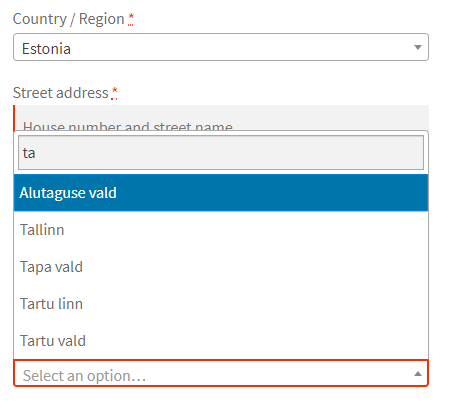
Checkout dropdown city field
Changelog
1.3 – May 8, 2025
- Enhancement – WordPress version compatibility
1.2.9 – November 12, 2024
- Enhancement – WordPress version compatibility
1.2.8 – September 9, 2024
- Enhancement – Security patch
1.2.7 – May 22, 2024
- Enhancement – WooCommerce version compatibility
1.2.6 – March 1, 2024
- Enhancement – WordPress version compatibility
1.2.5 – December 15, 2023
- Enhancement – WooCommerce version compatibility
1.2.4 – October 12, 2023
- Enhancement – WooCommerce version compatibility
1.2.3 – June 30, 2023
- i18n – Supported Countries
1.2.2 – March 18, 2023
- i18n – Supported Countries
1.2.1 – December 22, 2022
- Enhancement – Filters for states names
1.2 – October 23, 2022
- Enhancement – Filters for shipping methods and shipping zones
1.1.9 – August 19, 2022
- Dev – Reconfiguring the shipping zones and the store country is required if you applied the plugin on the following countries: Sri Lanka
1.1.8 – June 1, 2022
- Dev – Remove city value from default customer location
- Integration – State Filter option integration with Checkout Fields Manager for WooCommerce plugin
- Dev – Reconfiguring the shipping zones and the store country is required if you applied the plugin on the following countries: Peru
1.1.7 – April 10, 2022
- Dev – Product Distance Fee feature was removed
1.1.6 – February 27, 2022
- Enhancement – Cities Field Priority
1.1.5 – December 25, 2021
- Enhancement – Cities Shortcode HTML support
1.1.4 – October 20, 2021
- i18n – Supported Countries
1.1.3 – July 28, 2021
- i18n – Supported Countries
1.1.2 – June 29, 2021
- i18n – Supported Countries
1.1.1 – May 25, 2021
- Dev – Reconfiguring the shipping zones and the store country is required if you applied the plugin on the following countries: Italy (Bologne/Pistoia), UAE
1.1 – April 7, 2021
- Dev – Reconfiguring the shipping zones and the store country is required if you applied the plugin on the following countries: Côte d’Ivoire, Kuwait, Latvia, Malta, Pakistan, Peru, Saint Vincent and the Grenadines, South Africa and Sri Lanka
1.0.9 – March 12, 2021
- i18n – Supported Countries
1.0.8 – February 13, 2021
- i18n – Supported Countries
1.0.7 – December 22, 2020
- Dev – ‘woocommerce_states’ filter was replaced with ‘csz_cities’ for the countries the plugin apply on
1.0.6 – October 27, 2020
- i18n – Supported Countries
1.0.5 – July 27, 2020
- Enhancement – Distance Fee
1.0.4 – June 20, 2020
- i18n – Supported Countries
1.0.3 – May 31, 2020
- Enhancement – Distance Fee
1.0.2 – May 5, 2020
- Feature – Distance Fee
1.0.1 – April 5, 2020
- i18n – Supported Countries
1.0 – March 5, 2020
- Initial release