

Classic Menu Accessible (A11y)
Make the classic WordPress menus accessible (WCAG, RGAA, AnySurfer) with full keyboard navigation.
Plugin info
Maintenance & Compatibility
Maintenance score
Maintained • Last updated 173 days ago
Is Classic Menu Accessible (A11y) abandoned?
Likely maintained (last update 173 days ago).
Compatibility
Similar & Alternatives
Explore plugins with similar tags, and compare key metrics like downloads, ratings, updates, support, and WP/PHP compatibility.
Description
Classic Menu Accessible (A11y) makes the native WordPress menu more inclusive and compliant with digital accessibility standards (WCAG 2.2 level AA, RGAA, Anysurfer).
It improves the behavior of dropdown menus generated via Apparence > Menus (WordPress classic menu).
- WCAG 2.2 level AA, RGAA and Anysurfer compliance
- Compatible with Apparence > Menus (WordPress classic menu system)
- Keyboard navigation (TAB, SHIFT+TAB, arrows, ESC)
- Customizable focus styles in the admin
- Lightweight, no external dependencies
This plugin is ideal for institutional, non-profit and professional websites that want to improve the experience for people using a screen reader, keyboard-only navigation or other assistive technologies.
No complicated setup is required: just activate the plugin, and your WordPress menu automatically becomes accessible.
Compliance notes: The final accessibility compliance of your site depends on your content, theme, and practices. Always refer to your accessibility audits to validate overall compliance.
Internationalisation
Classic Menu Accessible (A11y) is fully translation-ready.
- Text domain:
classic-menu-accessible-a11y - POT file included in
/languages/ - Already translated into:
- English (default)
- Français (fr_FR)
- Deutsch (de_DE)
- Nederlands (nl_NL)
Installation
- Upload the plugin folder into
/wp-content/plugins/ - Activate the plugin via Plugins > Installed Plugins
Frequently Asked Questions
Yes, as long as your theme uses the native WordPress menu system (Apparence > Menus).
If your theme provides its own custom navigation or a menu builder, the plugin may not work properly.
Yes. Classic Menu Accessible (A11y) has been developed to meet the requirements of
WCAG 2.2 level AA, RGAA and Anysurfer.
Yes. You can customize it through your CSS.
It is possible to change the text color, background color, hover effect, font size, as well as the rendering on the mobile menu.
Yes. It improves keyboard navigation and accessibility on desktop, tablet, and mobile.
The final rendering may depend on the theme used.
Review feed
Screenshots
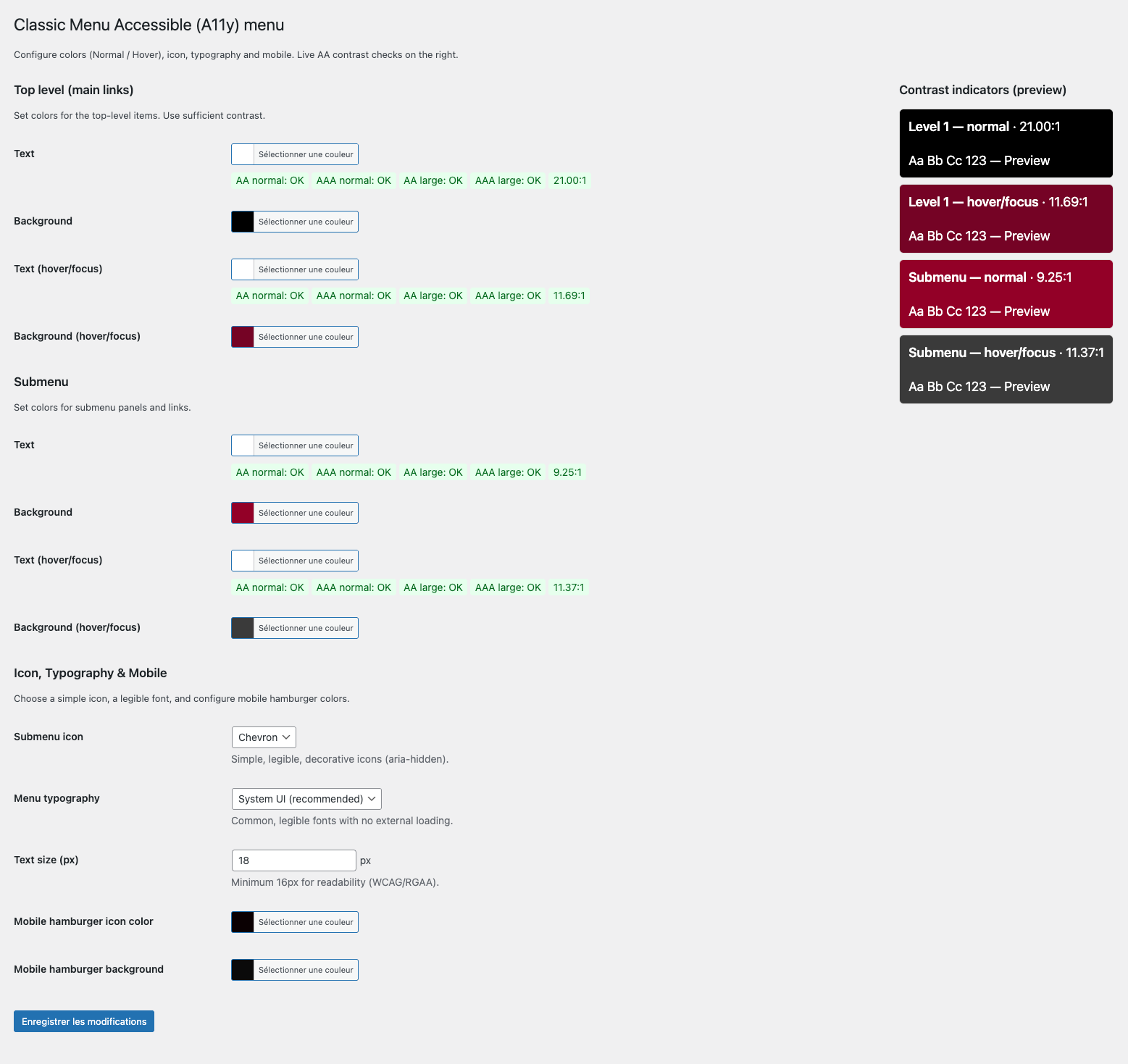
Plugin settings interface in the WordPress administration.
Changelog
1.0.0
- Initial release.